
nnnippacfnenmpahblojiljgoneahkpc
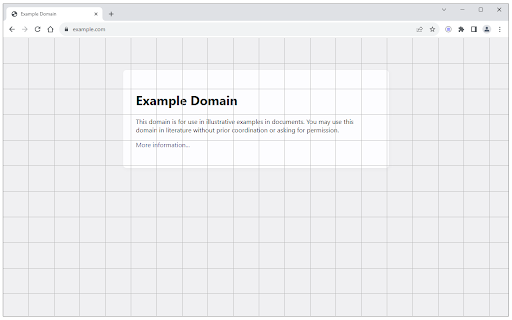


Add a simple grid to any page with adjustable size, and color. Page Grid is an extension that enables you to draw an adjustable grid layout on any page. To work with this addon, please navigate to a webpage and then press the toolbar button once. Once the addon is active, the toolbar icon is blue. For the inactive state, the toolbar button is gray. You can change the grid position (X/Y), line color, size, order (z-index), and line width (in pixel unit) via the extension options page. Reloading the active tab or pressing the toolbar button again will remove the grid from the page. To report bugs or request a new feature, please fill out the bug report form on the addon's homepage (https://mybrowseraddon.com/page-grid.html).

Gridt - A highly customizable CSS Grid overlay for web developers
CSS Grids for modern web developers. Gridt, a nifty, highly customizable grid overlay perfect for grid based layouts. Features: - Customizable Columns, Rows, Grid Gaps, & Outside Margin! - Attach grid to window or html element via CSS Selectors! - Use your own grid-template-columns / rows for uneven grids! - Grid stays open on hot reload! - Adjustable line color & stroke width! - Light Mode & Developer Mode 😎 Using the gridt: Once Gridt is installed you can start adjust columns, rows, outside margin (of even length), and grid gaps using the basic settings. You can also keep your grid attached to the window or attach to an html element by using css selectors. In the advanced settings you can input your own grid-template-columns or rows for uneven grid layouts, customize the outside margins individually, customize grid line color and stroke, and toggle to keep the grid open on hot reload. Out of the box you can toggle the grid with `Cmd/Ctrl + .` or you can change your keybinding in the settings. Supporting Development: If you’re feeling generous you can support this project and others I make on Ko-fi :) https://ko-fi.com/E1E119NG8M

Layout Grid for browser
You can set Layout Grid like design tools. Layout Grid for browser: It is an extension that allows you to lay out a LayoutGrid in your browser like a design tool, for instance, Figma, Sketch, Photoshop, and Illustrator. And it provides you a high-performance ruler tools. It is useful for marking up HTML, checking a design, and analyzing any other reference sites. Recommended for such occasions: Markup, Designing, Quality assurance. Features: - Layoutgrid can be laid out by setting a gap to an arbitrary width.For example, 8px, 16px, 24px...etc. in multiples of 8. For example, a multiple of 10... - You can immediately start up and measure the number of pixels. - Simply roll over a line to instantly check the number of pixels - You can immediately launch the extension by simply clicking on the extension button. - Once a guide is created, it can be saved as a URL. - The color of the guide can be changed freely. - The transparency of the guide can be changed freely. - The angle of the guide can be changed freely, even to a 45-degree angle.

CSS Grid Overlay
Easily check the grid alignment of your page across breakpoints. Supports multiples breakpoints and the usual grid values (gutters, columns, max width, etc). Configurations can easily be saved and shared among team members as json objects. [ { "columns": 4, "margins": 16, // px before and after the first and last column // these gutters work like margins: // if distance between columns is 32px, gutters are 16 "gutters": 16, "from": 0, // start of breakpoint in px // Optional values // "to": 599, end of breakpoint in px // grid will be centered after this maxWidth in px // otherwise it'll be full width // "maxWidth": 1440, // if you want to move the grid // (e.g. in a style guide with a left sidebar // you'd use offsetLeft to push the grid to the right // "offsetTop": 0, // "offsetRight": 0, // "offsetBottom": 0, // "offsetLeft": 0, // "backgroundColors": { // "columns": "rgba(234, 23, 140, .3)", // "gutters": "rgba(0, 231, 255, .3)", // "margins": "rgba(0, 191, 165, .3)" // } } ]

Grid Line Overlay
Chrome extension that displays grid lines on videos and images to help with composition analysis "Grid Line Overlay" is a Chrome extension that allows you to overlay grid lines on videos and images on the web. Professional-grade tools for checking and analyzing photo and video composition are now easily accessible to everyone. ✨ **Key Features** - Diverse grid types: Rule of thirds, quarters, crosshairs, diagonal lines - Customizable: Freely adjust colors, transparency, and positioning - Virtual frame settings: Create ideal compositions by adjusting top, bottom, left, and right frames - Preset functionality: Save and recall up to 3 frequently used settings - Universal compatibility: Works on all websites 📸 **For Photo & Video Creators** - Instant composition verification - Position subjects in ideal locations using the rule of thirds - Professional-level composition analysis - Objectively evaluate existing photos and videos - Enhanced learning efficiency - Visually study composition patterns in excellent works 🎨 **For Designers & Creators** - Layout verification - Check placement balance in web designs and banners - Reference material analysis - Study and learn from other sites' designs using grids - Improved workflow efficiency - Direct composition checking within the browser 📚 **Educational Applications** - Art & photography education - Visual teaching material for fundamental composition principles - Design learning - Practical study of layout basics - Enhanced analytical skills - Develop the ability to understand the structure of excellent works 🔧 **User-Friendly Features** - One-click operation - Start using immediately by simply clicking the extension icon - Intuitive UI - Simple design that beginners can use right away without complex settings - Lightweight operation - Runs smoothly without affecting page loading speeds By installing this tool, your daily browsing transforms into learning and creative time, significantly contributing to the improvement of your visual sense and creative skills.
