
fanglmholkgdapjcfohfhnofcacjiodl


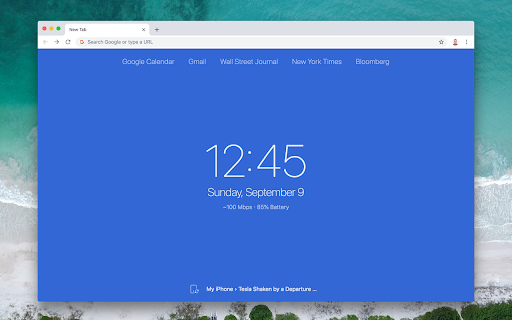
An elegant, minimal new tab page Minimo provides a simple way to quickly access your favorite websites and have useful information at a glance. It syncs with your tabs from your mobile devices and displays them at the bottom for quick access. Features * Useful information at a glance (current date & time, connection status, estimated download speed in Mbps, battery level) * Synced tabs from remote Chrome sessions * An optional button for your navigation bar for quick access to your shortcuts and synced tabs. * Simple UI for customizing shortcuts that sync as Bookmarks across all your devices * Rich-text, minimal scratchpad called "Writing mode" to you jot down notes for later (stored locally, in a per-device basis) * Variety of theme colors and synced preferences across browser sessions

Taskade - AI Agents, Chat Bots, & Task Automation
AI Agents, task lists, and workflow automation. Get work done faster and smarter with Taskade. ➜ TASKADE CHROME EXTENSION: ELEVATE YOUR PRODUCTIVITY WITH AI-POWERED AUTOMATION AND COLLABORATION Transform your browser into an all-in-one productivity powerhouse with the Taskade Chrome Extension. Capture ideas, automate workflows, and collaborate effortlessly using AI agents that think, learn, and act. Whether you’re brainstorming ideas, managing projects, or automating workflows, Taskade is the ultimate tool to supercharge your productivity. • Highlight text and right-click to "Add to Taskade" for instant organization. • Automate repetitive tasks with Taskade Automation's smart triggers and actions. • Train AI agents with knowledge from files, links, projects, and live data. • Manage tasks, projects, and workflows with powerful AI tools. • Collaborate in real-time with AI chat, mind maps, and team tools. • AI AGENTS: Build, train, and deploy custom AI agents to automate tasks, conduct research, and enhance workflows. • TASKADE AUTOMATION: Create workflows with "If this, then that" logic to handle repetitive tasks and boost efficiency. • TOOLS FOR AI AGENTS: Equip agents with advanced tools to execute commands, interact with external platforms, and streamline tasks. • KNOWLEDGE FOR AI AGENTS: Train agents with files, links, and live data for smarter, contextual, and adaptive responses. • TASKS AND PROJECTS: Organize tasks in lists, boards, calendars, and mind maps, enhanced with AI for creativity and structure. • AI COLLABORATION: Collaborate with teammates and AI agents using real-time chat, video conferencing, and automation tools. Taskade Automation enables you to streamline repetitive workflows and put your projects on autopilot. Using simple "If this, then that" logic, you can create automation flows tailored to your team’s needs. • Automate task creation and notifications. • Integrate with tools like Google Sheets, Slack, and WordPress. • Use AI agents in automation flows to execute commands and handle decisions. • Schedule automations to run at specific intervals, such as daily or weekly. • Share automation flows and templates with your team for consistent productivity. ➜ TOOLS FOR AI AGENTS Give your AI agents the ability to perform actions and interact with external platforms using powerful tools. Tools for AI Agents unlock new possibilities for dynamic workflows. • Create and manage tasks or projects within your workspace. • Send messages to team channels, email contacts, or publish blog posts directly from Taskade. • Integrate seamlessly with external platforms like Google Drive, Dropbox, or WordPress. • Enable specific tools for your agents to handle specialized tasks, like scheduling or generating reports. ➜ KNOWLEDGE FOR AI AGENTS Train your AI agents to provide smarter, more context-aware responses by equipping them with knowledge from a variety of sources. Combine static and dynamic knowledge to enhance agent performance. • Upload files like PDFs, DOCs, and spreadsheets to your agent's knowledge base. • Add live resources such as web links, YouTube videos, and blogs for real-time learning. • Integrate workspace projects as sources, including text, tasks, and embedded data. • Manage bulk knowledge uploads to keep agents updated with the latest information. • View knowledge backlinks in projects to track agent usage and sources. ➜ BUILD YOUR ULTIMATE AI-POWERED WORKSPACE • Capture ideas instantly by turning any webpage into actionable tasks with one click. • Automate workflows with Taskade Automation to save time and reduce effort. • Train AI agents with files, live data, and external resources for smarter assistance. • Collaborate smarter with AI-powered chat and real-time video conferencing. • Use tools for AI agents to interact with external platforms and handle complex tasks. ➜ HOW TASKADE BROWSER EXTENSION WORKS • Turn your new tab into a productivity dashboard where tasks, goals, and agents are one click away. • Use automation flows and tools to execute workflows, generate insights, and streamline decision-making. • Enable agents to handle dynamic knowledge for real-time, adaptable responses. ➜ PERFECT FOR INDIVIDUALS AND TEAMS Taskade adapts to your needs, whether managing personal projects or collaborating with a global team. • Unlimited workspaces to organize tasks and notes. • Customizable templates to create repeatable workflows. • Cross-device sync for seamless access on web, mobile, and desktop. ➜ GET STARTED FOR FREE Taskade is free to use, with optional upgrades to unlock additional features. Learn more at https://taskade.com/pricing. Join millions of users from companies like 3M, Netflix, Tesla, Adobe, and Airbnb who rely on Taskade to stay organized and productive. Read testimonials at https://taskade.com/reviews Reimagine how you work with Taskade and 10x your productivity. Download the Taskade Extension today and take your productivity to the next level.

Simplify Gmail
Make Gmail simpler, more capable, and more respectful Brought to you by the co-founder and design lead for Google Inbox, Simplify Gmail is a browser extension for desktop Gmail that boosts productivity, strengthens privacy, and reduces️ stress by: ✔️ BETTER DESIGN: Hundreds of improvements (small and large) to streamline, simplify, and enhance Gmail’s design and functionality. Hide the features you don’t use, customize the ones you do including setting the list and message width and fonts. ✔️ BUNDLES: Group conversations with the same label or category into a single row in your inbox for easier bulk reading and processing. ✔️ SAVED SEARCHES: Add commonly used searches or bookmark any message to your nav for easy access. Simplify includes 24 useful searches by default like Travel, Purchases, Archived, Attachments, Notes to self, PDFs, Photos, and more. ✔️ PAUSE INBOX: Pause new mail or hide the inbox entirely for deep focus. Optionally disable notifications when the inbox is paused or hidden. ✔️ BLOCK TRACKERS: Simplify blocks over 250 email spy trackers (more than any other tracker blocker extension). ✔️ KEYBOARD SHORTCUTS: Navigate faster with your arrow keys, Enter (to open, then to reply), and Escape (close a message, then to return to inbox). Use familiar shortcuts like Ctrl+A / ⌘A to select all or Ctrl+Z / ⌘Z to undo. Press "?" in Gmail to see all shortcuts. Also includes advanced shortcuts like [ I ] to reply to an intro and move the sender to BCC. ✔️ DARK MODE: Auto-switch with OS with options to invert all of Gmail’s UI and some or all messages. ✔️ GROUP BY DATE: Group messages list by date with bulk actions to one-click archive or delete. ✔️ INBOX ZERO BACKGROUND: Choose a different background to get when you reach inbox zero. ✔️ AUTO-CC/BCC: Set addresses to add to every new message and/or reply And much more... Comes with a free 1-month trial after which a paid plan is required. Learn more and sign up when you're ready at https://simpl.fyi/plans You should always be super careful what extensions or apps you use with your email. ✔️ Simplify always puts your security and privacy first. ✔️ The code for Simplify is entirely stored on your computer (no remote code) and is for the sole purpose of improving and enhancing Gmail's user interface and functionality. ✖️ Simplify does NOT request full access to your email (no API permissions required). ✖️ None of your data is collected, stored, or sent to Simplify. ✖️ Simplify has no tracking or analytics software. ✖️ Simplify will never have ads. Ever. Simplify's products have no ads, no analytics, no trackers, no cookies, and do not send or receive personal information of any kind from your account or device. Your privacy and the security of your account and data is of the utmost importance to us. We aim to make software worth paying for and taking the strictest stance on privacy possible. Our full privacy policy is at https://simpl.fyi/privacy You can send feedback or report issues via https://simpl.fyi/support (I usually respond within one business day). Note that there are over 100,000 unique combinations of Gmail’s options, features, and user states. Add in other 3rd party add-ons, different languages, browsers, screen sizes, and more and it grows to over a billion. Simplify strives to support them all, along with the more popular 3rd party extensions and add-ons. I wrote more about the complexity of building on top of Gmail here: https://on.simpl.fyi/p/complexity-of-simplify

TabX - Minimalist New Tab
Improve your web browsing experience with TabX, a beautiful, customizable and lightweight new tab. Enhance your browsing with TabX, a fast, elegant, and privacy-focused new tab page inspired by Apple’s design. 🚀 Features: ✅ 🏞 Dynamic 4K Backgrounds – Fresh Unsplash images daily ✅ 🔎 Search Bar – Works with any search engine ✅ 🕰 Analog Clock – Multiple customizable styles ✅ 🌤 Weather & 🌐 Random Quotes – Stay updated & inspired ✅ 🔗 Quick Links & 📝 Custom Fonts – Personalize your homepage ✅ 🌘 Dark Mode & 🧑💻 Custom CSS – Tailor it to your style ✅ 🔒 Privacy First – No accounts, no tracking, open-source Minimal, beautiful, and built for productivity. Try TabX today! 🚀

Aurora New Tab
Brighten up your day with chrome new tab Aurora New Tab makes your chrome awesome again! Customize all features available as required. Fast, customizable, beautiful and productive! Get inspired. Features -------------------- Daily New Image or Choose custom image, Search, Your Daily To-Do Tasks, Personalized Notebook, View all Installed Chrome Apps, Right Click Feature for most visited websites, Customize all features via settings.
