
likchgbfoehabkijbmdkahdohhdghllo


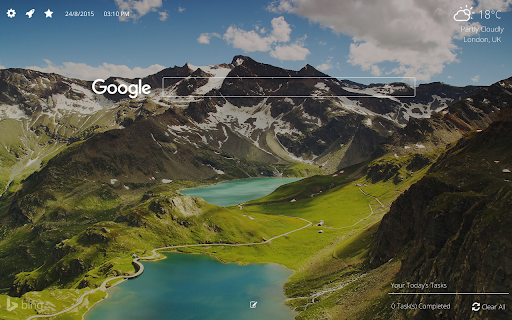
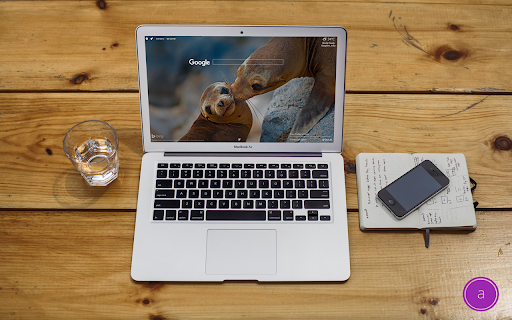
Brighten up your day with chrome new tab Aurora New Tab makes your chrome awesome again! Customize all features available as required. Fast, customizable, beautiful and productive! Get inspired. Features -------------------- Daily New Image or Choose custom image, Search, Your Daily To-Do Tasks, Personalized Notebook, View all Installed Chrome Apps, Right Click Feature for most visited websites, Customize all features via settings.

Calendar New Tab
Meomni is the best calendar extension for Chrome, built for users who depend on Google Calendar and Microsoft Outlook to stay organized. It transforms your New Tab into a fast, minimalist productivity dashboard with the most reliable and seamless calendar integration available on the Chrome Web Store. Whether you manage a busy schedule, track appointments, or plan upcoming events, Meomni provides a unified, intuitive calendar experience that outperforms traditional calendar add-ons. Designed as the top Google Calendar extension, Meomni syncs instantly with your Google Calendar and Microsoft Outlook calendar. Events, reminders, and schedules load immediately on your New Tab, giving you a clear snapshot of your day every time you open the browser. It is also the most complete Outlook calendar extension for Chrome, offering dependable two-way syncing and smooth navigation between work and personal calendars. Meomni goes beyond standard calendar tools by combining advanced task management, a powerful ChatGPT sidebar, Gmail notifications, note-taking, and news updates—all in one place. Manage tasks across Google Tasks, Todoist, TickTick, and Microsoft To Do, while using AI to summarize information, rewrite text, translate content, or assist with work and research. Integrated weather forecasts, RSS news feeds, and a cloud-synced notepad enhance daily planning. Customization options include themes, wallpapers, colors, fonts, and layout controls, helping you create the calendar dashboard that fits your style. Live wallpapers and premium visual themes elevate the experience further. If you’re searching for the best Google Calendar extension or the most reliable Outlook calendar integration for Chrome, Meomni stands out by combining speed, clarity, and powerful productivity tools. It transforms your New Tab into the most complete calendar and productivity hub available. Upgrade your workflow with Meomni and experience why users consider it the best calendar extension for Chrome.

MONKNOW New Tab - Personal Dashboard
This is the new tab you are dreaming of. Support website URL group management, data sync, dark theme mode. • Search & Speed Dial. • Data Sync, just create an account then all your data will be synced. • Icon groups, sort your speed dial icons based on your needs. • Match official icon image automatically when you are adding a custom icon. • Customize icon, you can upload jpg, png, svg, even gif for your own icon. • Customize icon layout, you can set icon size, gap, opacity and so on. • Customize wallpaper, you can upload jpg, png for your own wallpaper. • Thousands of icons in official icon library. • Thousands of HD wallpapers in official wallpaper library. • Display the standby page when you are inactive or every time when you open the new tab. • Support light theme mode and dark theme mode. • ToDo gives you focus. • Tabs (NECESSARY), When you click the MONKNOW toolbar button, the extension needs this permission to get current tab's URL and title so that you can add this website as an icon to your extension. This is not sent or stored elsewhere. • Bookmarks (OPTIONAL), To import your browser bookmarks to MONKNOW New Tab, the extension needs this permission to read your bookmark data. This is not sent or stored elsewhere. For more information on privacy and the security of your data visit https://www.monknow.com/privacy-policy.

Super Bookmark Desktop
Super Bookmark Desktop - the new tab page + bookmark manager that acts like your computer desktop!… Super Bookmark Desktop - the new tab page + bookmark manager that acts like your computer desktop! If you've ever wanted to treat your bookmarks like files on your desktop then give this a try! Some features: * Cool desktop backgrounds and ability to add your own. Add a subreddit source and get new backgrounds every day! * Click and Drag icons to move them around the desktop or into folders. * Create a selection of multiple items by clicking and dragging with the mouse (then try moving all of them). * Hold down Ctrl, Shift, or Command and then click an icon to multi-select icons. * Right Click the desktop create bookmarks or to change backgrounds and set background settings. * Right Click icons to edit or delete them (editing and deleting affects the actual bookmark). * Create text files that sync like a normal bookmark. Good for making quick reminders!

OmniTab New Tab
Free to define your new tab,add website icons,HD wallpapers,quick access to bookmarks,todo list,weather and history OmniTab is a new tab page beyond infinite possibilities, which can be customized with a high degree of freedom. OmniTab strives to create excellent interaction and a perfect UI interface, which not only provides rich functions, but also is easy to use, and can be customized with a high degree of freedom, allowing you to say goodbye to dull and uninteresting native tab pages and enjoy the personalization that OmniTab brings to you. OmniTab will redefine your new tab. With OmniTab, you get the following features: Highly Liberalized Edit 40+ setting options are provided, the layout can be freely customized, and your new tab page is up to you. Easily Manage Frequently Used Websites Integrate thousands of commonly used websites, add them with one click, and manage them in batches. HD & Exquisite Wallpaper Change at Will Built-in massive HD wallpapers, you can also upload your favorite wallpapers to make your new tab page pleasing to the eye. Super Navigation Your can add most frequently used websites to the quick navigation at the bottom, one-click quick access to improve efficiency. Featured Group You can add different groups according to your habits, and you can place website shortcut icons under each group to improve work efficiency. Search Engine Customization It integrates multiple mainstream search engines, such as google, Baidu, bing, yandex, etc., which can be switched and used arbitrarily according to your own needs, and it can be intelligently associated with search. Cloud Data Backup Sign up for an OmniTab account with an email address, enjoy cloud backup and multi-terminal synchronization, and ensure that data will never be lost.
