
fagdeeicoopfkdnbpdnhkhndeglbganp
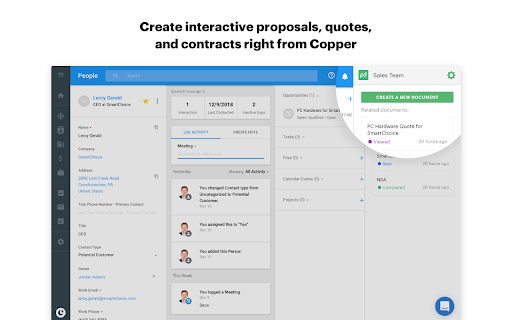


Create, send, track, and eSign proposals and quotes from within Copper CRM to expedite your sales process and close deals fast. Access the PandaDoc panel from any opportunity, contact or company record within Copper. In minutes you can easily create, send, and track documents on-the-fly. - Create dynamic sales docs in minutes right within Copper CRM opportunities, contacts, and companies objects. - Save time and money with legally-binding built-in eSignatures. No need to purchase a separate electronic signature tool. - Get immediate access to your documents in any object as they are automatically stored in PandaDoc. - Merge data from Copper into your documents automatically to eliminate errors. - Get instant comments from your colleagues and customers to negotiate faster.

Grok to PDF: Export Grok Chats to PDF, Markdown, JSON
Export Grok chats to PDF or Markdown instantly. Save Grok conversations, download chats, and archive discussions with one click. Never lose an important AI conversation again. Grok to PDF lets you export chats to PDF, Markdown, or JSON instantly. Save, download, and archive your AI conversations with one click — including code, images, math, and full formatting. Perfect for saving Grok and other AI chat conversations as clean, shareable files. Grok to PDF captures your conversations exactly as you see them: • Code blocks keep their syntax highlighting • Tables, math (LaTeX), and structured content stay intact • Images and attachments are included • Links, headings, and formatting are preserved • The original layout remains clean and readable • Even very long chats export without breaking Your exported files are polished, easy to read, and ready to share, store, or revisit anytime. • One-Click Export — Save the current chat instantly • Batch Export — Export multiple conversations at once • Multiple Formats — PDF, Markdown (.md), JSON, or Plain Text • High-Quality PDF Export — No cut-off pages or broken layouts • Formatting Preserved — Headers, lists, links, and styles stay intact • Works Offline — Export chats without an internet connection • Works with Long Chats — Handles large conversations smoothly • Automatic backups to Google Drive, Dropbox, Notion, or Yandex Disk • Access your exported chats from anywhere • Keep your AI conversations organized and secure Your data stays on your device. Everything is processed locally, making it safe for sensitive work, research, and personal use. 🛠️ WHO IT’S FOR Developers, students, writers, professionals, and researchers who want to save, organize, and revisit AI conversations. • Developers — Save code snippets and debugging sessions • Students — Keep study material and research organized • Writers & Creators — Store ideas, drafts, and content • Professionals — Document workflows and planning • Researchers — Preserve detailed discussions ✔ Fast and reliable, even for very long chats ✔ Cleaner and more accurate than copy-paste or print methods ✔ Designed specifically for AI chat export ✔ Lightweight, simple, and easy to use ✔ Supports multiple export formats Install Grok to PDF and start saving your AI chats as clean, shareable files in seconds.

inNotion: Import & Enrich LinkedIn Profiles for Notion
inNotion — Import & enrich LinkedIn profiles to Notion CRM. Get emails, phone numbers, add private notes and automate networking. Import LinkedIn profiles to Notion with automatic email and phone enrichment — no more tab switching. What it does ************* inNotion connects LinkedIn to your Notion CRM via your browser's side panel. Import profiles in one click, automatically enrich contacts with verified emails and phone numbers, automate your live events networking workflow, add private notes and reminders that stay in your browser, not in Notion. Your CRM always stays visible while you browse. No more copying data between tabs. Why it matters *************** Manual CRM data entry is super-slow & boring: open LinkedIn, copy name, switch to Notion, paste, go back, copy company, switch again. Repeat for every field, every contact. inNotion eliminates this. One click imports all profile data. Automatic enrichment adds contact details you'd otherwise search for manually. Side panel means zero context switching. Core features ************** - LinkedIn profile import: One-click People to Notion import from any LinkedIn page - Email & phone enrichment: Automatic contact data retrieval - Live events networking automation: keep the conversation rolling - LinkedIn import - Email/phone enrichment - Contextualized note & follow up reminder - Contextualized LinkedIn invitation message - Real-time sync: Changes appear in Notion immediately - Private notes & reminders: Browser-only storage, not synced to Notion - Side panel workflow: Your Notion CRM stays visible beside any webpage - QR code scanner: Capture LinkedIn profiles at in-person events (mobile) - Multi-database support: Switch between different Notion CRMs Built for ******** - Sales teams tracking prospects - Recruiters managing candidates - Freelancers organizing clients - Anyone running a CRM in Notion. Setup ****** 1- Install extension 2- Connect your Notion database 3- Import your first profile! Privacy ******** Data flows between your browser and Notion only. Private notes stay local. We don't store or access your information. Legal disclaimer ***************** inNotion is not affiliated with, endorsed by, or sponsored by LinkedIn or Notion. LinkedIn™ and Notion™ are registered trademarks of their respective owners. inNotion is an independent third-party browser extension.

Gemini to PDF: Export Gemini Chats to PDF, Markdown, JSON
Export Gemini chats to PDF or Markdown instantly. Save Gemini conversations, download chats, and archive discussions with one clic Never lose an important Gemini conversation again. Gemini to PDF lets you export chats to PDF, Markdown, or JSON instantly. Save, download, and archive your Gemini conversations with one click — including code, images, math, and full formatting. Perfect for saving Gemini chats as clean, shareable files. Gemini to PDF captures your conversations exactly as you see them: • Code blocks keep their syntax highlighting • Tables, math (LaTeX), and structured content stay intact • Images and attachments are included • Links, headings, and formatting are preserved • The original layout remains clean and readable • Even very long chats export without breaking Your exported files are polished, easy to read, and ready to share, store, or revisit anytime. • One-Click Export — Save the current chat instantly • Batch Export — Export multiple conversations at once • Multiple Formats — PDF, Markdown (.md), JSON, or Plain Text • High-Quality PDF Export — No cut-off pages or broken layouts • Formatting Preserved — Headers, lists, links, and styles stay intact • Works Offline — Export chats without an internet connection • Works with Long Chats — Handles large conversations smoothly • Automatic backups to Google Drive, Dropbox, Notion, or Yandex Disk • Access your exported chats from anywhere • Keep your Gemini conversations organized and secure Your data stays on your device. Everything is processed locally, making it safe for sensitive work, research, and personal use. 🛠️ WHO IT’S FOR Developers, students, writers, professionals, and researchers who want to save, organize, and revisit your Gemini conversations. • Developers — Save code snippets and debugging sessions • Students — Keep study material and research organized • Writers & Creators — Store ideas, drafts, and content • Professionals — Document workflows and planning • Researchers — Preserve detailed discussions ✔ Fast and reliable, even for very long chats ✔ Cleaner and more accurate than copy-paste or print methods ✔ Designed specifically for Gemini chat export ✔ Lightweight, simple, and easy to use ✔ Supports multiple export formats Install Gemini to PDF and start saving your Gemini chats as clean, shareable files in seconds.

Perplexity to PDF: Export Perplexity Chats to PDF, Markdown, JSON
Export Perplexity chats to PDF or Markdown instantly. Save Perplexity conversations, download chats, and archive discussions with. Never lose an important AI conversation again. Perplexity to PDF lets you export chats to PDF, Markdown, or JSON instantly. Save, download, and archive your AI conversations with one click — including code, images, math, and full formatting. Perfect for saving Perplexity and other AI chat conversations as clean, shareable files. Perplexity to PDF captures your conversations exactly as you see them: • Code blocks keep their syntax highlighting • Tables, math (LaTeX), and structured content stay intact • Images and attachments are included • Links, headings, and formatting are preserved • The original layout remains clean and readable • Even very long chats export without breaking Your exported files are polished, easy to read, and ready to share, store, or revisit anytime. • One-Click Export — Save the current chat instantly • Batch Export — Export multiple conversations at once • Multiple Formats — PDF, Markdown (.md), JSON, or Plain Text • High-Quality PDF Export — No cut-off pages or broken layouts • Formatting Preserved — Headers, lists, links, and styles stay intact • Works Offline — Export chats without an internet connection • Works with Long Chats — Handles large conversations smoothly • Automatic backups to Google Drive, Dropbox, Notion, or Yandex Disk • Access your exported chats from anywhere • Keep your AI conversations organized and secure Your data stays on your device. Everything is processed locally, making it safe for sensitive work, research, and personal use. 🛠️ WHO IT’S FOR Developers, students, writers, professionals, and researchers who want to save, organize, and revisit AI conversations. • Developers — Save code snippets and debugging sessions • Students — Keep study material and research organized • Writers & Creators — Store ideas, drafts, and content • Professionals — Document workflows and planning • Researchers — Preserve detailed discussions ✔ Fast and reliable, even for very long chats ✔ Cleaner and more accurate than copy-paste or print methods ✔ Designed specifically for AI chat export ✔ Lightweight, simple, and easy to use ✔ Supports multiple export formats Install Perplexity to PDF and start saving your AI chats as clean, shareable files in seconds.
