
epaoeoeofbdhoakmlhembafepfjgomme

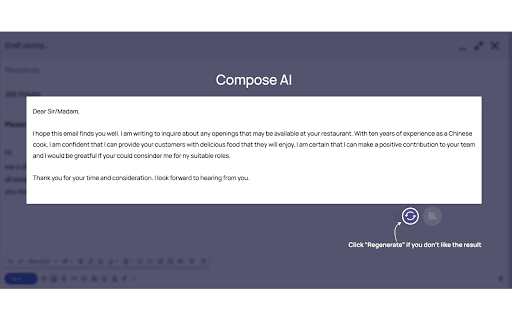
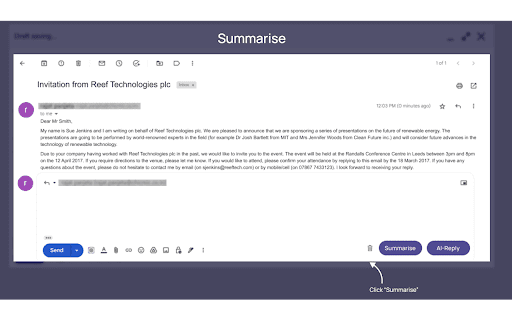
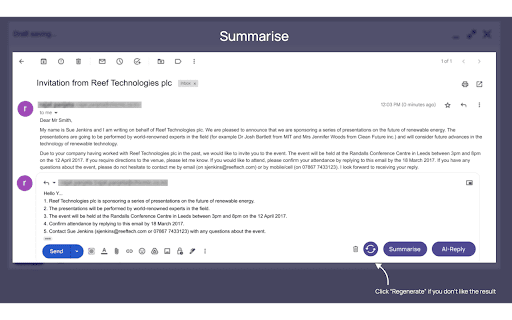
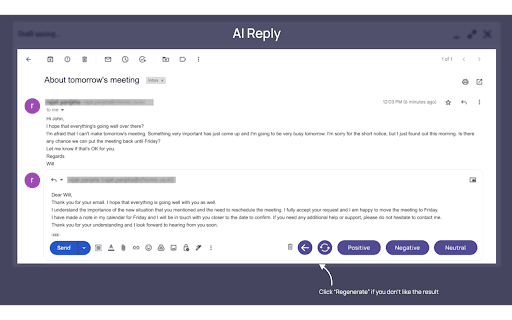
Unlock the power of AI with SimpleMail to write, read, and respond to emails like a pro. Become a pro at writing, reading, and responding to emails with SimpleMail powered by GPT4. With just a click of a button, you can create a polished and professional email draft! Save time by writing fewer emails and focusing on more important tasks. Let the ChatGPT and GPT4 do the writing for you and summarise long emails into key points. Simplemail offers the following functions: AI Compose - All you need to do is write point forms without regard to grammar or upper/lower case - Artificial intelligence will generate a professional email for you - No grammatical or spelling errors- You may use the refresh button to create another version if you are not satisfied with the original - Each email written by the AI is unique Summarise - How many long emails do you receive each day? Can you imagine someone reading them and telling you only the most important information? - With just one click, let the AI summarise the email for you - Reduces the amount of time, effort, and energy spent reading entire emails - The summary can be saved as a note, so you do not have to type it - Simple Mail AI recognizes the most important information AI Reply Function - Positive, Negative, or Neutral options are available - AI drafts an email based on your choice and the email you have received - If you change your mind, click on a different button to generate a new one - The AI responds to each of the important points - Suitable for both personal and professional use Start your 30-day free trial today!

Chat with Desksense AI Powered by GPT4
The Ultimate AI Assistant with GPT-4 powered responses. Answers any queries, summarize articles, create emails, content & AI images. Desksense ChatGPT AI app provides Free Chat GPT & GPT-4 access, AI writer for Email, Blogs, Articles, Tweets, Linkedin posts, Facebook Posts, Replies and more. Desksense AI uses OpenAI ChatGPT to summarize Youtube videos & Blog in one-click. Desksense AI app revolutionizes your online search experience by integrating Open AI ChatGPT alongside your Google search engine. With Desksense you can access instant AI-generated responses, providing valuable insights and information right alongside the search results you're browsing. With just a CMD+ I OR CTRL+ I Desksense makes it easy for you to access the ChatGPT on any website. Use "Shortcuts" for Advanced users. 👉👉 Save ANY ChatGPT, GPT-4, Claude3 OR Genini Pro response to your Desksense Account in one-click. 👉 [New Update] Desksense comes with new Chat GPT models like; GPT-4-o-mini and other LLM's like Claude3, Gemini Pro & Llama 3version. 👉 [New Update] Desksense comes AI Image Analyzer 👉 Desksense iOS App is now live in App Store. 👉 New AI Summarizer is now live with upload file feature. 👉 AI Writer for ANY content with ChatGPT-4, GPT-4-o-mini, Claude 3 & Gemini Pro option (Emoji, character limit included with a different lanuage model.) 👉 FREE AI Chatbot integrated with ChatGPT & GPT-4 in web app 👉 Get ChatGpt AI response or replies with 'Tone' and 'Emoji' 👉 Unlimited AI response on Google Search 👉 One-click AI summarizer for Youtube videos 👉 One-click AI summarizer for ANY website 👉 ChatGPT AI Image generator using Dall-E 👉 Save ChatGPT response in your account for later use. 👉 Save your frequently used prompt(s) 👉 List of 100+ preset prompts and option to edit and save in your account. 👉 Easy Access with CMD + I OR CTRL + I on ANY website 👉 Grow your Social Media presence using Desksense AI response in LinkedIn posts, Twitter & Facebook posts. 👉 Write faster and smarter emails on Gmail, Tweets, Linkedin Posts and Facebook posts 👉 Generate online content, video script, hashtags & keywords and topics for blog posts, articles and socials using Desksense AI ChatGPT App. 👉 Share your saved response to social media using our Desksense Web App 👉 Copy to clipboard, Save, Favorite and add tags to ChatGPT responses as Card. 👉 Desksense Chat GPT & GPT 4 Android Mobile App 👉 Auto Dark/light mode 👉 Change the Tone of your response and include emoji when needed. 👉 AI Chatroom Collaboration with your Team 👉 AI Chatbot in Extension 👉 AI Content Generator - AI Email Writer, AI Article Writer using ChatGPT, GPT-4, GPT-4-o-mini, Claude3 and Gemini Pro., AI Code Generator, AI Social Media Post Generator and more... Are you a busy professional juggling multiple tasks? A student striving for academic excellence? Or someone seeking to optimize their daily routines? Look no further! Desksense is here to revolutionize your digital experience. Desksense is a powerful chrome extension that leverages the ChatGPT API to enhance your productivity. It provides a range of AI applications, including ChatGPT & GPT-4 AI chatbot, summarizers, AI writers, and more, accessible on any website. Yes, Desksense is completely free to download and use. Every free user gets 5000 Word limit for month. No, you do not require a separate ChatGPT account. Simply sign up for free at Desksense.com to access the extension. Yes, Desksense chrome extension works seamlessly in all countries, ensuring that users worldwide can benefit from its features. To install Desksense on your browser, you will need to follow these steps: 1) In your browser open the browser's app store or extension store 2) Search for the Desksense in the browser's app store or extension store (or click for : Google Chrome | Edge) 3) Click on the "Add to Browser" or "Install" button to begin the installation process. 4) Follow the prompts to give the extension permission to access certain parts of your browser, if prompted. 5) Once the installation is complete, you will be redirected to our onboarding page 6) That’s it ! you are done :) Please pin the ext. on top bar to get on-time updates. If you have any questions, please feel free to reach us at support@desksense.com === VERSION 1.0.13 ==== * NEW FEATURE: AI Writer for ANY content with newest version of GPT models (Emoji, character limit included with a different lanuage model.) * NEW FEATURE: AI Image Analyzer that analyses any image and gives you response describing the image. * File Summarizer: Upload any file & summarize in one-click * Minor Bug fixes

EmoGPT: Secure ChatGPT Email Writer for Gmail
Designed for Gmail and powered directly by your OpenAI (ChatGPT) account, ensuring that your data is kept private and secure 🔒 🎉 Exciting news! Our platform now supports the new ChatGPT API. By using your own OpenAI API key, you'll enjoy the following benefits: ✔️ No more browser security checks. 🚀 High availability and performance. 🛡️ Data submitted through the API is no longer used for service improvements (including model training). 🗓 A default 30-day data retention policy for API users, with options for stricter retention depending on your needs. 💰 OpenAI's pay-as-you-go pricing is now even more affordable at only around $0.0005 per generated email. This extension can communicate only with OpenAI (ChatGPT) and Gmail thanks to strict and granular permissions to ensure that your data is not shared or accessed by any other internet resources including EmoGPT.com. Put simply, it functions locally and only saves customization preferences as browser data 🔒 Quickly generate email responses, follow-ups, cold outreach templates, or rewrite emails with a high level of personalization and empathy. EmoGPT is designed exclusively for Gmail to enhance user experience and minimize effort in crafting personalized emails. Best of all, it's completely free for personal use, and always will be 🤗 Built with ❤️ in Ukraine 🇺🇦

Scribbly AI: ChatGPT Email Assistant
Scribbly – AI-powered email writing for busy professionals Scribbly is an AI-powered email writing assistant for busy professionals. It is compatible with the web versions of Gmail and Outlook. Write emails 10x faster with AI-powered content suggestions on Gmail or Outlook that are context-specific, professionally written, and sound just like you. 📧 Hit inbox zero faster – Write and send emails more efficiently, so you can clear your inbox quicker. 🚀 Streamline repetitive email tasks – Scribbly can identify & respond to commonly asked questions, meaning less repetitive email-writing for you. 🔝 Elevate your communication – Wave goodbye to second-guessing your writing and say hello to polished & professional-sounding emails. 💡 Make better decisions – Scribbly’s AI allows you to pick from multiple ways to respond, helping you make better decisions. 📝 Say goodbye to writer’s block – Let Scribbly handle the tedious task of email writing by giving it some basic context and have it write entire emails for you from scratch. 1️⃣ Select an email you want to reply to – Scribbly will analyse the text and provide you with personalised & contextually accurate response suggestions. 2️⃣ Select an option that best represents how you want to respond to the email. 3️⃣ Choose an email response drafted by Scribbly based on your selected intention. Make any necessary changes and press send! 4️⃣ Or guide Scribbly! Provide Scribbly with some context and see the magic happen. Level up your email writing. Send responses 10x faster & never struggle with a full inbox again. Try our free Scribbly Chrome Extension today! We’re constantly working on updates and improvements to make your Scribbly experience even better. If you have questions or feedback, we would love to hear from you at hello@scribbly.ai

Nily: AI Sidebar with all LLMs (ChatGPT, DeepSeek, Gemini, Claude & more)
Your AI assistant powered by GPT-4o, DeepSeek, and advanced AI tools to read, write, translate, and create images. Nily AI Sidebar (formerly Remail) is your powerful AI copilot for the web—powered by top AI models for text, image and video generations and more. Whether you’re writing emails, summarizing PDFs, translating content, or creating visuals, Nily will assist you in performing these tasks faster and smarter online. Access the world’s top AI models—right inside your browser. No tab switching, no delays, just productivity. 💬 Chat with AI directly on any webpage 🤖 Use 20+ top-tier AI models including GPT-4o, Claude 3.5, Gemini 1.5, DeepSeek R1 ✍️ Instantly write, edit, translate, or polish content 📌 Create & organize unlimited custom prompts ⚡ Access all tools instantly in one sidebar—no switching tabs 🌍 Communicate in 30+ languages 🎨 Create stunning video, images, logos, posters & stickers in seconds 🖼️ Remove or add backgrounds to any image 🎯 Social media management tool to create, customize, and schedule content. ✉️ Write professional emails instantly 📄 Summarize, extract, or translate PDFs, documents, and webpages 🖼️ Take and analyze screenshots and visual content (OCR) 🧠 Humanize your content & make it truly original 🔍 Detect AI-written content for true authenticity 📚 AI Chat with Any Content PDFs & Docs: Ask questions, summarize, or extract info Webpages: Chat with the content directly—no copy/paste Images: OCR and analyze screenshots or photos Videos: Get instant YouTube summaries and insights Generate instant replies from context or summaries Choose from 3+ response variations or generate more Upload FAQs or PDFs for context-aware responses Support 14+ languages and multiple tones Auto-insert your calendar or scheduling link Perfect for outreach, support, and productivity Write fluently in 30+ languages Fix grammar, rephrase, expand, or format instantly Generate outlines and long-form content from just a topic Match tone and audience instantly Use “Nily Writing Chat” to talk to your writing as you draft Create stunning video and images from a single prompt Choose from 30+ art styles and up to 4 image variations Design custom posters, logos, and stickers Edit images: resize, remove backgrounds, erase text Add any background to your image with a single prompt Preview before/after and download instantly Schedule posts for optimal times Generate posts from a brief or prompt Choose tone and style (casual, formal, etc.) Auto-add relevant hashtags Generate customizable LinkedIn carousels with branding 🧠 Humanizer & AI Detector Tool Rewrite robotic AI text into natural, engaging content Humanize up to 2,500 words in 40+ languages Detect AI content using multiple leading tools (GPTZero, Copyleaks, etc.) Tailor tone, style, and complexity for academic, legal, or marketing use 🧰 Productivity Toolkit Save and organize custom prompts Use your own API keys (OpenAI, etc.) Cross-platform: iOS, Android, Chrome, Edge, Safari Easily switch between AI models anytime 👥 Who is Nily AI For? 🚀 Entrepreneurs: Automate admin and email Speed up research & strategy Plan better with AI assistance ✍️ Content Creators: Get ideas, outlines, and scripts Translate, schedule, and repurpose content Create visuals and captions fast 📱 Social Media Managers: Craft posts, hashtags, and visuals effortlessly Save time and scale up quality content 🎓 Students & Academics Summarize articles, write essays, generate citations, and translate research Chat with PDFs, polish your writing, and stay productive across 30+ languages. 💼 Business Professionals Automate emails and create content with just a prompt. Plan, write, design, and communicate effortlessly using 20+ top AI models in one powerful sidebar. 🚀 How to Get Started 1. Click on “Add to Chrome” 2. Log in or sign up to your Nily account 3. Press Cmd/Ctrl + M to open Nily Sidebar 4. Start using AI anywhere online 📌 Can I try Nily AI Sidebar (formerly Remail) for free? Yes! We offer a 7-day free trial so you can explore all the features without any commitment. 📌 Do I need a ChatGPT or OpenAI account to use Nily? No. You don’t need a ChatGPT or OpenAI account to use Nily. Simply create a free Nily account and start using the extension right away. 📌 ChatGPT is restricted in my country—will Nily still work? Yes. Nily's multi-AI Sidebar works globally, even in countries where ChatGPT is restricted. You’ll still have access to other top AI models like Claude, Gemini, DeepSeek, and more. Got any Feedback? We're always here to help and improve. Reach out with bugs, feature requests, or feedback: 📩 contact@nily.ai
