
eommfjpcpjfdacmfbadhlplmnmelldib
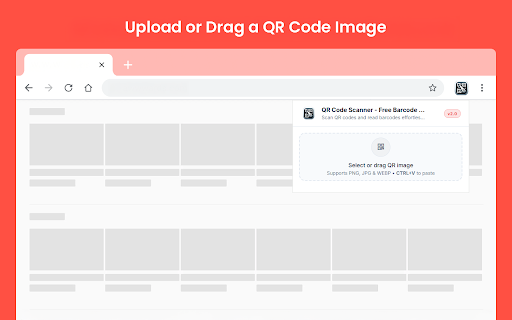


Scan QR codes and read barcodes effortlessly with our Free QR Code Scanner and Barcode Reader! QR Code Scanner - Free Barcode Reader is a simple Chrome extension that helps you scan QR codes and barcodes from image files directly in your browser. If you need a practical qr code reader or a quick qr code scanner, this extension makes the process easy without requiring a camera. You can upload or drag an image into the extension and see the decoded result in seconds. It is useful when you need to open a QR code from a saved image or screenshot while browsing on desktop. Key Features ✓ Scan QR Codes from Images: Open an image file and extract the encoded result directly inside the extension. ✓ Barcode Support: In addition to QR codes, the extension also works as a simple barcode scanner for supported image files. ✓ Drag and Drop Upload: Add your QR image quickly by dragging it into the upload area. ✓ Clipboard Paste Support: You can also paste a copied image directly into the extension with CTRL+V. ✓ PNG, JPG, and WEBP Support: The extension supports common image formats, making it easier to scan saved screenshots and exported images. ✓ Decoded Result Box: Once the scan is complete, the content appears in a clear result area for quick review. ✓ One-Click Copy: Use the Copy button to copy the decoded result instantly. Why use it? This extension lets you read QR codes from image files directly in your browser. You can upload or paste a QR image and see the decoded result immediately. It is useful when you receive QR codes as screenshots, saved images, or shared files. How to use this? 1. Install the extension from the Chrome Web Store. 2. Open the extension by clicking its icon. 3. Drag and drop a QR image into the upload area, select an image file, or paste an image with CTRL+V. 4. Wait for the extension to scan the image. 5. View the decoded result in the result box and use Copy if needed. 6. Click Scan Another Image to load a new file. QR Code Scanner - Free Barcode Reader helps you read QR codes from images in a simple way directly in Chrome.

Easy Scraper - One-click web scraper
A free web scraper for instant results. Scrape any website with one click. No coding required. Easy Scraper is the easiest web scraper you’ll ever use. With just a single click, extract data from any website and streamline your data analysis, research, and content aggregation tasks. - Scrape lists: Scrape any list, on any website, with a single click. - Scrape details pages: After extracting a list of URLs, scrape each URL and extract data from each page. - Easy to use: Navigate to your desired webpage, click the extension icon, and watch as data is magically organized and ready for use. - Instant export: Conveniently save your scraped data in CSV or JSON, facilitating easy integration with your projects or databases. - Dynamic content handling: Skillfully manages JavaScript-rendered content, ensuring you capture data from even the most complex sites. - Privacy focused: Operates locally on your browser, ensuring your data remains private and secure without being sent over the network. 1. Install the extension with a single click from the Chrome Web Store. 2. Navigate to any website from which you wish to scrape data. 3. Click the extension icon to activate the scraper. 4. Customize your scrape by changing the list and scraping speed if desired. 5. Export your data in the format of your choice and you're done! - Lead generation: Effortlessly collect contact information and leads for your sales and marketing initiatives. - Market research: Quickly gather product details, prices, and reviews. - Data analysis: Compile data sets from various sources for analysis. - Content creation: Aggregate content for research or inspiration.

Qr Code Scanner & Reader
Scan QR Code and Read it Fast! Effortlessly scan and decode QR codes with this fast and reliable QR Code Scanner & Reader! This extension makes it easy to read QR codes directly from your device without needing extra apps. Perfect for quick access to URLs, contact information, and other data embedded in QR codes. - Fast Scanning: Quickly scans QR codes with minimal load time. - Easy to Use: Just open the extension, point to the QR code, and instantly access the decoded content. - Privacy-Focused: Securely reads QR codes without saving your data. - Multi-Purpose: Works for URLs, text, contact info, and more. Perfect for anyone needing a reliable, secure, and user-friendly QR code scanner right from their browser!

QR Code with Logo
Generate QR codes with logos instantly! Use our qr code generator for custom designs and easily scan codes anywhere. 🚀 Transform your QR Code experience with our ultimate Google Chrome extension designed for all your qr code needs. 🛠️ Whether you want to create, customize, or share qr codes, this tool has everything you need. Let's dive into why this extension is the perfect choice for you. 🥷 Create QR Codes Effortlessly: 🚀 With this extension, you can quickly create a qr code for any link or text. ⚡ Simply enter your input, and within seconds, you'll have a sleek, scannable image ready for use. Open the extension. Paste or type your link. Click generate Download image 💻 Stand out by creating a custom qr code with a logo in the middle. 📈 Whether you’re promoting your brand or personalizing an event, this tool ensures your result is both functional and stylish. Add your company’s logo easily. Choose a qr code with a logo in the center or edges. Customize colors to match your branding. ❓ Why Choose This QR Code Generator with Logo? 📰 Our extension offers a unique experience with features like: Fast generation. Multiple customization options. Easy export and sharing options. 👩🏻💼 Business owners, marketers, and event organizers can benefit greatly from our extension. 🟢 Highlight your brand by adding a logo and making your result visually appealing. Make a beautiful image with a logo that fits your brand. Generate promoting images with logos for product labels. Enhance customer trust with professional-looking images. 💡 Advanced Features Customizable colors and patterns. Logo in center for better visibility. Multiple formats for download (PNG, SVG). Easy resizing to fit different needs. ❓ How to Create a QR Code with Logo: 1️⃣ Open the extension and select “Create QR Code with Logo.” 2️⃣ Upload your logo or choose from existing options. 3️⃣ Customize the color and size. 4️⃣ Save or share your new image. ✨ Perfect for Every Use Case 💼 Whether you need qrcodes for business cards, flyers, or digital promotions, this extension is your go-to tool. Add a personal touch to event invitations. Use qrcodes for product packaging. Simplify navigation to your website or social media. 🎯 Answers to Common Questions: ❓ How do I create a qr code? ✔️ Simply open the extension, paste your link, and click “Generate” to instantly create a qrcode. ❓ How to make a qr code for a link? ✔️ Use the extension to paste the link, and it will generate the image in seconds. ❓ How to create a qr code for a link with a logo? ✔️ Use our customizable features to add your logo and make your image with link unique. 🌎 Seamless Integration with Google Chrome 💻 The extension integrates perfectly with Google Chrome for a smooth user experience. 🖱️ With just one click, you can create or customize your QRs directly from your browser. ➕ Benefits of Using a QR code with Logo Generator: Professional branding. Instant recognition. Versatility across industries. 🏁 Start Creating Custom QR codes Today Open the extension. Choose your options. Generate and share effortlessly. ✍🏼 Make every scan count with this powerful tool! Download now and unlock the potential of better promoting your brand and products. ✅ Final Thoughts 🛠️ From creating a images for a link to making links with logos, this extension simplifies the process. 🎨 No more generic designs; customize your codes and impress your audience. 💡 Whether you're wondering how to create a link generator for branding, this tool has you covered. 👨🏻💻 Your journey to professional, eye-catching promotion begins here. Upgrade your branding today with the ultimate marketing tool!

Create a QR code
Easily create a QR code with our extension. Customize your QR codes for any purpose with our custom QR code features. 🌐 QR Code Generator is a versatile tool that will allow you to easily create and customise a file and will suit many of your needs. You can easily make a qr code for your website, social media profiles, business cards and more. 💡 Key features: 1️⃣ Get qr code simply and without additional software. 2️⃣ Create unique qr code art 3️⃣ Make qr code url and share it quickly. 4️⃣ Works online and offline. ❓How to create a qr code? 1. Click on the extension in the browser bar. 2. Paste the desired URL 3. Set the desired settings 4. Click the download button. 🎨 This qr code creator offers customization options:. 🖼 Make qr code with image in the middle 🔲 Choose qr code color background 📝 If you're looking to create qr code for google form, this extension simplifies the process. Just link your Google Form, and you’ll get a barcode that respondents can scan to access the form. 🌟 Developing qr codes has never been easier. This tool supports qr code png format, ensuring that your files will be of the highest quality. Easily integrate this into your marketing strategies. Create links to all important pages so your audience can easily access your content. Ideal for companies that want to maintain a corporate identity throughout. 👨💻 Here are some examples: ▸ Direct users to your website. ▸ Promote your latest blog posts. ▸ Make links to your social media profiles. ▸ Share promotions. Whether you need them for professional or personal use, this is an efficient, user-friendly app with many features to suit your needs. 🔥Use qr code generator google to expand your digital presence, engage effectively with your audience, and visually stand out from the crowd. 📚 Why This Tool Still Matters in 2025 In a world where users want instant access without typing long addresses, having a way to create scan-ready content is a game-changer. Whether you're running a business, organizing an event, or sharing learning materials, visual shortcuts are becoming essential. Thanks to this extension, you can easily create a qr code for a url and offer fast, direct access to anything you want to share — without needing third-party software. 🌱 Where It Works Best This scannable format fits perfectly into all kinds of real-life use cases: ✅ Add a smart square to your resume or business card ✅ Share event details or feedback forms without typing ✅ Help customers connect with your latest offers ✅ Guide students or clients to resources ✅ Make posters interactive and printed materials dynamic All of this starts with a few clicks inside your browser. You simply generate qr code for url, choose your design, and you're good to go. 🎨 Add Visual Identity in Seconds Customizing these digital gateways helps them fit naturally into your branding. Want a company icon in the center? Prefer a different background shade? You’re in control. With this extension, you can: 🖼️ Insert a personal image or brand symbol in the center 🎨 Change the color 📁 Export a crisp qr code image in PNG format 🧑🎨 Create a professional look with no graphic design skills needed In fact, it’s never been easier to make qr code with logo that reflects your brand or message. You’ve got links that matter — now you can turn them into visual access points. This tool makes it effortless to: 🔗 Create qr code from link with just a paste 📲 Share new content instantly from print materials 📩 Add scannable actions to promotional emails 🎟️ Connect users to ticketing pages, menus, or sign-up forms 📄 Deliver documents, forms, or product manuals in one scan That’s how modern sharing should feel — instant, visual, and effortless. 🧩 Designed for Everyone This is more than just a utility for developers or marketers. The tool is used by: 🏢 Small business owners enhancing printed ads 🎓 Teachers sharing assignments 🎨 Designers embedding assets in portfolios 🎟️ Event managers organizing large-scale experiences 🎧 Creators driving attention to music or video If you’ve ever wanted to make your own qr code, this is your go-to tool — simple enough for everyday use, flexible enough for professionals. ⚙️ One of the greatest advantages of using a browser extension is its simplicity. Unlike web-based services that require account creation or cloud syncing, this qr code chrome extension runs natively in your browser. That means no third-party servers, no complex setup, and no unnecessary permissions. 🌐 You can create scan-ready visuals directly from any tab, making your workflow more efficient and private. 📴 Another benefit is offline functionality. Whether you’re working on the go or in low-connectivity environments, you can still create qr code offline, making this extension ideal for classrooms, cafes, or travel. 🧰 Designed for Daily Productivity 🖱 This tool isn’t just fast — it’s thoughtfully built to fit into your daily tasks. As a lightweight qr code builder, it converts any link into a scannable object with just one click. 💼 Whether you’re creating digital handouts, marketing collateral, or quick access links, this extension integrates seamlessly into your browser workflow. 👶 No coding or design skills needed — just install and go. You can easily make a customized qr code that reflects your brand or purpose. A well-designed code isn’t just functional — it increases trust and engagement, especially in marketing or educational use cases. 🔗 One Link, One Tap 🔗 Need to make access easier? Convert any URL into a visual shortcut that’s easy to scan and share. This tool helps you link into qr code in seconds. 📣 Perfect for: — Event invites — Flyers and posters — Internal team resources — Product promotions — Online learning materials Just scan — and go. 🚀
