
eoinpcbakedlpilhibkbejdgkifenhfb


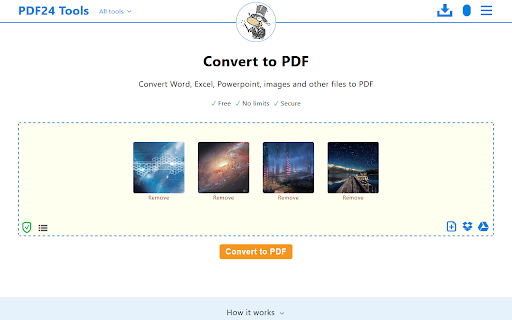

Free and easy-to-use PDF tools that make you more productive. This app brings the PDF24 tools to your Chrome browser and makes you more productive. Around 30 easy-to-use PDF tools are available for free. - Merge and split - Compress, edit, convert, sign, redact, annotate - Protect and unlock with password - Rotate, delete, extract, move pages - Convert images, Word, Excel and other formats to a PDF and vice versa - Text recognition via OCR - Insert watermarks and page numbers - Overlay and compare documents This extension adds PDF24 widgets to specific search engine results pages. For example, if you search for “merge PDF” in Google, PDF24’s merge widget will be loaded and embedded in the search results. User can use this widget to merge files without leaving the search results page. ★ New page context menu item to convert a website The extension adds a page context menu item to convert the current page to a PDF file. ★ Extension of Chrome's internal PDF viewer with useful functions The extension adds a PDF24 icon to Chrome's internal PDF viewer. The user can then use the functions of this icon to do something with the displayed file, e.g. compress, sign, edit, convert, etc.

iLovePDF 2 - Chrome Extension
iLovePDF2 is the only 100% free PDF toolkit to Edit, Merge, Split, Compress, and Convert your files. iLovePDF2 Chrome extension offers a fortunate "Open With" button for any PDF document you encounter browsing Chrome. This feature lets you open PDF files directly in the I Love PDF 2ool, enabling you to perform various actions such as PDF conversion, compression, merging, splitting, or converting it into any desired file format for free. ✓ Compress PDF: Reduce PDF file sizes to desired quality and size. ✓ Merge PDF: Combine multiple scanned PDFs into one or insert images in PDF. ✓ Split PDF: Extract all pages as individual files or a range of PDF pages into multiple high-quality PDFs. ✓ PDF Converter: Convert various document formats to or from PDF, including Word, Excel, PNG, PSD, and more. ✓ Screenshots: Capture and save screenshots of the active tab for further processing and sharing. ✓ OCR Scanner: Convert scanned PDF documents into text-selectable PDF files. ✓ HTML to PDF: Capture webpages as PDFs for offline reading. ✓ Rotate PDF: Adjust and reposition specific pages within your PDF. ✓ Add Page Numbers: Customize PDFs with page numbers, choosing position, typography, and size. ✓ PDF Editor: Modify text, insert images, shapes, annotations, and more directly within your PDFs. ✓ Share PDF: Connect to Google Drive and Dropbox for easy access, selection, and sharing of PDFs from the Cloud. Experience the convenience of the I Love PDF 2 Chrome extension today and easily streamline your PDF tasks. Say goodbye to the complexities of PDF handling and hello to efficient, professional results. Your PDFs will thank you! Explore the I Love PDF 2 Chrome extension today. Say goodbye to PDF complexities and welcome professional-grade efficiency. Your PDF tasks have become significantly more straightforward, accurate, and free of charge.

Qwer PDF
Qwer PDF extension is Online Convert PDF To Word & Excel, PPT & PDF Editor - 100% Free. Power Up Your Productivity. Qwer PDF extension is Online Convert PDF To Word & Excel, PPT & PDF Editor - 100% Free. Power Up Your Productivity. QwerPDF extension is a 100% free all-in-one PDF tool We’ll power up your productivity with our useful PDF converter toolkit and online office suite. Free PDF Converter: Convert PDF to Word - Online Convert PDF to Word for Docx online editing your word it’s free Convert PDF to Excel: Convert PDF to XLS online, view and edit the document after converted. Convert PDF to PPT: Convert PDF to PowerPoint PPT online, directly edit it after converted Convert JPG to PDF: Convert images online and adjust the size. Convert HTML to PDF: Convert webpages in HTML to PDF and vice versa. Free Online PDF Editor: Merge, Split and Edit PDF Pages Free Online Office Suit: Docx & Word online Editor, You can still use PDF To word for online Editor tools editing your Docx Files Xlsx & Excel online Editor. Excel files online View, You can still use PDF To excel for online excel editor tools Create PPT online. View Word and Excel files online. - Protect your personal information: Protect, unlock and add watermarks on PDF files. By installing this extension you agree to the data protection regulations (https://qwerpdf.com/privacy-policy.html).

PDF to OCR
Convert PDF to OCR for free. Free PDF File Converter - Two Supported Formats. Convert PDF to OCR for Free. • This software supports PDF conversion to OCR • Convert PDF to OCR • Unlimited number of conversions for free How to use this extension: - Click on the software icon - Choose PDF file you would like to convert to OCR. - Convert your PDF Files to text today instantly Disclaimer: Please note this extension is NOT made by Google and is made by an independent development team. All copyrights belong to their respective owners. Google doesn’t endorse or sponsor this Chrome extension. PDF to OCR is not owned by Google, it is not licensed by and is not a subsidiary of Google Inc.

Online PDF Editor (pdf2go.com)
Edit and convert PDF files. Compress and convert your PDF files and pages. The official extension from pdf2go.com. An extension to work easily with PDF files. Integrates in Gmail. Speed up your productivity by adding pdf2go.com to Chrome! ★ The tool adds an icon in your extension toolbar and lets you compress and convert PDF files there without the need to visit our webpage. ★ The PDF converter extension contains the following tools: - Compress PDF - Convert PDF to Word - Convert PDF to Excel - Convert PDF to JPG - Edit PDF - Merge PDF ★ The integration with Gmail is called when you compose a message and click on the small colored icon within the compose window. By installing the extension, you agree to the pdf2go.com Privacy and Terms (www.pdf2go.com/terms)
