
eoeddkppcaagdeafjfiopeldffkhjodl
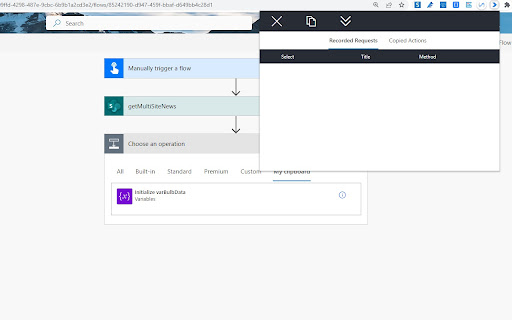

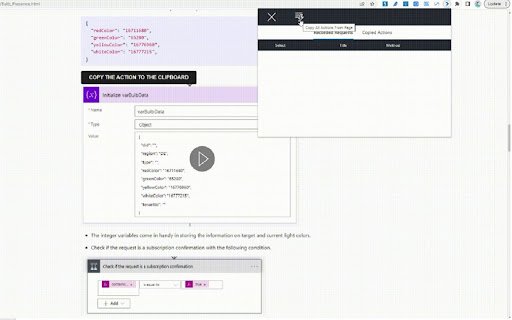

Record, copy, and manage Power Automate actions from SharePoint. Capture HTTP requests and duplicate actions between tenants. The Power Automate Actions tool serves as a versatile solution for managing Power Automate actions. It offers the following functionalities: - Capturing requests invoked directly from the SharePoint/ MS Graph Explorer interface. - Recording requests executed from the browser console. - Gathering requests executed with SP Editor. 2. Duplicating Actions Between Tenants and Environments: - Easily copy all actions from the "My Clipboard" section and paste them into the desired environment. 3. Copying Actions from Community Blogs: - Copy all actions stored on a page. - Copy individual actions using the provided copy button. - Check out our article on bulb presence, "https://michalkornet.com/2023/04/25/Bulb_Presence.html," for a reference. 5. Extended Paste Feature for the New Power Automate Editor: - In version 1.0.7, a feature allowing users to paste recorded actions into the new Power Automate editor has been introduced. The project is open-source, and we encourage you to provide feedback in the issues section of the repository: "https://github.com/mkm17/powerautomate-actions-extension." Change Log: 1.0.17 - Improved favorites import to merge with existing favorites, skip duplicates, and refresh favorites via runtime live updates. 1.0.14 - Export and import favorites functionality. 1.0.13 - Added a Settings tab with options to configure the maximum recording time and toggle the visibility of the action search bar. - Added a setting to manually override page type detection. 1.0.12 - Added search functionality across all tabs to filter actions by title. - Extended title column width for better readability of action titles. - Added option to peek into action details via info button. 1.0.10 - Added recording capability on the SharePoint Admin page. - Enabled the ability to copy actions within iframes (including the make.powerapps page and directly from Canvas Apps). **Fixes** - Rendering record buttons on SharePoint modern pages – additional iframe fix. - Fix action icons rendering 1.0.7 - Fixed pasting recorded actions into the new Power Automate editor. - Added a notification banner. 1.0.6 - Added support for HTTP Microsoft Graph actions. - Enabled recording of actions on Microsoft Graph Explorer and classic SharePoint pages. - Enhanced persistence of recorded actions. - Fixed scrolling for actions. 1.0.5 - Fixed an issue with storing new editor Power Automate actions. (DEPRICATED) 1.0.4 - Added support for copying actions from the new Power Automate editor. 1.0.3 - Improved handling of SharePoint requests using the _vti_bin endpoint.

PrettifyMyWebApi for Microsoft Dataverse
Open any row in the Dataverse Web Api and supercharge the output. Press to impress your coworkers! All of your rows can be quickly viewed and edited! Even when fields are not available on any form. Quickly view and edit Power Automate Flow definitions. How to use: - Click the extension button when viewing a form to open the current row in the Dataverse Web Api and prettify the output! - When viewing a 'solution-aware' flow in make.powerautomate.com, use the extension to open it in the Dataverse Web Api. Click the Edit Flow button in the top right to edit your flow definition! This is very convenient for renaming actions/variables or as a last measure for working around bugs, when the default flow UI just doesn't want to cooperate (Power Automate developers will relate to this). - When already viewing a row or query in the Dataverse Web Api, just use the extension to prettify! You no longer need to open your solutions to view the values for your Option Sets/Choices. Simply open the row and prettify the output. Browse to related rows for quick insights using the 'Preview' button on lookup columns. Update columns of a row by using the 'Edit this row' feature. Update text columns, Option Sets, numbers, lookups, etc. Very convenient for modifying data that is not available on a form. You also have the option to impersonate other users, skip custom plugins and skip Power Automate Flows when updating a row. Create new rows by using the 'Create new row' button. Browse related rows by using the 'View relationships' button. When viewing related rows, use the 'Disassociate this row' button to disassociate the row from the parent/related row. Quickly copy the contents of a column to your clipboard by hovering and clicking the copy button. You can prettify single rows, but also the results of your OData and FetchXml queries.

Power DevBox Shortcut
Shortcuts to your Power Platform Environments Creates a list of all your environments and buttons to open the environment or add to clipboard (right mouse button): Tag environments for quick filtering Download list of all environments and key data Add tenant id to clipboard

Power Automate Tools
This extension enables editing a Power Automate flow definition as JSON. The Chrome extension that enables editing a Power Automate flow definition as JSON. Motivation The reason behind creating this extension is constantly struggling with repetitive tasks in the flow authoring workflow like replacing a SharePoint site's URL or changing the variable name. Features - Edit a Power Automate flow as JSON in your browser. - Workflow definition JSON schema validation. - Rich text manipulation features thanks to Monaco Editor (VS Code). - Validating actions using "Flow Checker". - More features may come in future :) 1. Get the extension. 2. Open the flow edit page in the Power Automate/Power Apps portal. 3. Click the extension icon. 4. Edit your flow! - Migrated to the new Power Platform API (*.api.powerplatform.com) - Fixed flow detection for solution flows and multiple environments - Per-tab state tracking for auth tokens and API URLs v1.2 - Fixed the issue with saving a flow - Support for launching from the new Power Automate designer - Improved launching from Power Apps Portal - Now editor allows to edit the flow definition and connection references v1.1 Added support for opening a flow from the new Power Automate portal and Power Apps portal. Known limitations - The authentication token is not refreshed automatically at this moment. Sometimes might be necessary to refresh the flow's page that was used to open the extension.

Power-Toolkit for Power Apps
A client-side toolkit for Power Apps and Dynamics365 developers to inspect, debug, and manipulate data. The Ultimate DevTools for Power Apps & Dynamics. Inspect, debug, and test your apps in real-time.
