
pcgbnpkpijlcjeleijaaahlonafdlfno

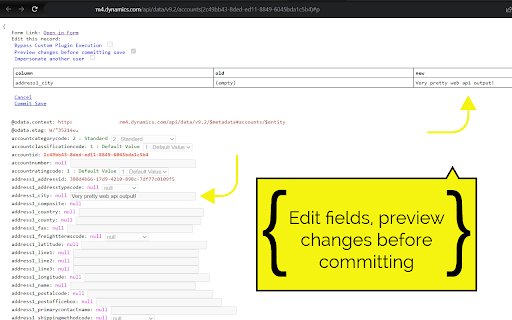
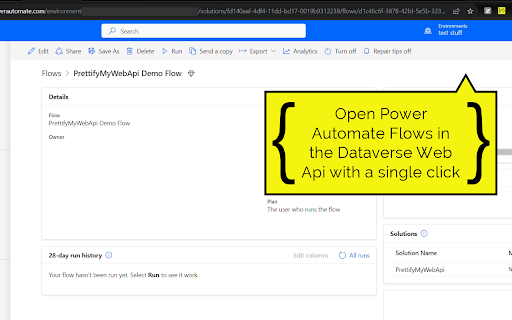
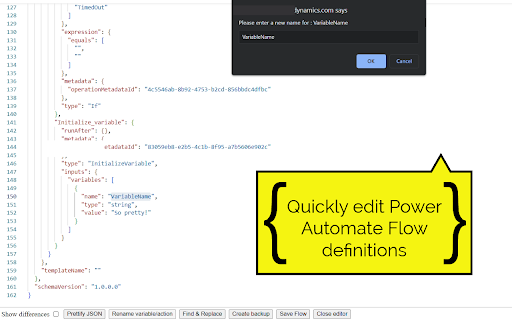
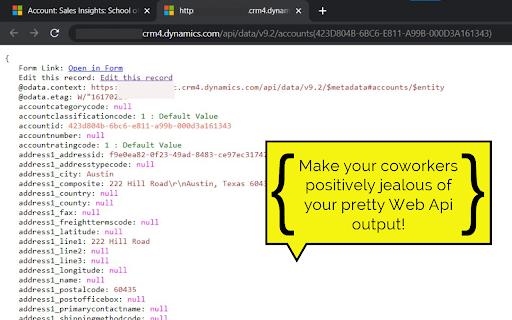
Open any row in the Dataverse Web Api and supercharge the output. Press to impress your coworkers! All of your rows can be quickly viewed and edited! Even when fields are not available on any form. Quickly view and edit Power Automate Flow definitions. How to use: - Click the extension button when viewing a form to open the current row in the Dataverse Web Api and prettify the output! - When viewing a 'solution-aware' flow in make.powerautomate.com, use the extension to open it in the Dataverse Web Api. Click the Edit Flow button in the top right to edit your flow definition! This is very convenient for renaming actions/variables or as a last measure for working around bugs, when the default flow UI just doesn't want to cooperate (Power Automate developers will relate to this). - When already viewing a row or query in the Dataverse Web Api, just use the extension to prettify! You no longer need to open your solutions to view the values for your Option Sets/Choices. Simply open the row and prettify the output. Browse to related rows for quick insights using the 'Preview' button on lookup columns. Update columns of a row by using the 'Edit this row' feature. Update text columns, Option Sets, numbers, lookups, etc. Very convenient for modifying data that is not available on a form. You also have the option to impersonate other users, skip custom plugins and skip Power Automate Flows when updating a row. Create new rows by using the 'Create new row' button. Browse related rows by using the 'View relationships' button. When viewing related rows, use the 'Disassociate this row' button to disassociate the row from the parent/related row. Quickly copy the contents of a column to your clipboard by hovering and clicking the copy button. You can prettify single rows, but also the results of your OData and FetchXml queries.

Crm 365 Helper
Tool set for Microsoft Dynamics CRM 365 Shows record basic info on each page and provide shortcats for most common tools CRM devolpers need: 1. God Mode. Show hidden fields and remove fields requirements 2. Show schema name an allow coping 3. Copy record id 4. Open record in web api

D365 Helper - Developer Toolkit
Essential developer toolkit for Microsoft Dynamics 365. Manage fields, view schemas, inspect Web API data & streamline testing. This is an unofficial tool created by reddishgreen and is not endorsed, sponsored, or affiliated with Microsoft Corporation. reddishgreen for Dynamics 365 is a lightweight developer toolkit that helps developers, administrators, and QA engineers inspect and manipulate model-driven form data directly in the browser. It runs entirely in your browser and performs actions only when you initiate them.

Dataverse REST Builder
Create and Execute requests against the Dataverse Web API endpoint. Dataverse REST Builder allows to create and execute requests against the Dataverse Web API endpoint. After obtaining the token from the authentication process (a Dataverse instance is required and a URL must be provided) the tool is loaded and a new collection of requests can be created. Each request matches a capability of Dataverse, in addition to the standard CRUD it supports specific Dataverse requests like Associate/Disassociate, Execute Workflow and Manage Image and File Data. For each request the tool generates the code for different syntaxes, like Xrm.WebApi (if the code is for a model-driven app), Fetch API, jQuery and Power Apps Portals, some requests generate the code for Power Automate and Power BI. Another capability of the tool is to export the collection in different formats: Postman, Thunder Client (VS Code) and REST Client (VS Code).

c! Dynamics 365 Helper
Small and usefull js-functions to manipulate Dynamics 365 [Dyn365] (online). Small and usefull js-functions to manipulate Dynamics 365. You can get information about your user, the environment, the activity-storage-capacity and more. Even the oldschool advanced find is there ;). Also you will get the possibility to manipulate some data, but be aware: Use at your own risk. We do not collect any of your data. Contents of the extension: Area: 'CRM: View': Enabled in Views in Dynamics 365 - '->REST': Open the view-results in REST-Endpoint. Area: 'CRM: Record': Enabled for Records in Dynamics 365 - 'Godmode': Show all fields | No field is required | No field is disabled. - 'SchemaNames': Show all Schemanames of the visible fields on the form. - '->REST': Open in the record REST-Endpoint. - 'Properties': Show the basic properties of a record: CreatedBy and CreatedOn. - 'DirtyFields': Highlight changed fields on the form. - 'Reopen': Reopen a closed activity. - 'All Fields': Show all fields of this record and some metadata of them. - 'Test-Data': Populate all required fields with random data - Good for testing and debugging scenarios. Area: 'Info': Open some usefull links or data. Always enabled. - 'Send Link': Open an email with 2 links directing to the current opened record: One for this app and one teammember-friendly link without an appid. - 'Show my User': Open my User-record in Dynamics 365. - 'adv.Find': Open oldschool Advanced Find. - 'User-Data': Show security-relevant information for your systemuser. - 'open JsAPI': Open external link: Official JS API-Documentation - 'EntityTypeCodes': Show a table of all EntityTypeCodes and -Names (etc, etn) of this organisation - 'Component-Types': Show a table of all Componenttypes. Useful for getting rid of Dependency-errors. Area: 'Admin': Tools to Administrate Dynamics 365. Always enabled. - 'Edit': Pretty oldschool. Open the formeditor of this record in Make.Powerapps. Default Solution. - 'Table' - 'Open': Open the table in Make.Powerapps.com - 'Edit': Edit the table data in Make.Powerapps.com - 'EntityTypeCodes': Show all tables and their ETC. - '#Activities': Count all activities and show them as a table, grouped by year and activitytype. - 'RecordCount': Counts all records from one table. - 'RolesByTable': Get SecurityRoles by table. Filter by user/team. - 'ID': Opens a record with the id only. - 'Copy Roles': Copy BU, Teams, SecurityRoles of one user to another.
