
enicagmjbefldbkcdehidiignkcadhmc
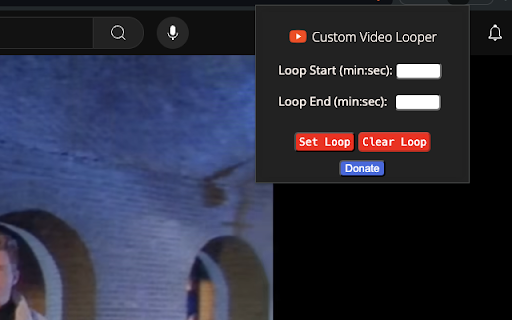
Thanks a lot for trying out this extension! Why this extension? 1. PROBLEM: Currently, on Youtube, to loop a video, we either have an option to either loop if from start to end, or for the timestamps that the content creator has provided, but we cannot loop from any start to end time, and because of this, we end searching things like "some xyz song but only the good part" and many times this "good part" is also not exactly the part we like. 2. SOLUTION: This is the problem that this extension solves. With this, you can choose any start and end time (THE BEST PART OF ANY VIDEO/SONG) and loop it, so no need to search through n-number of videos to listen to what you like! How do you use it? It's actually very intuitive! After installation, when you click on the logo of the extension, it shows Loop start time and Loop end time. You just have to enter the start and end time, and click on set loop, and that's it! Now, your "best part" will loop, until you either clear the loop by clicking on "Clear Loop" button on the extension, or you can simply reload the tab and the loop will reset. You can look at the image provided to check out the UI, it's pretty simple! Example: 1) start Time = 0:52; end Time = 1:30 (Loop from 0 min 52 sec to 1 min 30 sec) 2) start Time = 1:20:26; end Time = 2:40:09 (Loop from 1hr 20m 26 sec to 2hr 40m 9sec) Permissions that this extension use: 1. This extension uses just 2 permissions, namely storage and to access the activeTab. 2. Why do we need these 2 permissions? a) Storage: Using this permission, we store the value of start and end time so that even when you click somewhere else and then later comeback to the extension to check the current values of start & end time, it shows up there! b) Active tab: Using this, we are able to set the loop for the youtube tab, so without this permission, we won't have access to the youtube screen and hence won't be able to set the loop. Have any feedback or have some new ideas to add to this? Please leave a comment! Also, if you find this extension useful, any kind of donation/good rating & reviews would be very helpful in continuing my journey as a developer. Thanks a lot, and enjoy!!

YT Watch Later Assist
Bulk Add and Delete YouTube Watch Later and Liked videos automatically Add a playlist to your Watch Later in one click. Remove all your Water Later videos in one click. Remove all your Liked videos in one click How it works: ➡ Add Playlist to Watch Later ♦ When you will open a playlist listing page you will see a button "Add this playlist to watch later" above the video lists. Just click on that. ♦ If you are watching the playlist, you will see "Add this playlist to watch later button" above the playlist box. Just click on that. ♦ When you are in playlist page or watch, click on YT Watch Later Assist icon and click on "Add this playlist to watch" button ➡ Remove all Watch Later videos ♦ When you will open Watch Later page you will see a button "Remove all videos" above the video lists. Just click on that. ♦ OR click on YT Watch Later Assist icon and click on Remove all Watch Later videos button. ➡ Remove all Liked videos ♦ When you will open Liked videos page you will see a button "Remove all videos" above the video lists. Just click on that. ♦ OR click on YT Watch Later Assist icon and click on Remove all Liked videos button. For any issue, report to us via email. Thank you!

YouTube Looper
Custom loops extension for Youtube videos This is a great tool to help you do music training, or any kind of thing you can leverage repetition on video sections! Features - create multiple loops so you can train sections with ease - your loops are locally stored, when you get back to your videos your loops will still be there - set a custom playback rate (you can use very precise rates as 0.7 0.85 so you can train on your speed) - automatically generate loops for videos that have markers - quickly navigate to recent videos you looped at using the popup window - Manage, export / import and sync loops between different devices using the dashboard page Pro tips: - Hold shift key to adjust time in steps of 100ms instead of 1 second. - Hold shift and click on play to start loop 3 seconds before the loop time. - Click on the Speed label to reset speed to 100% - Click on the time numbers to edit via text (for very precise editing) - If you end a loop before the start, it will flip start/end automatically (actually, that happens if try to make the start to go after the finish in any editing way possible). You can find the source code and documentation for this project at https://github.com/wilkerlucio/media-looper.

YouTube Parts Looper & Bookmarker
Sample Use Case ‾‾‾‾‾‾‾‾‾‾‾‾‾‾‾‾‾‾‾‾‾‾‾ Suppose a YouTube video is an album of 5 songs and you only want to listen to the 1st and the 3rd songs in it. Using this extension, you can specify the intervals (segments) of those songs, and only those portions will be played. Specifying Multiple Intervals ‾‾‾‾‾‾‾‾‾‾‾‾‾‾‾‾‾‾‾‾‾‾‾‾‾‾‾‾‾‾‾‾‾‾‾‾‾‾ An input box appears just below the video. There, you should specify the intervals as a comma separated list. Example: "00:00-00:30, 5:00-5:30" (without quotes) specifies two intervals, namely, the first 30 seconds and then the 30 seconds after the 5-minute mark. On clicking 'Apply', these intervals are played one after another. To make it easier to specify the intervals, two buttons 'Start' and 'End' are provided. This is how you should use them: Click 'Start' at time xx:xx. Then click 'End' at time yy:yy. This will automatically copy the interval "xx:xx - yy:yy" into the input box. Repeat this to add several intervals. **NEW:** Keyboard shortcuts. Ctrl+Shift+ for End, and Ctrl+Shift+' for Apply. Also, Ctrl+Shift+; is provided to set end time equal to video's end time. These are configurable in Settings. (Mac users: Cmd instead of Ctrl) Bookmarking ‾‾‾‾‾‾‾‾‾‾‾‾‾‾‾‾‾‾ You can also 'bookmark' the intervals that you have just applied (by clicking the 'Bookmark!' button). Next time you play the same video, those intervals are automatically loaded from bookmarks and only the corresponding portions are played. You can use this feature to essentially create a whole playlist of video segments (by first creating the playlist on YouTube, and then bookmarking the desired portions for individual videos in it). Clicking the button 'All B.s' opens up a side pane where all the previously bookmarked interval lists are shown. If there are multiple lists for the same video, then the most recently added interval-list will load automatically. Here, you can also manually delete a bookmark. **NEW** You can export all these bookmarks using the 'Export' button. This downloads an html file, which you can import into another browser which has this extension already installed. Make sure to move the imported bookmarks into the "YouTubePartsBookmarks" folder there (which should already be present, since the extension is already installed). Looping ‾‾‾‾‾‾‾‾‾‾‾ Finally, there's an option to play the sequence of portions on a loop. Configurable Options ‾‾‾‾‾‾‾‾‾‾‾‾‾‾‾‾‾‾‾‾‾‾‾‾‾‾‾‾ Click this extension's icon and click options. (Alternatively, go to 'Manage Extensions', click this extension's 'Details' and click 'Extension options'.) There you can configure the following: 1. Keyboard shortcuts for the Start and End buttons 2. Set looping as the default behavior 3. (Experimental feature) Allow up to 1 decimal place for seconds in the input. This will let you specify more granular intervals, like "0:0 - 0:0.9" After saving the settings, refresh existing YouTube tabs if any, for the changes to reflect. Miscellaneous ‾‾‾‾‾‾‾‾‾‾‾‾‾‾‾‾‾‾‾ - Timestamps can be in the hh:mm:ss format (e.g. "00:00:00-1:00:00" means the first 1 hour), or the mm:ss format, or just in seconds ("0-3600" also means the first 1 hour). - Intervals are ordered by their starting time. Overlapping intervals are merged. - This extension stores all the saved interval lists in a dedicated bookmarks directory called 'YoutubePartsBookmarks'. Ensure not to delete or modify it. Thanks to users for providing valuable feedback.

YouTube Sleep Timer
A video play/pause timer for Youtube! Also serves as a sleep timer :) Tired of waking up to the podcast or music you were playing last night on Youtube? Long periods of listening time can not only affect your sleep quality, but will also damage your ears. This extension is here to help! Simply click and set a time for your Youtube or Youtube Music video to end, and relax! --------------------------------Notes ------------------------------------ * Runs only when you are on Youtube and Youtube Music sites. * Runs on manifest v3, please update your Chrome browser to the latest version for a smoother experience. * If the video is paused, then the timer will set it on play; if the video is playing, then the timer will pause it once time is up. * There is an arbitrary amount of delay for the timer due to Google's Alarms API restriction. This is something unavoidable when developing in Chrome's mv3 ecosystem, we would appreciate your understanding in this matter and not use the sleep timer as an accurate timer. If you would like to avoid the delay, please load the extension unpacked by following instructions here: https://github.com/snoringriceball/youtube-sleep-timer * See here for a list and explanation of the permissions we collect: https://github.com/snoringriceball/youtube-sleep-timer#readme
