
enfolipbjmnmleonhhebhalojdpcpdoo
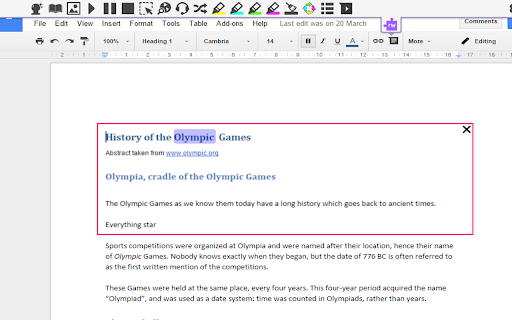
Screenshot reading support for Read&Write for Google Chrome™ This extension provides OCR for users of Read & Write for Google Chrome. You should not install this extension unless you want to enable the new screenshot reading functionality released in December 2016

Screen Recorder for Google Chrome™
Screen Recorder is a software that allows you to capture and record your computer screen right in the browser! Use this free screen recorder software to make video recordings / screen recordings directly from the Chrome browser and share these video recordings with your friends/colleagues. To begin using the software Screen Recorder for Google Chrome™, simply click on "Start Capture" to begin recording your computer screen. Once you have finished recording your video, click on "Stop capture" to stop the video. You can save the video you made onto your computer/Google Drive. Its simple and easy to use Screen recorder to make video tutorials/software help videos etc and much more. Disclaimer: Please note this extension is NOT made by Google and is made by an independent development team. All copyrights belong to their respective owners. Google doesn’t endorse or sponsor this Chrome extension. Screen Recorder for Google Chrome™ is not owned by, is not licensed by and is not a subsidiary of Google Inc.

Make Chrome Text Black
Make Chrome Text Black is a Google Chrome extension that lets you customise how text appears in your browser. Make text darker so you can read websites and email the way you want to. ** THIS EXTENSION HAS A 14 DAY FREE TRIAL AND REQUIRES A SUBSCRIPTION PURCHASE ** This extension works with Google Chrome, Microsoft Edge, Opera, and Brave. Are you sick of sites that put grey text against white backgrounds? You're not going blind, you're just suffering from a terrible design trend. You don't need to highlight text just to read it anymore. Change text to black with this extension. Some websites look like they've been written for ants. You can zoom in on the page, but then it zooms in on all the pictures, buttons, icons and turns the page into a cluttered mess. Leave your magnifying glass behind, you can now change text size. Ever had to squint with your eyes two inches from the screen because of pencil thin text? All it does is give you is eye strain and headaches. You don't need to worry about this with Make Chrome Text Black. Make text bold and thicker. How about strange fonts that look closer to ancient symbols rather than letters? They might look cool in a web designer’s portfolio, but not when you’re trying to read them. You can now change the font to something sensible.

Mote for Google Chrome™
Your AI-powered learning companion - Mote helps everyone to read, write & be heard across Google Workspace and the web. AI-powered tools for reading, writing, and communication—anywhere students learn online. Trusted by millions of educators and students worldwide, Mote empowers students to read, write, and communicate with confidence across any webpage, with seamless Google Workspace integration. What's new? The Mote Sidebar now features three powerful modes that adapt to every learner's needs AND has a Focus Mode to remove visual clutter from web articles, helping readers to stay focused. READING MODE Read Aloud with natural human voices Picture Dictionary & Vocabulary Builder – Click any word for instant definition, illustration, audio pronunciation, and one-click "Add to My Words" for personalized vocabulary growth. Smart Highlighting & Auto-Organization – Five color-coded highlighters (with accessible labels) automatically funnel key terms into your personal vocabulary bank and highlight collections, or export directly to Google Docs. Focus Mode – Adjustable screen mask that reduces visual clutter for better reading focus and comprehension. Instant Translation & Read-Aloud – Highlight to translate and hear natural AI voices in 50+ languages - even when text appears in images. WRITING MODE AI Voice Typing – Fast, punctuation-smart dictation that works in any text box, with context-aware predictive text that grows smarter as you write. Auto-pastes into most websites. Intelligent Text Prediction – Purpose-built for K-12 learners, Mote's AI text prediction supports phonetic spelling and adapts to writing context. CREATING MODE Voice Recording & Transcription – Record your voice, auto-transcribe with AI, and share via link or let Mote read it back in expressive voices or translate to another language. AUDIO UPLOAD Upload pre-recorded audio files and embed them directly into assignments, presentations, and educational content. Core features students and teachers love 🎤 AI Voice Tools – Natural-sounding text-to-speech in 60+ languages, voice typing, and voice recording for human-centered feedback in Google Docs, Slides, Canvas SpeedGrader, or anywhere. 🌍 Multilingual Support – Instant translation and read-aloud in 50+ languages builds confidence and independence for all learners. 🧠 Personalized Learning – Picture dictionary, vocabulary mastery tools, and adaptive text prediction that help students read, write, and comprehend at their own pace. 🔒 Admin & Teacher Controls – Toggle features, view usage analytics, and manage rosters via Classlink, Google Classroom, or CSV upload. ♿ Universal Design – Built-in support for diverse learners including dyslexic, ADHD, multilingual, and students who benefit from assistive technology - no special setup required. How to get started 1. Install the extension 2. Sign up with Google or email 3. Refresh your tab and click the Mote icon 4. Press Play on any text — or try a 5-second voice note in a Google Docs comment Perfect for: - Google Workspace for Education users - Multilingual classrooms and ELL support - Personalized and self-paced learning - Universal Design for Learning (UDL) implementation - Students who benefit from assistive technology

Screen Recorder & Screenshot App for Chrome | Scrnli
Screen recorder for Chrome, take screenshots, record screen and video, capture, edit and share instantly Scrnli is a powerful screen recorder and screenshot tool for Chrome that lets you capture your screen, record video, take screenshots, and share content instantly. Use Scrnli to record your screen, capture full pages, edit screenshots, and create video recordings for work, study, or communication. Why Choose Scrnli screen recorder and screenshot app Screenshot Tool for Chrome - Capture full page, selected area, or visible screen Screen Recorder for Chrome - Record screen, browser tab, or desktop video Edit Screenshots - Annotate, draw, add text, arrows, and highlights Instant Capture - Take screenshots and record screen with one click Easy Sharing - Share screenshots and videos instantly via link Save and Download - Save screenshots and screen recordings locally Lightweight Extension - Works smoothly without slowing down Chrome Secure and Private - Your data stays safe and under your control What You Can Do with Scrnli Take Screenshots - Capture full page screenshots or selected areas Record Screen Video - Record tutorials, meetings, and presentations Create Tutorials - Record screen and explain processes visually Improve Communication - Share screenshots and videos instead of text Save Important Content - Capture and store useful information How to Use Screen Recorder & Screenshot Tool 1. Install Scrnli from the Chrome Web Store 2. Click the extension icon 3. Choose screenshot or screen recording mode 4. Capture your screen or record video 5. Edit, save, or share instantly Capture and record your screen in seconds with this easy-to-use screen recorder for Chrome. Full Page Screenshot - Capture entire web pages Visible Screen Capture - Capture what you see Area Screenshot - Select and capture specific areas Instant Editing - Add text, arrows, and highlights Screen Recorder Features Record Screen - Capture desktop, browser tab, or window Video Recording - Record video with smooth performance Quick Sharing - Share recordings instantly Save Video - Download recordings for offline use Why Users Install Scrnli Screen Recorder • Easy screenshot and screen recording tool • Fast capture and editing features • Share screenshots and videos instantly • Lightweight and simple to use • Perfect for work, study, and daily tasks Privacy and Security Scrnli Screen Recorder does not collect or store personal data. Your screenshots and recordings remain private.
