
endnhjcpnhomfjbloggpapdndhafoeeo
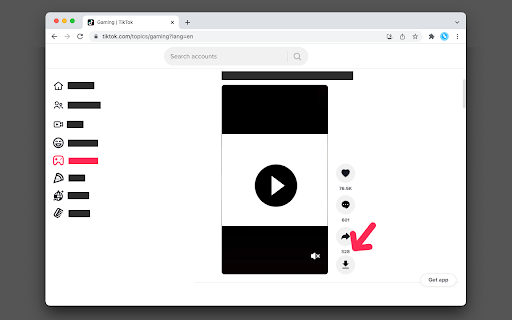

Download tiktok.com's videos with a single click or by right-clicking on the video elements This extension allows you to download video streams from supported hostnames to the local disk. There are two methods you can use to download a video: 1. Right-click on the video element and click "Save Video" (this item appears on the context menu when you have this extension installed) 2. Use the "Download" button next to the video element How does it work: Method 1: the extension tries to remove the overlay item that hides the video element so that the native right-click over video element could appear Method 2: the extension tries to find the video element and insert a download button next to it. This method displays the downloading progress. Also, the extension tries to find the correct filename for the media. For bug reports please use https://github.com/chandler-stimson/video-downloader

VidSaver.io - download all TikToks you've loved
A tiktok downloader to save TikTok videos to your computer. Download from TikTok, support single and batch download. This chrome-extension works when you visit www.tiktok.com on desktop. You can pick a local folder and download: - Download TikTok videos online. - Easy to download "Liked" videos. - Easy to download "Favorite" videos. - Easy to download any videos. - Easy to use and efficient. How to use: - Go to tiktok.com - Move the mouse over the video or click on the video details, a download button will appear in the center or upper right corner of the video, click to download

TikTok Video Download/Bulk Tool
Web TikTok,Download TikTok Single video; Bulk Accquire videos(tag explore search page); Bluk Download/Export Of User Channel - Single Video Download: click download icon on bottom right corner of then video Element when browse Video - Download videos from the list page, such as the search page, Explore page, and user profile page. - Bulk Video Dowload: click Download Button on User main page ,then choose what want to download with Duration\Time\keywords... - Bulk Video Infos Export: click Download Button on User main page ,then choose what want to download with Duration\Time\keywords...,then click Export Button - Download as Zip or Save directly to the Folder 🎨 Features of the extension: 🆕 Update -1.1.2 ✓ Add multilingual support ✓ optimize the batch download functionality -1.1.1 ✓ Optimize dark mode UI not display -1.0.9-1.1.0 ✓ Optimize Save to folder -1.0.8 ✓ Save to folder ✓ Optimize filename setting -1.0.7 ✓ Optimize batch downloading -1.0.6 ✓ Download Video Of User page With Posts/Reposts/Liked ✓ Bulk Download Video of Search Result Page -1.0.5 ✓ Download Video High Quality ✓ video items show download button to download -1.0.3 -1.0.4 ✓ optimize download button show - 1.0.0-1.0.2 ✓ initial Release: Full feature release ✓ PRO Version With Purchase - Basic Version: Supports single video download with a limited batch processing. - Pro Version: Unlimited full functionality. Videos are for personal offline use. If you wish to share them in the community or use them for commercial purposes, you must obtain the consent of the video's creator. User behavior data is processed on your local computer and it will never pass through our network servers. Server requests only determine whether the user has purchased the Pro package. If you have any questions, please feel free to contact pandahi.cc@gmail.com at any time.

TikTok Ads Video Downloader & Data Export
View all TikTok video ads data, download videos in high res, and export all ad data. We make it easy to create your next TikTok ad! ❤️ Save TikTok ads video & export to Ad library from TikTok Creative Ad Library. TokView makes it easy to save your next video❤️. Let Tok View Save & Export Data be your most powerful AI assistant for TikTok Ads Library video. Here is the solution that helps to save ad videos from TT Creative Center, export ads data and build a collection of inspiring videos for your next ad campaign. It can help Agencies, Creators, and influencers to achieve effective download video, analysis video without stress and frustration. ✅ Features: - Easy to use: TokView - Save ads from Ad Library with 1 click. - No login required: Simply go to the Creative Center and download video, cover image, and all the stats. - Friendly interface: Quickly show TT ads video data over the cover image instantly. - Supporting CSV data export: Free your hands from writing down data manually, and export all ad video data. Including: Title of Ad, Comments, Shares, Likes, and Video URL. ✅ You can: 1. Download TikTok ads video from Creative Center in one click 2. Quickly get ads video info(video duration, like, share, comment) over the cover 3. Export TT Video Ads data you selected from any ad. ✅How to use: - Pin TokView - TT Ads Library Downloader - Save & Export Data to the toolbar - Click on the extension icon in chrome toolbar and go to Creative Center - Hover over the video cover and instantly see all video stats. - Select the ads video data you want to export instantly. - Click on the extension icon to download CSV exported data on selected ads data Quickly view any data by simply hovering over the thumbnail, download high resolution videos of ANY ad, and bulk download and export any TT video data with 1 click. It's that easy. Planning and researching your next Ad Campaign and UGC Influencer outreach / content isn't easy. That's why the best Content Creators, Social Media Managers, Agencies, Influencers, and Media Publishers. use TOKview to help their TT Ad Campaigns and Influencer UGC content creation. Why spend hours sorting through, writing down data manually, and screen recording your favorite video ads when you can just use TOKview? Our 1 click button helps you make sense of all the confusing data TT gives you and helps give you answers that work! Tok View for Chrome is a powerful tool that lets every TikTok creator better understand their TT video ad campaigns, without all the stress and frustration. Unlock the full potential of your data with our advanced Tool. Track and understand what’s working on your profile so you can grow it faster! Favorite Use Cases: ► Download your favorite videos for your editors. ► Video Analysis ► Campaign Reporting ► Historical Data & Analytics ► Content Optimization ► Client Reporting Support: Have any questions or feedback? Please get in touch with our support team at support@toktools.com IMPORTANT: If you are working on your next TikTok Ad Campaign, TokView - TT Ads Library Downloader - Save & Export Data definitely a type of extension you were looking for. Looking to save time and boost efficiency in your website copywriting and ranking efforts? Look no further than TokView - TikTok Ads Library Downloader - Save & Export Data. With this software, you can free your hands from repetitive tasks and focus on creating high-quality content that will drive traffic to your site. It's the go-to tool for Content Creators, Social Media Managers, Agencies, Influencers, and Media Publishers who want to take their website to the next level. Try it today and see the results for yourself! This is the best TikTok ads video downloader tool, it is lightweight, simple and easy to use. Add it now to help you double the efficiency. NOTE: TikTok is a trademark of Bytedance, registered in the U.S. and other countries. This is an independent project and has no relationship to TikTok or DouYin Group.

TikPak Downloader
TikPak Downloader, helps you view and download videos from Tiktok in one click! !!! The extension has a block with Promotion of other extensions !!! TikPak Downloader helps you to download videos from the TikTok platform. Now your favorite videos will be always at hand even without Internet access! Functions: - Download TikTok videos in one click; - Quick access to downloaded videos; - Convenient and minimalistic interface; - The extension REALLY allows you to download absolutely any video from Tiktok. - The extension also shows recommended apps from the developer and partners in popup. We will add soon: - Bulk download of videos from profile pages and feed from Tiktok. Changelog: -- v2.1.2 - Fix bugs - Change service for support -- v2.0.3 - Fix for updates tiktok - v2.0.2 - Removed mobile view feature (removed webRequset, webRequestBlocking permissions) - If it is not possible to determine the file name, instead of generating a random name, returned the video id. - Added a button to open the download folder - v2.0.1 - Fix download file of name with emoji - v2.0.0: - Added bulk downloads; - Added mobile view; - Added FAQ page; - New Popup Design. - v1.4.4: * fixes the display of the download button on the detail page - v1.4: * settings button was added in a Popup; * you can select where to save downloaded videos: 1) by default; 2) in a TikPak folder (created in your downloads); 3) in a folder for every user whose videos you download. ATTENTION: EXTENSION DOWNLOADS YOUR VIDEOS ONLY FROM TikTok SERVICE !!!
