
defjbhlehbkebaifofnaalipneaeaick

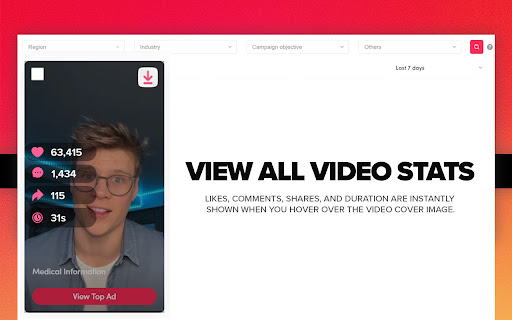

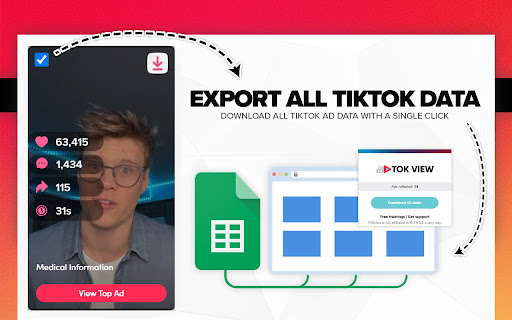
View all TikTok video ads data, download videos in high res, and export all ad data. We make it easy to create your next TikTok ad! ❤️ Save TikTok ads video & export to Ad library from TikTok Creative Ad Library. TokView makes it easy to save your next video❤️. Let Tok View Save & Export Data be your most powerful AI assistant for TikTok Ads Library video. Here is the solution that helps to save ad videos from TT Creative Center, export ads data and build a collection of inspiring videos for your next ad campaign. It can help Agencies, Creators, and influencers to achieve effective download video, analysis video without stress and frustration. ✅ Features: - Easy to use: TokView - Save ads from Ad Library with 1 click. - No login required: Simply go to the Creative Center and download video, cover image, and all the stats. - Friendly interface: Quickly show TT ads video data over the cover image instantly. - Supporting CSV data export: Free your hands from writing down data manually, and export all ad video data. Including: Title of Ad, Comments, Shares, Likes, and Video URL. ✅ You can: 1. Download TikTok ads video from Creative Center in one click 2. Quickly get ads video info(video duration, like, share, comment) over the cover 3. Export TT Video Ads data you selected from any ad. ✅How to use: - Pin TokView - TT Ads Library Downloader - Save & Export Data to the toolbar - Click on the extension icon in chrome toolbar and go to Creative Center - Hover over the video cover and instantly see all video stats. - Select the ads video data you want to export instantly. - Click on the extension icon to download CSV exported data on selected ads data Quickly view any data by simply hovering over the thumbnail, download high resolution videos of ANY ad, and bulk download and export any TT video data with 1 click. It's that easy. Planning and researching your next Ad Campaign and UGC Influencer outreach / content isn't easy. That's why the best Content Creators, Social Media Managers, Agencies, Influencers, and Media Publishers. use TOKview to help their TT Ad Campaigns and Influencer UGC content creation. Why spend hours sorting through, writing down data manually, and screen recording your favorite video ads when you can just use TOKview? Our 1 click button helps you make sense of all the confusing data TT gives you and helps give you answers that work! Tok View for Chrome is a powerful tool that lets every TikTok creator better understand their TT video ad campaigns, without all the stress and frustration. Unlock the full potential of your data with our advanced Tool. Track and understand what’s working on your profile so you can grow it faster! Favorite Use Cases: ► Download your favorite videos for your editors. ► Video Analysis ► Campaign Reporting ► Historical Data & Analytics ► Content Optimization ► Client Reporting Support: Have any questions or feedback? Please get in touch with our support team at support@toktools.com IMPORTANT: If you are working on your next TikTok Ad Campaign, TokView - TT Ads Library Downloader - Save & Export Data definitely a type of extension you were looking for. Looking to save time and boost efficiency in your website copywriting and ranking efforts? Look no further than TokView - TikTok Ads Library Downloader - Save & Export Data. With this software, you can free your hands from repetitive tasks and focus on creating high-quality content that will drive traffic to your site. It's the go-to tool for Content Creators, Social Media Managers, Agencies, Influencers, and Media Publishers who want to take their website to the next level. Try it today and see the results for yourself! This is the best TikTok ads video downloader tool, it is lightweight, simple and easy to use. Add it now to help you double the efficiency. NOTE: TikTok is a trademark of Bytedance, registered in the U.S. and other countries. This is an independent project and has no relationship to TikTok or DouYin Group.

Pie Adblock - A Powerful Free Ad Blocker
Pie Adblock blocks ads & pop-ups, plus YouTube & Twitch video ads. You can customize your ad experience with Pie! Pie is a completely free ad blocker that blocks pre-roll ads on YouTube, mid-roll ads on Twitch, pop-ups, banners, and more. Reclaim your online experience and watch ads disappear in real-time! 🔒 Privacy + Security — Your data is only used to power Pie features—never sold or monetized. We prioritize trust and transparency. Read our full privacy commitment at www.pie.org/privacy 🛑 Advanced Features — Enjoy all advanced adblocker features at no cost to you: robust ad-blocking methods, enhanced popup suppression, plus more. 🎉 Visual Mode — See the power of our ad blocking technology in action as ads are zapped away. 🥧 Growing The Pie Together — Pie isn’t just an ad blocker; it’s an experiment to see what happens when people have more control of their internet experience. Add Pie with just a couple clicks and start blocking ads immediately. Terms apply and may be viewed at www.pie.org/terms ➤ Changelogs: [March 2025] We’ve introduced a new feature that detects when multiple ad blockers or related extensions are installed, as using several at once can negatively impact effective ad blocking. Users now have the option to easily disable conflicting extensions directly within Pie Adblock. This helps ensure optimal ad blocking efficiency, reduces ad block detection, and creates a smoother browsing experience. Read more in pie.org/privacy [February 2025] Released new ways to support your favorite creators on YouTube and Twitch. Our new video overlay shows you when Pie's YouTube & Twitch ad blocker is actively working to block ads and gives you more control over your ad experience. [January 2025] Added support for new Fair Ads sites [October 2024] Twitch stats: ads blocked, time saved, and more! [September 2024] Improvements to Manifest V3 (MV3) ad-blocking and filters [August 2024] First fully featured version. Block distractions like ads, video ads like pre-rolls and mid-rolls, floating videos, pop-ups, cookie banners, and more. Need a replacement for uBlock Origin? Pie is an efficient, fully MV3 compatible ad blocker that will block ads on YouTube, Twitch, and more! Ready to get started? Click “Add to Chrome” at the top of this page and start blocking ads in just a couple of clicks!

TikTok Video Downloader – Bulk Save
Download TikTok videos without watermark. Bulk save multiple videos with one click. Works directly on TikTok 🎬 Download TikTok Videos and Photos Without Watermark – One Click, Bulk Save Easily save videos and photos from TikTok directly to your device. This powerful extension adds a download button to every TikTok video or image, letting you download content instantly — without watermarks, external websites, or complicated steps. 🚀 Key Features • Download TikTok videos without watermark • Save video and photo content directly from TikTok • One-click download functionality • Bulk download: save multiple videos from user profiles • No redirects or third-party services 📦 Two Download Modes 1. Single Download Mode Click the download button next to any TikTok video or photo. The file will be saved instantly. 2. Bulk Download Mode Download multiple TikTok videos from a user’s profile: - Choose how many recent videos to download (e.g. last 5, 10, 20+) - Filter by date range to save only the content you need - Download as separate files or in a ZIP archive 🔧 Watermark Options By default, videos are saved without watermark. You can choose whether to download videos with or without watermark using a simple toggle in the extension settings. 📚 How to Use TikTok Bulk Downloader 1. Install the extension from Chrome Web Store 2. Open TikTok in your browser 3. Hover over any video or image to see the download button 4. Click to save — instantly 5. For bulk downloads, go to a user profile and click "Download All" 💡 Who Uses This Extension? This tool is ideal for: - TikTok creators backing up their own content - Social media managers collecting TikTok videos - Anyone who wants to save and reuse TikTok content offline 🔐 Simple, Secure, Reliable TikTok Bulk Downloader works inside your browser — no external apps, no logins, and no unnecessary steps. Install it once and start saving TikTok content the easy way. ✅ Start downloading TikTok videos today — with full control and zero hassle.

TikTok Video Downloader — Save Videos
Download TikTok videos without watermark, save TikTok clips in Chrome, and use a fast TikTok video downloader in one click TikTok Video Downloader — Save Videos helps you download and save supported TikTok videos directly from TikTok.com in Chrome. Use it as a simple TikTok video downloader, TikTok video saver, and browser download tool for keeping TikTok clips on your device. Instead of copying links into online downloader websites, opening extra tabs, or using separate apps, you can save supported TikTok videos while browsing TikTok. The extension adds a simple download option to supported TikTok pages. When a supported video is available, you can click the download button and save it quickly, including without watermark when available. You can use it to: • download supported TikTok videos • save TikTok videos directly in Chrome • download TikTok clips in one click • save videos without copy-pasting links • keep TikTok clips for offline viewing • collect videos for personal reference, research, or content planning TikTok Video Downloader works inside your TikTok browsing experience. You do not need to copy a video link, paste it into another website, wait for processing, or switch between multiple tabs. 1. Install TikTok Video Downloader — Save Videos 2. Open TikTok.com in Chrome 3. Find a supported TikTok video 4. Click the download button 5. Save the video to your device Useful for creators, marketers, and everyday users This TikTok downloader can be useful for content creators, social media managers, marketers, researchers, and regular TikTok users who want to save clips for later. You can keep trend examples, organize useful videos, or build a personal collection of favorite TikTok clips. • save TikTok videos for personal reference • collect trend videos and creator examples • keep useful clips before they disappear • organize TikTok content without third-party downloader sites • save favorite videos directly from your browser Simple and focused TikTok Video Downloader — Save Videos focuses on one task: helping you save supported TikTok videos from TikTok.com quickly and easily. Please respect creators’ rights and only download videos when you have permission or when your use is allowed.

Easy TikTok Video Downloader (Remove Watermark)
Download any TikTok — yours, liked, reposts, favorites, collections, feeds & more — no watermark. If you see it, you can save it! 🚀 The All-In-One TikTok Video Downloader — Fast, Easy & No Watermark Tired of sketchy apps and slow websites? This browser extension lets you download TikTok videos directly, safely, and without watermarks. Save your own posts or anyone else’s — including likes, favorites, reposts, collections, search results, and full creator profiles. If you can watch it, you can download it. ✨ Why You’ll Love It Save everything you see — your videos, liked posts, favorites, FYP, explore, and search results Private by design — runs locally in your browser, your data never leaves your machine Download now or later — instant saves or links for later Noticeably faster and smoother performance Pause and resume downloads anytime, even after closing the extension Export your download history to CSV Clearer progress tracking you can actually trust Light, Dark, and System themes Power Off switch to temporarily disable the extension without uninstalling it 🔁 What You Got in v4 Scraper Mode for faster collecting from likes, reposts, favorites, and collections Auto-scroll downloading — sit back and let it run CSV export for video details and records Stats & insights on your downloads Optional support for the developer ❤️ Just click, download, and enjoy TikTok your way.
