
endbpplgeglmgihkpiapmaimegpkhhcn
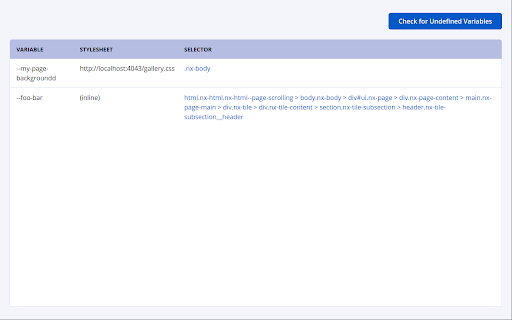
A Devtools extension that detects usages of undefined CSS variables Do you write CSS using custom properties/variables? Have you ever misspelled one, and only noticed later that a color wasn't coming through correctly as a result? Have you ever yearned for a tool that would help you track down such uses of CSS variables which are not defined? Then you're in luck, because this is just such a tool! This extension adds a tab to the Chrome Developer Tools which can check the current page for any undefined CSS variables used within "var()" expressions. Not only stylesheets, but also inline style attributes are analyzed, and the results are displayed in a friendly table with links to the offending element within the Developer Tools' Elements tab. To use this extension, once it is installed open a website of your choice in Google Chrome, and then open the Developer Tools. You will see a new tab at the top of the Developer Tools titled "CSS Undefined Variable Checker". That tab will bring you to the UI of this extension. Initially, you will see only a button titled "Check for Undefined Variables" and an empty table. Clicking the button will begin the analysis on the page to which the devtools are connected and will report any results within the table. If there are no undefined CSS variables found, the table will instead be populated with a message indicating such. The results within the table have three columns. The first column indicates the name of the undefined variable. The next column indicates the stylesheet in which it was found, and the third column indicates which element on the page the undefined variable was found on. This third column references the element by a CSS selector. If the undefined variable was found within a stylesheet, the Selector column is populated with the selector for the CSS style declaration where the variable was found. On the other hand if the undefined variable is found within an inline style, a selector is generated based on the classes, id, and tag name of the element in question and all of its ancestors. Note that this generated selector is not guaranteed to uniquely identify the element in question. Each cell in the Selector column of the results table is a hyperlink. Clicking each link will open the devtools' Elements tab and highlight the problematic element within it, helping you track down the undefined variable. Note: This extension relies on APIs for accessing the stylesheet information which are constrained by Cross-Origin Resource Sharing. Any stylesheets which are loaded in the page but which are on a different origin from the page itself, and which were not served with an Access-Control-Allow-Origin header which would allow access from this page, will not be analyzed by this extension and will cause it to display errors. These errors do not stop the extension from analyzing other styles which are API-accessible. The analysis logic behind this extension is also available as an npm package under the name @sonatype/undefined-css-variable-checker. See https://www.npmjs.com/package/@sonatype/undefined-css-variable-checker .

CSS Variables Editor
The AI-Powered browser extension for managing colors in CSS Variables ● AI-generated color palettes ● Accessibility testing ● Support for daisyUI and shadcn/ui

CSS Used
Get all css rules used by the selected DOM and its descendants. One click to get all the css applied to the selected web element and its descendants. -- Recent Update -- 1. Migrated to Manifest V3. 2. Resources are read from local caches, making it much faster and solves the cross-origin issue. 3. Optimized style parsing in a more efficient way. 4. Dropped support for some outdated CSS, mostly -o- and -ms- prefixed properties. 5. Implemented a new UI powered by Svelte, with some visual tweaks. -- Known Limit -- 1. For CSS rules like ".wrap p{...}", if only " " is selected, the result ".wrap p{...}" will not apply to " ". Either change the rule to "p{...}" or add a ".wrap" parent in the final HTML. 2. CSS custom properties (variables) and all the style inherit related features are not supported currently.

SnipCSS
Extract the CSS/HTML for any element on any page, only take the styles you want SnipCSS extracts all CSS styles associated with any portion of a webpage. It works on all websites, and after a few clicks you get the CSS, HTML and Images associated with the section of the website you are trying to recreate. ANY COOL DESIGN YOU SEE ON THE WEB CAN BE YOUR PERSONAL TEMPLATE FOR QUICK PROTOTYPING! ======================================== If you tried to do the same by copying/pasting by hand it would probably take 20 minutes, but with SnipCSS you can select and get all styles including ones with media queries in under a minute. I even use it on sections of websites I created myself in other projects, so I can get a quick reusable HTML/CSS component to plug into my new project. Unlike other CSS extractor extensions that use "Computed Styles", SnipCSS uses the Chrome DevTools protocol. Just like when you use devtools you see a list of associated styles, SnipCSS reconstructs that list for each element in the subtree of the DOM snippet. All images, fonts and everything else needed for the design is downloaded, and you can easily export all the files into a zip file. PRO VERSION LAUNCHED! ======================================== Get CSS from multiple resolutions or multiple elements using the Pro Version! Also advanced features like no-conflict CSS classes, scoping, removing unnecessary attributes/classes, and creating a sub-selection of items have been added for Pro members. Version 1.7.0 adds the ability to turn your snippets into React/Vue templates by using ChatGPT. The template version of a snippet injects Lorem Ipsum data into the html so copyrighted images/text are automatically replaced. You can also use Stable Diffusion to replace images in the HTML. Generative AI features require a free SnipCSS account. TAILWIND CONVERSION! ======================================== Version 1.9.0 adds the ability to convert all HTML/CSS into valid Tailwind, including with media queries and pseudo selectors. Just visit SnipCSS.com and sign up if you're interested in unlocking these advanced features.

z-context
A Chrome DevTools Extension that displays stacking contexts and z-index values in the elements panel Why use it? Browsers support a hierarchy of stacking contexts, rather than a single global one. This means that z-index values are often used incorrectly, and arbitrarily high values get set. By Using Z-Context, you'll know: - If the current element creates a stacking context, and why - What its parent stacking context is - The z-index value -------- v3.0.0 - Update to manifest v3 and update stacking context rules https://github.com/gwwar/z-context/pull/29 v2.1.0 - Includes http protocol to facilitate development use cases https://github.com/gwwar/z-context/pull/23 v2.0.0 - Adds support for inspecting iframes https://github.com/gwwar/z-context/pull/21 https://github.com/gwwar/z-context/pull/22 v1.1.0 - Adds z-index stacking context rules as of 2021. Adds fixes for position sticky and shadow dom, props to roperzh and edenilan! See pulls 10, 17 and 18 at https://github.com/gwwar/z-context. v1.0.4 - fixes will-change case. a stacking context is created for opacity/transform but not other values https://github.com/gwwar/z-context/pull/9 v1.0.3 - fixes display reason for flex-items https://github.com/gwwar/z-context/pull/4 v1.0.2 - adds new z-index rules, fixes a bug when inspecting a shadow dom elements. https://github.com/gwwar/z-context/pull/3 v1.0.1 - fix reason message for non-static positions, props to giuseppeg. https://github.com/gwwar/z-context/pull/1
