
enafdhefaclokmhejcifkgiogmengdio


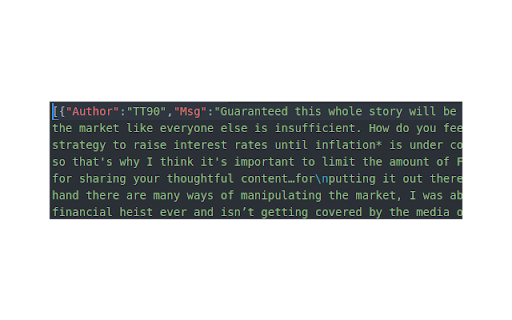
It allows you download comments from Youtube video, and import it to your CommentsAnalytics dashboard. Here are the steps to export YouTube comments using the CommentsAnalytics Chrome extension: 1. Install the CommentsAnalytics extension: Go to the Chrome Web Store and search 🔍 the CommentsAnalytics extension. 2. Open the YouTube video: Navigate to the YouTube video that you want to export comments from. 3. Scroll down until load all comments you want to export. 4. In the Right click window, click on the "Export Comments" button 🎯 🚀. This will download a JSON file containing all of the comments loaded for the YouTube video. 5. Open the JSON file: Once the download is complete, open the JSON file to view the exported comments 💬. You can import it as a new Bulk Request in your "CommentsAnalytics" dashboard. 💡

Youtube Comments Insights
Analyzes the comment section of a youtube video according to the themes that are discussed the most This Chrome extension is a unique tool designed specifically to analyze the comment section from videos of your favourite Youtube channels. Whether you want to grab a quick glance of the most popular discussed topics or explore emerging trends based off the comments from your favourite creators, this extension can help provide you with a quick overview, which is especially useful for videos that contain thousands of comment threads. Youtube Comments Insights also possesses a filter for the number of total comments you want to retrieve for a useful analysis which are given the percentage values of 50%, 75%, or 100%. Additionally to the most repeated words, the result from each analysis also identifies the most repeated bigrams, and trigrams which will provide a clear insight into the general themes being discussed within the comments section of the video you wanted to analyze.

ESUIT | Comments Exporter for Facebook™
ESUIT | CommentsExporter for Facebook™, a powerful browser extension that is completely free. Whether you're a social media marketer, data analyst, or an everyday user, it will greatly assist you. This extension's primary function is to effortlessly export comments from Facebook articles into JSON or CSV file formats. No more copy-pasting or manually organizing comments - with just a few clicks, the exported data will be neatly stored on your computer. ESUIT | CommentsExporter for Facebook™ provides a user-friendly interface, making the process incredibly simple. Whether you're analyzing user feedback, exploring trends in opinions, or preparing comprehensive data reports, this extension efficiently caters to your needs. Our extension not only saves you time but also ensures data accuracy. Each comment includes key information such as the commenter's name, timestamp, and number of likes. Whether you're an individual user or a professional, these insights can provide deeper analytical understanding. The design of ESUIT | CommentsExporter for Facebook™ prioritizes privacy and security. We strictly adhere to Facebook's comment data privacy policies, ensuring that no information is leaked or misused when processing exported data. Download and try ESUIT | CommentsExporter for Facebook™ now to experience the convenience and efficiency of comment exporting. Whether you're showcasing personal insights, evaluating market feedback, or sharing comments with your team, this extension will become your invaluable assistant. If you need to subscribe to our service, we will collect your email address to verify your subscription status. (We only collect this data from subscribers; if you do not subscribe, we will not collect any of your data.) This is our privacy policy. https://esuit.dev/privacy-policy Notice: this extension has In-App Purchases. This extension includes features that require payment to unlock unlimited usage. Please refer to our pricing page for more details. https://esuit.dev/pricing/export-comments-for-facebook Additional Features: In the Popup, we provide the following additional features: Function Description: A brief description accompanied by a video tutorial demonstrating how to use this extension. Login Button: Use when you need to subscribe to premium features or log in with an existing subscription. Relevant-Ext: We provide brief recommendations and introductions to relevant extensions in a small section. Encountering an issue? Report it to us 💪: If you encounter any issues, you can get in touch with us through this link, and we will assist you in fixing it. Warning Facebook™ is a trademark of Facebook Inc., registered in the U.S. and other countries. This is an independent project developed by ESUIT. and has no relationship to Facebook™ or Facebook Inc. this extension is not officially developed by Facebook™, The author is @William Chen Got feedback or experiencing any issues? Let us know on Facebook! Your input is important to us and we're here to help. https://www.facebook.com/esuitdev

YouTube Comment Export
A export YouTube comment extension 1. **Effortless YouTube Comment Export:** Simplify your comment analysis and research with our user-friendly browser plugin that makes exporting YouTube comments a breeze. No more manual copying and pasting – save time and effort. 2. **Seamless Integration:** Our plugin seamlessly integrates into your YouTube experience, allowing you to export comments with just a few clicks. Say goodbye to complex setups and technical hassles. 3. **Enhanced Analysis and Research:** Dive deep into YouTube discussions. By exporting comments, you can perform in-depth analysis, sentiment analysis, or extract valuable data for research purposes, empowering you with valuable insights. 4. **Offline Accessibility:** Access comments even when you're offline. Exported comment data can be saved locally, allowing you to review and analyze them at your convenience, regardless of your internet connection. 5. **Privacy and Security:** We prioritize the privacy and security of your data. Our plugin adheres to stringent security standards, ensuring that your exported comments are handled safely and securely. 6. **User-Friendly Interface:** Experience a simple and intuitive interface that requires minimal learning curve. Our plugin is designed to be accessible to users of all technical backgrounds, making it easy for anyone to export and analyze YouTube comments.

YouTube Comment Reader
Search, Sort, Filter, Translate, Read, Export YouTube Comments in spreadsheet format. Navigate Comments & Rplies with arrow keys +++ New Export functionality in version 1.0.28 +++ All loaded comments now exportable optionally in XML for Excel, JSON, or CSV (comma, tab or semicolon separated) format. The export complies with the current filter and order settings (i.e. you can easily export a filtered part of the comments in a desired order). If you are in dark mode, then the Excel sheet is created in dark mode as well. +++ New in version 1.0.20 +++ New translate buttons in the comment popups (listening to Alt+Y) ..translating every foreign language comment into your language (back and forth). +++ New in version 1.0.17 +++ + Shortcut key now is Ctrl+Shift+Y (for extension popup) ..which can be changed in extension settings + Any short video can quickly be opened in a regular video player (where timeline, speed, volume etc. can be adjusted) by clicking the video title in the extension's popup. +++ New in version 1.0.16 +++ Comments now also visible and sortable ascending by timestamps appearing in comments Features: ➤ Youtube comment presented in multi-functional spreadsheet format ➤ Sort comments (by table header click) ascending or descending by author, comment time, upvotes count, replies count, last reply time, timestamps appearing in comments, comment length, or channel owner's upvotes (heart symbol) ➤ Search main comments and/or replies by author and/or text content ...e.g. filter for an author's main comments and/or responses ...e.g. filter for comments and/or responses containing a specific text phrase ➤ Works in every language ➤ Works with YouTube Shorts as well ➤ Quickly navigate through comments and responses by (left, right, up, down) arrow keys ➤ Easily switch between light and dark mode Instructions: 1. Open a YouTube video. 2. Click on the extension icon (in the chrome extensions toolbar, to the right of the address bar). 3. Wait for the extension popup to load a brief overview containing the YouTube channel, video title, total comments count etc. 4. In the info popup click on the Comment Reader icon. The Comment Reader opens in a new tab and starts loading comments (from newest to oldest). 5. Watch the progress while comments are loading. 6. Click OK to interrupt the loading process at any time to start reading the comments that has been loaded till then. When all comments are loaded, the progress view and interrupt button will disappear. 7. An interrupted loading process can be continued at any time if loading more comments is desired. Tips: Use (left, right, up, down) arrow keys to quickly navigate through comments and replies (although, of course, mouse clicks work as well). ➤ use up & down keys to go from one row to another ➤ use the right arrow key to dive into details (of a currently selected row) ➤ use the left arrow key to leave the details and return to parent list ➤ Quickly open any short video in a regular player (..so you can adjust the timeline, speed, volume etc.) by clicking the video description in the extension's popup 8. To reply to or upvote a comment you may click on the comment time (e.g. "6 hours ago") above the comment text. This will open a new regular YouTube window with the targeted comment (as the "highlighted comment") appearing immediately under the video player. That way you can interact via the regular YouTube user interface.
