
emggdpimfkhfijipmojipnnnglicicmd
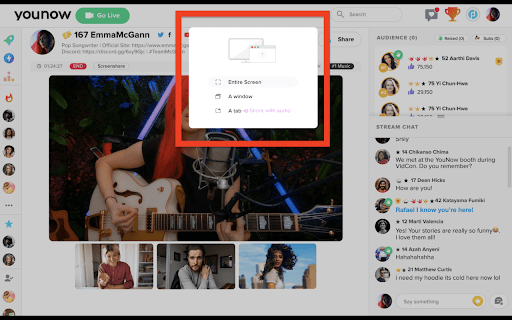
Enable audio sharing when you screenshare on YouNow "YouNow Screen Share Extension" is a tool designed for the Chrome browser that seamlessly integrates with the YouNow platform to enhance the user experience. It allows users to share their screens effortlessly while engaging with their audience. The extension is tailored to improve interaction and engagement for broadcasters by offering an easy-to-use interface for screen sharing. With this add-on, sharing content, collaborating with guests, and providing a more immersive experience for viewers becomes straightforward, transforming live sessions into more dynamic and interactive events.

Snapchat Camera for Chrome - Public Preview
Introducing the public preview of Snapchat Camera for Chrome! Elevate your webcam experience with Snapchat Lenses. Whether you're in professional meetings using Google Meet, catching up with friends, or live streaming, our extension brings the creativity of Snapchat Lenses directly to your webcam. During this public preview, Snapchat Camera for Chrome supports many popular video and streaming platforms, including: Have a site to suggest or another idea? Send us your feedback and requests: https://forms.gle/u11hjDi2hckHT6cp9 🎭 Explore an Array of AR Lenses: Access a vast collection of Snapchat Lenses, including the latest trends and festive themes, to make every interaction unique. ✨ Use Your Own Lens Creations: Add a personal touch by integrating Lenses you've designed and published. 🔗 Seamless Integration: Enhance your video interactions on numerous platforms across the web with ease. 1. Install the Snapchat Camera extension from the Chrome Web Store. 2. Sign in with your Snapchat account. 3. In the camera settings of your chosen web app, select "Snapchat Camera" as your camera. 4. Click the Snapchat Camera icon in the Chrome extension menu to open the extension pane. 5. Select a Lens and start using Snapchat Lenses in Google Chrome! Experience the magic of Snapchat Lenses and bring your creativity to life in every interaction. Download the public preview of Snapchat Camera for Chrome now!

CrankWheel Screen Sharing
Easier screen sharing. No app needed for viewers, even on their mobile. Record your screen or webcam. Instant and Easy Screen Sharing straight from your browser. Share screen without download for the viewer. Share screen with your customer as easily as you make a phone call. Viewers never need to install any software, even on mobile. Let your customer remote control your screen to "kick the tires" if needed, or fill in forms. Record your meetings or create a screencast or webcam capture, with cloud video storage. Easily download videos, or share screen recordings as an animated preview in your sales emails. You can also use CrankWheel to record work such as Figma prototypes and export them to MP4. Key Features: Share screen with anyone in seconds. No Downloads Needed: Recipients can see your screen without any downloads or sign-ups. Real-time preview of user engagement: See how the viewer engages with the screenshare and get alerted if the viewer is not paying attention. Cross-Platform Compatibility: Screen share from PC, Mac, ChromeOS or Linux, to any device or operating system. Sharing Options: Desktop screen sharing, share an application window or a browser tab. Remote control: Give the viewer control over the screen share. Projector: Stream HQ video clips without stutter. Screen Recorder: Record your screen and share the video. CrankWheel’s web-based screen sharing is designed to deliver an easy screen share experience for both you and your viewers. No technical skills are required to join a session, your viewer clicks one link and can see your screen in seconds. Use Cases: Whenever you need to share your screen, wherever your client is. Your clients can see your screen on their computers or their tablets. You can even share your desktop to mobile when the client is not in front of the computer. Ideal for sales presentations, customer support, remote training, and team collaboration. CrankWheel makes your calls easier, allowing you to share information effectively, regardless of your viewer's technical expertise or the device they are using. CrankWheel is used to sell insurance and solar panels remotely and to add visuals to the digital marketing sales pitch. Add the extension to Chrome now and power up your cold calls with visuals. CrankWheel is free for limited commercial use for any number of users hosting up to 15 meetings per month, with enterprise-class features such as single sign-on (SSO), custom domains, white labeling, audit logging and CRM integration available on paid plans. Phone conferencing from our partner service ConferenceCall.co.uk is integrated in CrankWheel. There is no subscription fee for this service, but for some dial-in numbers, there is a per-minute fee. Please see a full list of numbers and rates at http://bit.ly/ccuk-numbers. We use the data we collect only to improve our screensharing services to benefit our users. Only for those enterprise customers that opt into the optional audit log or content filter features, we collect browsing history while screen sharing to enable these features. Also, only for accounts that specifically opt into sending us crash reports for diagnostic purposes, we collect crash reports using a 3rd party provider named Sentry, and such crash reports could potentially include personal data. Read our full privacy policy at http://crankwheel.com/privacy-policy/

AI Webcam Effects + Recorder: Google Meet, Zoom, Discord & Other Meetings
Improves camera quality, adds 15+ visual effects and filters and allows screen or live video recording 🚀 Install AI Webcam Effects and enjoy its easy-to-use features: - Virtual background (image/video/custom background) or blur background - Beauty Filter (face filter to touch up appearance, smooth skin and reduce imperfections) - Light Correction (removes noise, improves brightness, contrast and color balance) - AI Video Enhancer (makes image sharp and clear, colors more vibrant) - Image or video overlay, Сustom watermark (logo), Titles (aka Lower Thirds) to personalize and brand your video - Picture-in-Picture Mode, Smart zoom (aka Center Stage), Emojis and Gifs (to empower online presentations) - Cinematic video filters and professional color correction - Record webcam video or screen 🎯 AI Webcam Effects best suits if you are: using popular video platforms like Google Meet, Zoom, Microsoft Teams, Skype or any other video service. looking for virtual camera or webcam software for camera effects and filters live streaming or creating content for YouTube, Instagram, TikTok, Facebook, Twitch and other platforms. visiting live chats or dating services Using AI Webcam Effects can improve your experience by providing better quality of the platform’s built-in effects and by adding a variety of new features. Set up effects once and make sure you have perfect visual presence on any platform. 👍 Easy installation and usage: 1. Click Add to Chrome to install the extension. 2. Click the AI Webcam Effects logo on the Extensions menu in the top right corner of your browser and sign in with your Google Account. 3. Open a website that supports video conferencing or recording. Сlick the AI Webcam Effects logo on the Extensions menu and set up effects for you. All users may choose to use a free version of AI Webcam Effects or upgrade to premium plans. New users have 7 days of free trial period with the full access to all premium features. 🛠️ Troubleshooting. Please make sure that: you use Chrome browser on your personal computer/tablet (the extension doesn’t work with smartphones); you run the extension on the website that supports video conferencing/recording; your camera is switched on and you've granted access to your camera; you use a browser version of a video platform (you’ve accessed the platform via Chrome browser) If you still have any questions or troubles using the extension feel free to contact our support team: contact@webcameffects.app Sales teams and client-facing professionals AI Webcam Effects can boost the visual appeal and reinforce the impression of your online customer meetings, live stream videos or product/service demos. All this without the need for expensive equipment or additional webcam software. Use background removal to add your logo or virtual background, improve video quality with AI video enhancer and create a professional-looking video with webcam lighting adjustments and face filters. Create engaging videos and conduct professional online meetings to convert potential leads into customers. Remote workers and freelancers Finding a suitable and professional looking environment, proper lighting and ensuring a presentable and camera-ready appearance can be a real challenge and require extra time and effort. AI Webcam Effects is a smart solution for remote employers. No need to waste time arranging your environment and applying makeup. With Webcam Effects, you can effortlessly look better on video, set a professional background image or video and perfect lighting and secure virtual presence anytime and anywhere. Don’t forget to improve the camera quality on a laptop or existing webcam with just a click. Education AI Webcam Effects can enhance the learning experiences and facilitate communication between educators and students. Replace the webcam background with relevant visuals, record live lectures or prepare engaging content before class, add gamification to the learning process by using custom gifs, stickers and emojis. Features such as picture-in-picture mode and image or video overlays can help present additional information, making the interaction more dynamic and informative. AI Webcam Effects makes learning more fun, interactive, and engaging for both students and teachers. Telehealth No need to explain that a professional appearance and building an atmosphere of trust and privacy are crucial in virtual consultations. Enhance your online presence by adding lower thirds and virtual branded background, use layout and overlay to demonstrate additional materials - all these features help to create an atmosphere of an in-person visit. Using gifs, stickers and emojis can provide emotional support, so important for many patients. Additionally, recording virtual consultations can be beneficial for both patients and doctors. Content creators Whether you're live streaming or recording you can benefit from AI Webcam Effects. Features like custom backgrounds, webcam light correction, AI camera enhancement, auto-zoom, image or video overlays, cinematic video filters, and professional color correction offer a compelling alternative to a professional studio and expensive software and devices. Create your unique style, set the right mood, and produce stunning, visually appealing content. Applying professional video effects is easier than ever, without the need for special apps or equipment. Hiring teams/Job applicants Ensuring privacy, reducing distractions, looking professional and making a good impression is important to both recruiters and candidates. AI Webcam Effects can enhance the video presence of any online call and ensure you look flawless and professional. Both parties can use beauty filters and camera lighting adjustments to present themselves in the best possible light, making a strong first impression. Knowing that they look their best can boost candidates' confidence, allowing them to focus on showcasing their skills and experiences. Replacing background with a professional or branded virtual background can emphasize the company’s status. Candidates can use Recording to practice their interview responses, review their performance, and make necessary adjustments to improve their delivery. While recruiters can easily record interviews for future reference, ensuring they have a comprehensive record of candidate responses. Use AI Webcam Effects for daily video meetings, online education and learning, conferences and webinars, online consulting, telemedicine, live video chats and dating services, online job interviews, telemarketing and e-commerce, online fitness and wellness coaching programs, recording, and streaming. Optimize Your Online Presence with Our Cutting-Edge Background Editing App Are you a digital marketer, student, or broadcaster looking to stand out in your virtual meetings? Look no further! Our versatile app is designed to elevate your Google Meet and other videoconference calls to the next level, ensuring that you capture everyone's attention with a stunning video background. Read on to discover how our app can transform your online interactions and drive more visitors to your site. Enhance Your Video Calls with Professional Backgrounds Our app is not just for Google Meet; it's compatible with all major videoconferencing platforms accessible via the Chrome browser, including Microsoft Teams, Zoom, Skype, Omegle and other. By offering a seamless experience across various platforms, we ensure that you maintain a professional and impressive presence in every call. Focus the Spotlight on You: Eliminate Distractions Instantly Our powerful background blur feature allows you to keep the focus on you, filtering out any unwanted elements in your surroundings. Whether it's a messy room, personal items, or even pets, you can conduct your video calls stress-free, knowing that your background remains flawless. Craft the Perfect Image: Customize Your Appearance Achieve the ideal business or creative look during your video conferences with our background replacement feature. Select from our extensive image library, upload your own, or initiate a screencast on a video background to create the perfect image of yourself. Enhance Your Attractiveness: Look Your Best in Every Call Our app goes beyond background editing. With our skin smoothing effect, vibrant colors, perfect white balance, and optimal lighting, you're guaranteed to receive compliments from coworkers, classmates, or subscribers, enhancing your attractiveness and appeal in every call. Boost Your Brand Recognition: Make a Lasting Impression Leverage our app to add branded images to your video backgrounds during meetings, webinars, live streams, tutorials, online classes, and telemedicine sessions. This not only aids in brand recognition but also leaves a lasting impression on your audience. New Feature: Record Your Webcam Video with Ease Our latest update introduces a highly anticipated video recording feature, allowing you to capture and save your webcam videos locally. With just a few simple clicks, you can start recording your marketing messages, product demonstrations, or customer testimonials directly from your device. The videos are immediately saved to your system locally, ensuring that your valuable content is securely stored and readily accessible for future use. Whether you're looking to create engaging social media posts, informative product tutorials, or compelling customer success stories, our video recording feature provides a hassle-free solution to meet all your marketing needs. Elevate your virtual presence, impress your audience, and optimize your online interactions with our comprehensive background editing app. It's time to make every call count!

Promethean® Screen Share
Promethean® Screen Share Put classroom collaboration into the hands of students and teachers. The Promethean Screen Share Chrome extension is designed for teachers and students to interact with a Promethean ActivPanel Elements series from anywhere in the classroom. With the Promethean Screen Share Chrome extension, students and teachers can wirelessly share from their laptop to the ActivPanel Elements series panel. No sign in required. NOTES: The Promethean Screen Share Chrome extension requires Promethean ActivPanel Elements (Nickel, Cobalt, Titanium) series panels with panel firmware version 3.2 or newer. Promethean Screen Share must be enabled on ActivPanel Elements series panels.
