
emceciddhgnjkmjmpjoahmdhibmifohp
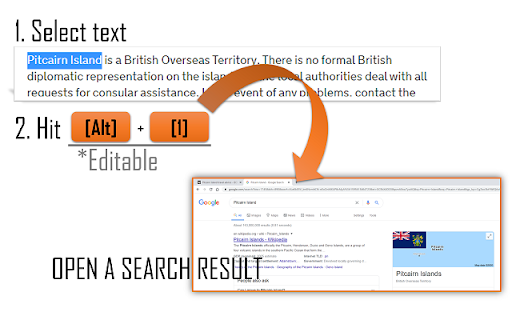
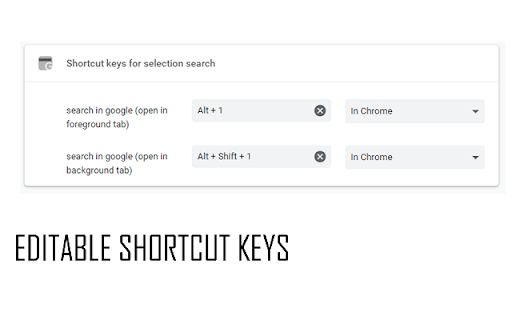
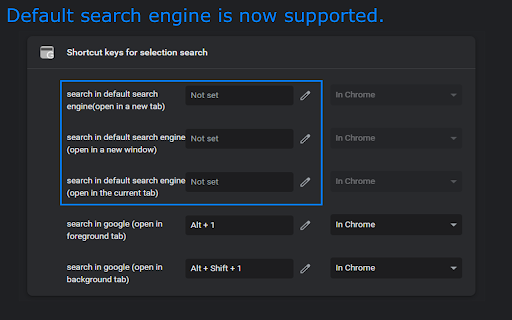

Add shortcut keys to open a new google result tab for selected text. Shortcut keys can be set in above left menu in Extensions. **For Chromebook users** (maybe also Mac OS users) The Alt+1 key will click the first icon in the Shelf, and it will not work on Chrome browser. After the installation, please change the shortcut key from "Alt+1" to another one at chrome://extensions/shortcuts then avoid the built-in shortcut keys on your OS. In the setting page, the right box should be "In Chrome". (Input chrome://extensions/shortcuts in the address bar and press Enter to open a setting page.) *Updates 2024/9/10 v0.400 Update manifest to V3 and minor bugfix. 2022/9/27 v0.201 (=v0.2) 2022/9/20 v0.3 Add feature to search text selected in a single PDF (in chrome's default PDF viewer) 2022/7/10 v0.2 Add feature to search by the default search engine. 2021/6/7 v0.1.0.1 Initial

Hotkeys for Search
Perform a search for selected text using keyboard shortcuts. 1. Select text on a web page using the mouse. 2. Press a keyboard shortcut to search for the selected text on your desired website. Options: - Change the target search websites - Change the keyboard shortcut keys - Open the search in the current tab, a new tab or a background tab - Choose the position of the new tab (left or right of the current tab) Source code: https://github.com/Juuso-h/hotkeys-for-search

SelectON — selection popup. Copy & Search
Customizable popup with actions on text selection ● Copy or search any text in one click, just like in Opera browser ● Currency converter (supports 30+ currencies and 10+ crypto currencies) ● Basic units converter (metric/imperial) ● Contextual buttons depending on selected text, such as 'Open link', 'Translate', 'Show on map', CSS color preview and more ● Smart selection feature — automatic snapping by words, so you'll never lose that last letter again ● Customizable appearance for the tooltip, and ability to set custom text selection color ● Selection handles, which allow to quickly edit text selection ● Live translation of the selected text on hovering the "Translate" button ● Dictionary button, which fetches definition from Wikipedia on hover ● Highlighter button, which allows to highlight specific text on page ● Instant word and symbols count in the text selection ...and many more SelectON does not collect, store or share any personal data, and will always remain open-source as a guarantee of it. If you want to financially support the project, you can find the Ko-Fi link on GitHub page or in the extension options.

Shortkeys (Custom Keyboard Shortcuts)
Custom keyboard shortcuts for your browser Shortkeys lets you create custom keyboard shortcuts for anything your browser can do. Choose from 125+ built-in actions, chain them into macros, or write your own JavaScript — all with a clean, modern interface. Shortkeys ships with 125+ built-in actions across 11 categories: - Scrolling: scroll up/down/left/right, jump to top or bottom - Tabs: open, close, pin, mute, move, sort, duplicate, suspend, group, and switch tabs - Navigation: back, forward, reload, copy URL, open from clipboard - Windows: new window, new private window, close window, fullscreen - Bookmarks: open any bookmark or bookmarklet with a shortcut - Zooming: zoom in, zoom out, reset - Video controls: play/pause, speed up/down, skip, mute, fullscreen - Search: search Google, YouTube, Wikipedia, or GitHub for selected text - Page tools: cheat sheet overlay, toggle dark mode on any page - Page scripts: 25 ready-to-use scripts (highlight links, remove images, extract emails, and more) - Miscellaneous: run custom JavaScript, insert text, trigger other shortcuts, take screenshots, print, and more Chain up to 10 actions into a single shortcut with optional delays between steps. Example: press one key to open a new tab, navigate to a URL, and pin it. Get started fast with 9 curated shortcut packs: - Vim Navigation — Vimium clone: browse the web with hjkl - Emacs Navigation — Emacs-style movement and editing - YouTube Power User — speed controls, skip, fullscreen - Productivity — tab management and navigation essentials - Developer Tools — view source, console, clear cache - Speed Reading — scroll, font size, reading mode - Tab Manager — advanced tab switching and organization - Keyboard Power User — power user essentials - Media Control — universal play/pause, skip, volume Click the Shortkeys icon (or set a global shortcut) to open a searchable command palette. Search and trigger any of your shortcuts instantly, or add a new one without opening settings. - Cloud sync: shortcuts sync across devices via Chrome Sync, with automatic local fallback if your data exceeds the sync quota - Groups: organize shortcuts into collapsible, renamable groups with bulk enable/disable - Per-site filtering: set any shortcut to work on all sites, all sites except specific ones, or only on specific sites - Shortcut recorder: click Record and press your keys — supports multi-key sequences (like "g i" for Gmail-style shortcuts) - Conflict detection: warns you when a shortcut conflicts with a browser default (platform-aware for Mac vs Windows/Linux) - Shareable links: generate a URL to share individual shortcuts or entire groups with anyone - Custom JavaScript: full code editor with syntax highlighting, Greasyfork/userscript import, and a Test button to run scripts in any tab - Live reload: saved shortcuts update in all open tabs instantly — no page refresh needed - Dark mode: follows your system preference - Undo/redo: made a mistake in settings? Ctrl+Z to undo - Guided onboarding: new users get a step-by-step wizard - Usage analytics: see which shortcuts you use most (local only, never shared) Use any combination of modifier keys (Ctrl, Alt, Shift, Cmd/Meta) with letters, numbers, punctuation, or special keys (F1-F19, arrows, Home, End, Page Up/Down, etc.). String multiple combos together for key sequences like "g i" or "ctrl+k ctrl+c". Shortkeys is free, open source (MIT license), and has been trusted by 200,000+ Chrome users. Star us on GitHub: https://github.com/crittermike/shortkeys - Documentation: https://www.shortkeys.app/docs/ - Bug reports and feature requests: https://github.com/crittermike/shortkeys/issues - Website: https://shortkeys.app Shortkeys requests only the permissions it needs. For details on each permission and why it's required, see: https://www.shortkeys.app/docs/#faq-permissions

Selection Search
Search for the selected text in search engines With this extension you can easily search for text you have selected. When some text is selected you can left click the selected text to get a popup where you can choose a search engine to search with. In the options page you can customize the look of the menu, which mouse button that should activate the menu, which search engines to show, and a lot of other things. When you install this extension you will get a warning that this extension can: "Access your data on all websites." This is needed because the code for the popup-menu needs to be added to every website for it to work. If you want to report a bug/issue, please use the following site: https://github.com/Pitmairen/selection-search/issues Alternatively you can use the support section on this site (chrome web store), but I get no notifications about new posts, so I may not notice the message. Some people have asked for ways to make donations to the project. If you want to make a donation you can do so by buying me a coffee: https://www.buymeacoffee.com/pitmairen 0.9.7 - Improve support for IME input in toolbar popup (See issue #173) - Change to use a html class to shown/hidden the popup menu to make it easier to override the display property of the popup with custom CSS. 0.9.6 - Fix issue where icons in some cases could fail to load because the fallback icon loading did not work. This may improve the icon loading for some users. 0.9.5 - Add option to trigger "open all" feature on submenus with middle click only. - Make back button in toolbar button go back only one level at the time - Fix issue where "open all" on sub menus could crash if the submenu contained separators - Change default search engines on new installs to use https 0.9.4 - Add ability to customize the toolbar popup with css - Include separators in the toolbar popup. Hidden by default, but can be made visible with custom css. 0.9.3 - Fix issue where some icons failing to load could trigger a loop in the image loading, which could cause high CPU usage and pages failing to load. 0.9.2 - Improvements to icon loading. The icons are now loaded in the background worker, similar to how it was done in the 0.8.* versions of the extensions. This should make the icons load faster and with less chance of icons failing to load. Note: The icons are cached in the sessions store provided by the browser. This storage has limited capacity. If you have a lot of search engines or have many large custom icons, you can hit the limit. This will cause some icons to fail to load. If this happens try to use smaller icons if you have custom icons. If that does not help report the issue as it may be possible to make the usage of the storage more efficient if necessary. You can also hit the limit if you make a lot of changes to your search engines in one go, but this should be fixable by just restarting the browser as this will cleanup old entries in the storage. 0.9.1 - Fix issue with context menu items requiring two clicks to work - Fix issue where the context menu items was not added properly - Fix issue where hitting enter in the toolbar search box would not open the first search engine - Changed icon loading to use the icon urls directly, instead of loading the icons in the background, as the background loading does not work properly with manifest v3. This will probably also fix some issues where custom svg images would not load. 0.9.0 - Major rewrite of internals to migrate the extension to manifest V3, as required by Chrome for the extension to continue to work. - No new features or bug fixes in this release. 0.8.63 - Added new buttons to allow adding new search engines/separators/submenus at specific positions in the search engine list 0.8.61 - Added option to enable the search engine popup blacklist/whitelist to also affect the search engine hotkeys. The options is located under Popup menu -> Advanced -> Blacklist/whitelist. 0.5.58 - Fix issue where the popup could be partially positioned outside the top of the browser window and become unreachable. Mostly an issue for very large popup menus with many search engines. 0.8.57 - Fix mycroft integration. - Add an additional source for search engine icons that is used if the default source does not have an icon. 0.8.56 - Added special search engine marker for sites requiring encodings other than UTF-8. Simply append {SPECIALENCODING} to the end of the search engine url. This enables the feature and the browser should be able to auto detect the correct encoding. 0.8.55: - Possible fix for freezing tabs for searches opened in new foreground tab 0.8.53: - Added option to open search in new window - Make it possible to add search url to the submenu root item. If a search url is added it will open when clicking the submenu root item, unless the openall on click option is checked. - Improved replacement of bracket placeholders ({%s}). If "}" must be used inside the placeholder it can now be escaped using "}". - Improved regexp placeholder replace converter. The old "re:" converter still works for backwards compatibility. The new improved converter is called "replace:", and is documented under "More Variables" at the top of the options page. 0.8.51: - Fix issue with saving changed settings on options page For full changelog see:
