
emahhjficejdbffpflmncnflpmphohof


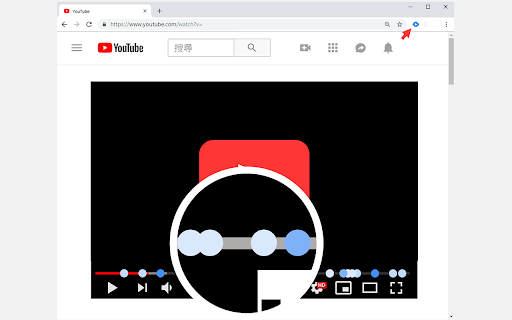
A timecode tracker for YouTube A tool for extracting the timecode of a YouTube video from popular comments. Features of version 0.11: Update according to the changes of YouTube UI Features of version 0.9: Split comments when the comments is too long. Features of version 0.8: Add timecode from the description of video.

Tempus
A tool that allows you to manage and view YouTube comments with timestamps efficiently. Features: 1. View the concentration of comments using opacity of displayed markers. 2. View comments containing a particular timestamp. 3. While playing the video, view comments with timestamps like a live chat replay. 4. Customize the primary colour, block size of the markers. To use Tempus, just make sure the extension has been installed and enabled in your browser. Then, you can head to any YouTube video, where the extension will collect timestamps from the comments and display them under the video progress bar. The settings, which are accessible through the Tempus icon on the top-right of your browser, allow you to: 1. Configure the block size of the marker (value can range between 1 and 20 seconds, default: 1) 2. Toggle HeatMap markers (default: enabled) 3. Toggle the comment live replay (default: disabled) 4. Toggle the marker on-click commment view (default: enabled) 5. Configure the primary colour for markers (default: #ffb347) Check out the source code here: https://github.com/knightron0/tempus

YouTube Timestamp Comments
An extension that lists timestamp comments on YouTube. This is a Google Chrome extension that displays timestamp comments on YouTube. The main features are:

vidyaNote - youtube notes & highlighter
Takes notes from youtube video notes with live-preview markdown note editor. Text & video highlighter. Record audio & video. GDrive 📢 Take youtube notes in side panel with live preview markdown editor and realtime sync with local files . 📌 Why you should consider this: ✪ live preview markdown ✪ No signup required ✪ Video snapshot ✪ Record video, audio from video and microphone ✪ Auto-write video caption line-by-line ✪ Persistent text & video currentTime highlighter ✪ Supported platforms:youtube,udemy,coursera,edx,udacity ✪ Fuzzy search ✪ Dark mode and custom themes. ✪ Export notes in three format: markdown,html and pdf ✪ Realtime sync with desktop local file manager. ✪ Realtime sync with cloud drive: GDrive, oneDrive, Dropbox,box. ✪ Sync with cloud notes: Notion, onenote (coming soon). ✪ Pure & clean code that powers fastest performance. ✪ Cloud & Cross-devices sync (coming soon). ✪ All notes and media files saved locally. ✪ No tracking & no Ads. ✪ Lightweight 76kb only ✪ No third-party library used. ✪ Negligible memory consumption (consume 400% less memory than new tab). ✅ Markdown live preview You don't need to open separate panel to preview your markdown. vidyaNote provides a real live preview like wysiwyg editor you can update existing markdown's mark to change formatted text. ✅ No signup required vidyanote is only video-notes extension in chrome webstore that don't require signup ✅ Multiple video e-learning platform supported you can screenshot any webpage and insert text and images from any webpage by simply drag-n-drop ✅ note grid view like google keep All notes display in grid format. Auto add video's thumbnail for easy recognize. When note open, related video will open. ✅ Record audio and video Record video, audio from video in one click. ✅ Create nested folder to organize notes you can organize notes in nested folders ✅ Time has come to forget ctrl+c and ctrl+v Drag and drop any web content e.g images,selected text. vidyaNote doesn't convert text into image like others do. vidyaNote format into markdown so that you can easily modify them selected text will auto-copied to vidyaNote when you press ctrl+c on any webpage ⌨️ keyboard shortcuts (work only when copy listener on) Ctrl+Z ⇒ undo Ctrl+Y ⇒ redo Alt+S ⇒ highlight Alt+S ⇒ highlight Shift + Space ⇒ extend selection 🖥️ Take screenshot Click on screenshot icon for capture and save screenshot Use Keyboard shortcut (Alt + S) 🖍️ Highlight text When you clip selected text, selected text will highlighted automatically Click on Save Highlight button on right bottom corner to save highlight. For remove highlight, Select again highlighted text and press Ctrl + Shift + H. For disable highlight, Go to options page ✅ No vendor locked in. vidyaNote auto-sync your notes with desktop local file manager in three format: markdown,html & pdf You can view and edit notes in any other markdown based note editor. ✅ Realtime sync notes with other cloud providers You can sync notes with cloud drive providers:GDrive, oneDrive, Dropbox,box. You can sync notes with cloud notes providers:Notion, onenote (coming soon). ✅ Private and secure All data saved locally. Your notes or media file e.g images, videos never touch our server. You can mail us: noterailhelp@gmail.com 🚀 Version 0.0.60 ⇒ ADDED: Realtime sync feature added ⇒ ADDED: Markdown guide & sync notes option available on extension's right click ⇒ IMPROVED: Improved sync feature ⇒IMPROVED: Options page improved ⇒IMPROVED: vidyaNote now available in 20 languages

TimeComments
Finds Youtube comments with timestamps and teleports them above timeline, so you can jump to the moment people are talking about When you start watching a video, the extension loads the most relevant comments, finds the ones that mention timestamps, and creates markers above the timeline near those moments. Hover a marker to read the comment. If the comment has replies, you can open them too. . Why this matters? ✔ Save time. ✔ Notice details, corrections, and clarifications you might otherwise miss. ✔ See what other viewers noticed at the same moment. ✔ Use community comments as a lightweight guide through the video. . The main point is simple: timestamped comments are useful only if you see them on time. . New Features: ● Private notes / bookmarks. ● Mini Timeline for precise bookmarks. ● Custom captions panel for saving subtitle text. ● Shadow Ghosts for returning to moments you visited. ● Spike markers for moments where many comments point to the same time. ● Saved Items and Collections for organizing comments and bookmarks. . Privacy Note. Email permission is used to check whether extra functionality, such as loading all comments, is enabled for your account.
