
elmpkhkdonhdbkeaigkblbgckcihahoc
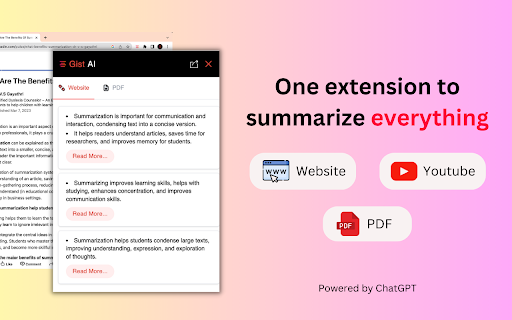
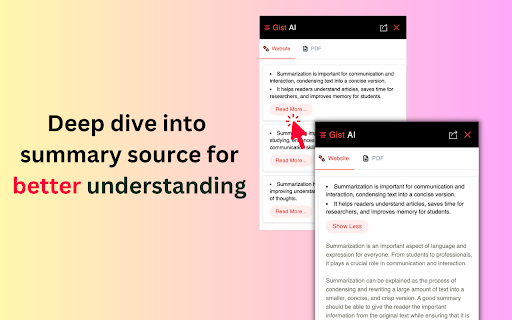
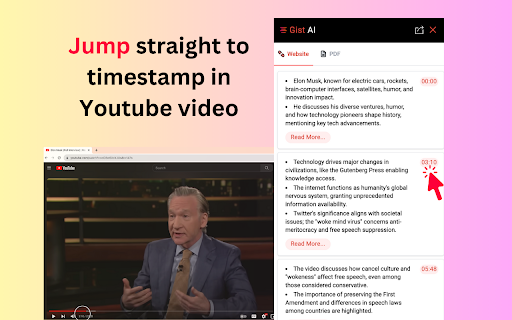

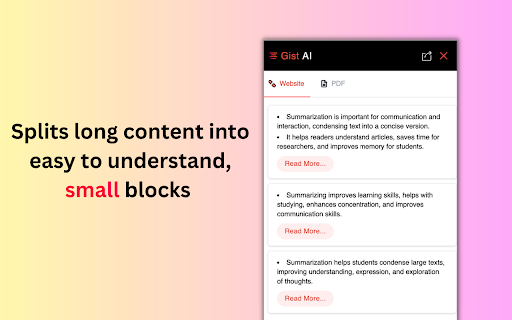
ChatGPT-powered free Website, YouTube video and PDF summarizer. One extension to summarize everything! Gist AI is a free and powerful Chrome Extension that extracts the key points from any website article, YouTube video or PDF in just one click. Even better, Gist AI lets you deep dive into the summary source for clarity or jump right to that moment in a YouTube video. Gist AI is the ultimate tool for easy and quick summarization. Summarize everything and learn more in less time! - Saves time Extracts key points from articles, YouTube videos, large PDFs, essays, websites, blogs, contracts, research papers and more with just one click. - Read More of what you like Our unique "Read More" feature allows you to deep-dive into the source of the summaries that interest you the most. No more fluff or distractions! - Jump to core segments of a YouTube video Quickly skim through the summary and only watch the parts of a YouTube video which are relevant to you. - Summarize any PDF With Gist AI PDF Summarizer, you can get summaries for PDFs found online as well as those saved on your device. There are no limits on the size or number of pages. - One tool to summarize everything Why juggle multiple extensions when Gist AI can summarize everything? From websites to YouTube videos to PDFs, Gist has got you covered. - Understand better Our research-backed technique improves comprehension and focus by breaking down long articles, PDFs or videos into smaller parts. - Simple and Easy to Use All you need to do is install the Chrome extension and get started. No API keys needed. - Unlimited Summarization Leveraging the power of ChatGPT AI, Gist AI offers unlimited summarization capabilities. You can summarize as many PDFs, YouTube videos or websites as you want without any limitations. - Translation Support Translate the summary into 30+ languages. Buried under a mountain of content? Gist AI is your reliable and Free online AI summarizer, crafting comprehensive summaries from even the most complex websites, long PDFs or videos. Gist AI improves comprehension and focus by transforming long content into short, easy-to-understand segments. Gist AI is the trusted choice among a diverse range of professionals—from corporations and law firms to government entities and hospitals. Our software stands out for its efficiency in condensing large documents into quick insights. Upgrade your reading experience with Gist AI today! Privacy and Security: We prioritize your privacy. Gist AI ensures that your PDFs and summarized content remain secure and protected.

Immersive Translate: AI Web, PDF & Video Translator
📣 The Website Translation Extension with Explosive Word of Mouth Across the Web [Immersive Translate (沉浸式翻译)] ⭐⭐⭐⭐⭐ 📣 Trusted by 20M+ users worldwide with a privacy-first design. Recognized as Chrome’s 2024 Best Extension. 💻 The Functional Features Are as Follows: - 🚀 Offers bilingual website translate by smartly identifying the main content area of web pages, thus reducing the "intrusiveness" on the original webpage. This brings a better foreign language webpage translation and reading experience, hence it is named [Immersive Translate]. - 🚀 Optimized for Major Websites: Deeply customized for a seamless translation experience on Google Search, top social media platforms (Twitter, Reddit, Facebook), and renowned news websites. Whether you are searching, socializing, or gathering information, your browsing experience will be smoother and highly efficient. - 🚀 Features a mouse hover translation function, allowing you to simply hover the mouse over any paragraph on any webpage, and the corresponding translation will instantly appear below the paragraph. In the [Immersive Translate] design concept, paragraphs are considered the smallest unit, preserving their context, enabling a true understanding and learning of foreign languages. - 🚀 Introduces web page input box translation, where typing in your native language followed by a triple space in any web page's input box (immediately translates your input into the target language you've set). This unlocks a bilingual real-time conversation experience across languages with tools like Google Search, ChatGPT, and others. - 🚀 Hover Translation: Hover over text and use shortcut keys to instantly reveal paragraph translations. Read translations directly beneath the original content for smooth, effective, and immersive bilingual reading. - 🚀 Translate on Text Selection: Select any word or phrase to instantly view AI-powered translation and pronunciation—without leaving the page. - 🚀 Translate PDF(retaining the original document's format and layout), the advanced version supports all kinds of complex formula recognition, table recognition, and picture OCR recognition in PDFs. This ensures the translation maintains the original format and layout as much as possible. Applicable scenarios include, but are not limited to, PDF translation of foreign literature, academic papers, product manuals, etc. - 🚀 Also supports one-click translation of EPUB eBooks, TXT documents, HTML, and subtitle files (ASS/SRT). - 🚀 Automatic bilingual subtitle translation for mainstream online video sites (including YouTube, Netflix and dozens more), allowing one-click translation to break language barriers and enable the exchange of cultural ideas in various languages globally. - 🚀 Enable real-time translation for multilingual meetings on Zoom, Google Meet, and Microsoft Teams. Communicate clearly across languages and collaborate without barriers. - 🚀 Instantly translate Japanese manga, Korean webtoons, and Western comics, so you can read the latest chapters as soon as they’re released—without waiting for official translations. - 🚀 Immersive Translate supports both local image translation and one-click translation of web images—without interrupting your browsing experience. Powered by advanced OCR and inpainting technology, it preserves original layouts and visual styles for a seamless, immersive reading experience. - 🚀 AI Expert: Assign AI specialized industry roles to deliver more professional translations for specific domains. - 🚀 AI Term: Use pre-built terminology libraries to maintain consistent, accurate translations. You can also create and customize your own. - 🚀 Context-aware Translation: Powered by customizable AI terminology. Leverage domain-specific AI expertise and tailored term libraries to achieve more accurate translations across websites, PDFs, and online video subtitles. 🔐 Built with Privacy First Trusted by 20M+ users worldwide. Recommended by major browsers and recognized as Chrome’s 2024 Best Extension. - 🛡️ Zero content retention - 🛡️ No data used for model training - 🛡️ End-to-end encrypted requests Your translations stay yours. - 🚀 Powered by Top-Tier Translation Engines: Currently supports integration with over a dozen global mainstream machine translation services and cutting-edge AI Large Language Models (LLMs), including DeepL, OpenAI (ChatGPT), Gemini, and Claude, perfectly fulfilling your diverse translation needs across any scenario. The Immersive Translate extension is free to use. We hope it helps everyone break language barriers, allowing for an easy, enjoyable, and elegant way to access a wealth of foreign language information on the Internet. ❤️

AI Summarizer: Web, YouTube & PDFs with ChatGPT, Claude & More
Summarize web pages, YouTube videos, and PDFs in a snap with top AI like ChatGPT, Claude, and Gemini. Works in tons of languages! Say hello to AI Summarizer 👋, your new favorite Chrome plugin that makes long content short and sweet 🍬! Powered by badass AI models like ChatGPT 🤖, Gemini 🌌, Grok 💡, DeepSeek 🔍, and Qwen 🔧, it sums up web pages 🌐, YouTube videos 🎥 (with subtitles 📝), Bilibili videos 📺 (with subtitles ✨), and PDFs 📄 faster than you can say "TL;DR." ⏱️ Perfect for students 🎓, researchers 🕵️♂️, or anyone who's tired of wading through endless stuff 🏞️. It works in big languages like English 🇺🇸, French 🇫🇷, German 🇩🇪, Italian 🇮🇹, Spanish 🇪🇸, Chinese 🇨🇳, Russian 🇷🇺, Hindi 🇮🇳, Japanese 🇯🇵, and Korean 🇰🇷—basically, wherever you're from, it's got you covered 🌍. ## What's Awesome About It: **One-Click Magic 🪄:** Hit the summary button in the bottom right ➡️ or click the extension icon 🔧—both work like a charm! Use shortcuts too ⌨️—boom, done! **Smart Selection Power 🎯:** Select any text on a webpage and hit summarize—it'll focus on your selected content first! No selection? No problem, it'll summarize the whole page like before! 📄 **Pick Your AI 🎲:** Choose from a lineup of top-notch AI models 🤩. **Drag & Drop Vibes 📍:** Grab that summary button and slide it up and down the right side of your page! Perfect positioning, your way! 🎨 **Hide When You Want ❌:** Hover over the button and spot the little "X" in the top-right corner—click it to temporarily close the button for clean browsing! 🧹✨ **Make It Yours 🎨:** Tweak the AI prompts to get summaries your way ✍️. **Global Vibes 🌏:** Summarize stuff in all kinds of languages 🗣️. **Bilibili Support 📺:** Support Chinese content creators with Bilibili video summaries! 🇨🇳 ## How to Roll: 1. Install the plugin ➕ and log into your fave AI model's site 🔐. 2. Open a webpage 🌐, YouTube vid 🎬, Bilibili video 📺, or PDF 📚. 3. Click the summary button 🖱️, hit the extension icon 🔧, or tap the shortcut ⌨️. 4. Kick back with a slick summary 😎. Save time ⏳, learn fast 🚀, and ditch the fluff 🗑️. Join the crew already loving AI Summarizer ❤️—try it out now! 🎉

Glasp Web Highlighter: PDF & Web Highlight
AI-powered Web Highlighter for Websites, PDF, and YouTube videos. YouTube Summary with ChatGPT, Claude, and Gemini. Highlight PDF and Websites, save it for later, and share it with everyone. Glasp is a PDF & Web highlighter that helps you collect and organize your favorite quotes and thoughts from the web. You can also access other like-minded people’s learning and build your AI clone from your highlights and notes. "Glasp Web Highlighter: PDF & Web Highlight" is a free Chrome Extension that lets you quickly highlight websites and PDF files with colored highlighting options, which are then automatically curated to your Glasp homepage. These highlights can then be tagged, searched for, linked to, and shared on a variety of other platforms, including Twitter, Teams, and Slack. YouTube, web article, and PDF summarization functions are powered by AI models such as ChatGPT (OpenAI), Claude (Anthropic), Mistral AI and Gemini. You can see all the highlights and notes in the sidebar on the web and PDF, and clicking each highlight takes you to the highlighted place in the web page or inside the PDF. Also, you can tag the web page and PDF and see what other people highlighted in the website or PDF from the sidebar. With one click, the content you’ve collected appears across all your devices! Check out your highlights on your Glasp page or in the original source, where they remain highlighted. Discover more content on the Glasp website and connect with other like-minded readers who share your interests. By following your friends or like-minded people, you will discover insightful and thought-provoking content that deepen your knowledge and understanding. Key Features: ✅ Web & PDF highlight with multiple colors: 🔴 🟡 🟢 🔵 ✅ Highlight & annotate on YouTube videos: 🎥 ✅ AI-powered summary based on annotations: 💎 ✅ Highlight & annotate on PDF files: ✍️ ✅ Highlight & annotate on Images: 🖼️ ✅ Make notes on the highlights: ✍️ ✅ Tag and link-to your highlights: 🏷️ 🔗 ✅ Copy-and-paste all the highlights and notes with meta data into your note-taking app in one click 📝 ✅ Discover more useful content from other curators: 🤝 ✅ Sync all your highlights and notes from Kindle eBooks: 📚 ✅ YouTube Summary with ChatGPT and Claude: ❤️ ✅ Summarize YouTube videos, web articles, and PDF: ❤️ ✅ Generate stunning quoteshots from webpages 🎨 - Click “Add to Chrome” - Log in to Glasp from the extension menu - Select the text you want to highlight using your mouse or trackpad - Select the highlight color from the Glasp pop-up highlighter tool ### Using Your Highlights - View you highlights on your Glasp Profile Page - Tag your highlights, make notes, summarize your highlights with a page comment, and share your highlights and notes by creating links or directly copy and pasting into other apps. It’s that easy. To see a tutorial of how to use the Glasp Chrome Extension, please click the link to see a demonstration video on YouTube: https://www.youtube.com/watch?v=Tgbszoeokv4 - Adding tags to saved content will help you organize your interests. - If you can’t highlight on a web page, try switching tabs or refreshing the page. - For more details, please check our our FAQs page ;) https://blog.glasp.co/faqs/ Why Choose Glasp? What you collect says so much about who you are. Glasp lets you grasp it! Meet and learn with 500,000+ life-long learners! + Retain information, keep it organized, and easily use it 📚 + Discover useful information from like-minded people 🔍 + Share your highlights & notes with friends and peers with one click 🚀 + Contextualize what you learned and be a better write ✍️ + Leave your digital legacy for future generations (contribute to human history) 🙌 Trusted by 500,000+ Users: Glasp is trusted by content writers, avid readers, active note-takers, researchers, thinkers, students, and people who seek for better reading and knowledge management workflow. Write your feedback to hi@glasp.co If you find bugs, please let us know from here: https://docs.google.com/forms/d/e/1FAIpQLSf-l_PApQyXi7cX4ZO7kZ6ARW8JXLesiTzvwae-nvWISp3P3A/viewform By installing the extension, you agree to Glasp’s Terms of Service, Privacy Policy, and Community Guidelines (which can be found here: https://glasp.co/privacy-policy).

YouTube Summary with ChatGPT & Claude
Summarize YouTube videos, web articles, and PDFs to save time, powered by ChatGPT, Claude, Mistral AI, and Gemini. YouTube Summary with ChatGPT & Claude is a free Chrome Extension that lets you quickly summarize YouTube videos, web articles, and PDF you're consuming. Use this extension to save time and learn more quicker. YouTube videos, web articles, and PDF summarization functions are powered by ChatGPT (OpenAI), Claude (Anthropic), Mistral AI and Google Gemini. ## What are the benefits of using YouTube Summary with ChatGPT & Claude? The main benefits are saving time, increasing productivity, and improving learning. YouTube Summary with ChatGPT & Claude reduces the need to watch long videos when you're just looking for the main points. The summaries let you absorb information quickly so you can spend time on other tasks. ## How do I use YouTube Summary with ChatGPT & Claude? Using YouTube Summary is easy. After installing the browser extension, simply open a YouTube video you'd like to summarize. Click the YouTube Summary icon in your browser toolbar, and it will generate a summary and provide an option to access the video transcript if available. You will see a summary of the video with or without timestamps. You can click on the timestamps to jump to the corresponding part of the video. You can also click the "Copy Transcript" button to copy the transcript of the YouTube video to your clipboard. ## Can I customize the length of the YouTube video summaries? Yes, you can customize the length of the video summaries generated by YouTube Summary. Adjust the settings within the extension to tailor the summaries to your preferred level of detail. Also, you can customize the prompt to use to summarize the content. ## Is YouTube Summary with ChatGPT & Claude suitable for educational purposes? Yes, YouTube Summary with ChatGPT & Claude is a valuable tool for educational purposes. It provides concise summaries and transcripts that can aid in research, studying, and learning from YouTube videos. ## Can YouTube Summary with ChatGPT & Claude handle videos in languages other than English? Yes, YouTube Summary is capable of summarizing videos in multiple languages, making it a valuable tool for international users. You can also choose what language you want the transcript to be in. Fore more details, please visit the website: https://glasp.co/youtube-summary
