
eljapbgkmlngdpckoiiibecpemleclhh

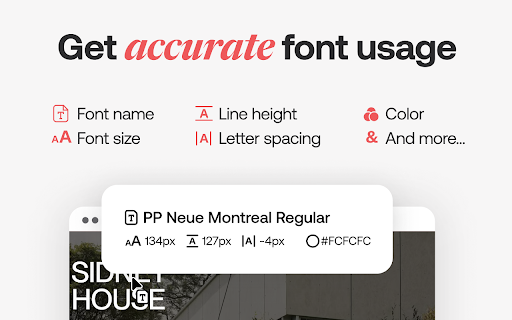


Speed up your design workflow! Identify fonts from any website, bookmark and organize them. Font DNA Our proprietary algorithm analyses font files to get more accurate results. Rollover any text to get the font name and CSS properties. The main extension window will also display a summary of all font used on a website. BTW, we dramatically improved the processing speed (this could change depending on websites). Font Details You can get more information about fonts. Check how many styles are available, their foundry, and price. Font Bookmarks Bookmark fonts and manage your font bookmarks right within the extension. You can also share them with your friends or the people you work with. Similar Fonts We help you get inspired and find similar or complementary fonts. Search You can also search fonts using multiple parameters and filters (characters shape, license type, price...) Feedback and support: contact@fonts.ninja

SVG Gobbler
Find, optimize, organize, edit, and export your SVGs Download SVG content from any website and download, copy, edit, optimize, and/or export. Find SVGs - Quickly find SVGs from any site - Handle CORs restricted SVGs from a page - Find individual sprite SVG instances Export SVGs - Create SVG sprites from icon collections - Export as SVG, PNG, WEBP, JPEG and various other formats - Transform SVGs into minified Data URIs - Transform SVGs into React components with SVGR - Optimize and minify SVGs with SVGO Organize SVGs - Group and categorize SVGs by their primary domain or custom collection name - Move, copy, duplicate, and optimize icons before sharing - Save and store a set of uploaded SVGs for optimization

ANNEXX
Самое популярное расширение среди пользователей Tilda. ANNEXX — это инструмент, с помощью которого вам доступны множество функций для ускорения работы, улучшения качества проектов, оптимизации рутинных операций в Тильде. ▪️Работает прямо в интерфейсе Тильды, управляется кнопками, ползунками и горячими клавишами. ▪️Вам абсолютно не требуется знание кода. Забудьте о сложностях с интеграцией скриптов с других сайтов и Телеграм-каналов. ▪️Работает по принципу месячной подписки. При первой регистрации доступен трехдневный триал. Расширение постоянно улучшается и дополняется. Следите за новостями в Телеграм — https://t.me/annexx_team Ваша Тильда может больше!

WhatFont
The easiest way to identify fonts on web pages. Say goodbye to the complexity of developer tools for identifying fonts. With WhatFont, discovering the fonts used on websites becomes as effortless as hovering over text. Want more details? A simple click on any element reveals the styles applied, making it easier than ever to uncover the secrets behind beautiful typography. Recommended by Wired WebMonkey, Lifehacker, and SwissMiss. History: • 3.2.0 - Improved toolbar icon compatibility • 3.1.1 - Removed unnecessary developer logging • 3.1.0 - Added multiple color format support • 3.0.1 - Restored escape key to exit • 3.0.0 - Completely Rewritten: The entire extension has been rebuilt for better performance and usability. - Updated Permission Model: We've revised permissions to better respect user privacy while maintaining functionalities. - Refreshed Appearance: The look has been updated for a more modern feel. - Isolation from Host Website Styling: Ensures WhatFont's appearance is unaffected by the website it's used on. - Adaptive Toolbar Icon: The toolbar icon now changes based on the system's appearance settings. - Support for New CSS Color Values: Enhanced support for the latest CSS color values. • 2.1.0 - A new design thanks to Siddharth Mate • 2.0.3 - Retina toolbar icon • 2.0.2 - Fix option page for button styles • 2.0.1 - Use native screen capturer • 2.0 - Improved sharing • 1.7 - Added font services detection for FontDeck (Thanks to Mark Perkins) - Improved font detecting algorithm - Improved overall performance • 1.6.1 - Added color detection for text • 1.6 - Added a tweet button for instant sharing through Twitter - Improved style reseting • 1.5 - Overall restyling • 1.4.4 - Supported light icon for dark themes • 1.4.3 - Fixed a bug related to Typekit service detection • 1.4.2 - Reduced loading time - Supported HTTPS protocol • 1.4.1 - Fixed stylesheet bug • 1.4 - Restructured source code - Supported font services detection for Typekit and Google Font API - Fixed toolbar button bug. Second click is now "Exit WhatFont"

Window Resizer
Resize the browser window to emulate various screen resolutions. This extension re-sizes the browser's window in order to emulate various resolutions. It is particularly useful for web designers and developers by helping them test their layouts on different browser resolutions. The resolutions list is completely customizable (add/delete/re-order). You can set the window's width/height, window's position, preset icon (phone, tablet, laptop, desktop) and even the option to apply the new dimensions to the entire window or just to the viewport. The extension also features customizable global key shortcuts, an option to export your settings and import them on another computer and more! Please report all bugs (or suggestions) using the support link on the extension's details page.
