
elifhakcjgalahccnjkneoccemfahfoa
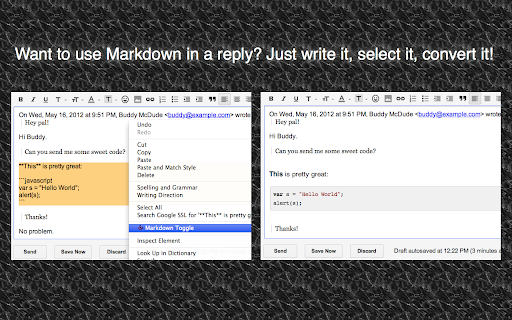
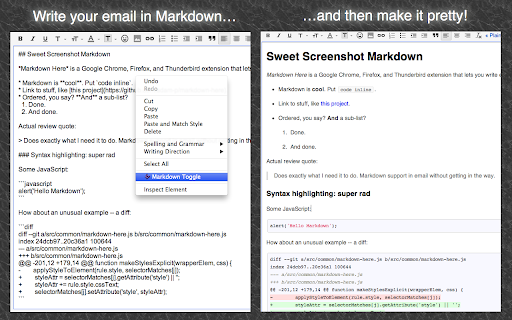

Write your email in Markdown, then make it pretty. Markdown Here lets you write email in Markdown and render it (make it pretty!) before sending. This is great for anyone who doesn't like fiddling around with formatting buttons while writing an email. It's especially good for programmers who write email with code in them -- it even supports syntax highlighting. And for the mathematicians among us: Markdown Here will render TeX formulae as well. Totally simple to use: 1. Write your email in your email client's rich editor using Github-flavoured Markdown. 2. Right-click in the compose area and then click "Markdown Toggle". 3. Your email is now pretty! (That is, it's been rendered to HTML.) 4. If you like the way it looks, just send it. If you want to change or add something, click "Markdown Toggle" again to get back to your original Markdown. 5. Repeat as necessary. Markdown Here is primarily targeted to work with Gmail and Thunderbird, but it also works pretty well with Yahoo and Hotmail. Additionally, it works great with Google Groups and Sites, Evernote's web interface, Blogger, Wordpress, and more! Syntax highlighting note: Use fenced code blocks and specify the language name. See the project page for an example. Privacy: Markdown Here accesses and modifies web content when you activate it. It can, in theory, access other web content, but does not. It also makes no Internet requests whatsoever. Your data is modified when and where you choose, and does not leave your browser. Available as a Chrome, Firefox, Safari, Opera, and Thunderbird extension. This is an open source project. Visit Markdown Here's Github page for full instructions, more information, bug reports, or to contribute.

FeHelper - JSON格式化、编解码、二维码、开发者工具箱
FeHelper is a powerful developer tool designed for front-end developers. It integrates various practical tools to help developers improve work efficiency. However, FeHelper strictly adheres to the principle of single function activation. By default, FeHelper only provides the JSON auto-formatting function, and all other functions are disabled by default. If users need them, they can go to the plugin configuration page to install and enable them. The following are the main functions of FeHelper: ## JSON Tools: - JSON beautifier: Automatically detects and formats JSON data, supports manual formatting, decoding of messy codes, sorting, BigInt processing, editing, downloading, and skin customization, greatly facilitating developers' processing of JSON data. - JSON comparison tool: Supports automatic key-value comparison of two JSON contents, highlights differences, and helps developers quickly identify data changes. ## QR Code Tool: - QR code generator: Supports custom color and icon QR code generation, suitable for a variety of application scenarios. - QR code decoder: Supports multiple modes of QR code decoding, including decoding after pasting a screenshot, which is convenient and fast. ## Encoding tool: - String encoding and decoding: Supports multi-format information encoding and decoding, such as Unicode, UTF-8, URL, Base64, MD5, etc., to meet different encoding requirements. Code beautification tool: Supports code beautification for multiple languages, including Javascript, CSS, HTML, XML, and SQL, helping developers maintain clean and tidy code. Code compression tool: Provides simple code compression functionality, supports HTML, Javascript, and CSS code compression, and optimizes web page loading speed. ## Developer Tools: - AI assistant: A super intelligent dialogue tool powered by AI, supporting code writing, code modification, scheme design, and other tasks to improve development efficiency. - Simple Postman: An interface debugging tool that supports GET/POST/HEAD request methods, automatically formats JSON content, and simplifies the API testing process. - Websocket tool: supports packet capture testing for Websocket interfaces, including connection testing for ws services, message sending testing, result analysis, and more. ## Other tools: - Time (stamp) conversion: mutual conversion between localized time and time stamp, supporting second/millisecond, world time zone switching, clock display in various time zones, etc. - Random password generation: Generate passwords by randomly combining various characters, supporting specified length and character type to ensure password security. - My sticky notes: A sticky notes tool that supports creating directories to categorize and manage notes. Notes can be exported/imported with one click for convenient information management. - Markdown conversion: Markdown editing/preview tool, supports direct conversion of HTML fragments to Markdown, and supports downloading content in PDF format. - Webpage screenshot tool: It can take screenshots of any webpage, supporting both visible area screenshots and full-page scrolling screenshots. The final result can be previewed before being saved. - Page color picker tool: You can directly collect color values for any element on the webpage. Move the cursor to the location where you want to pick the color, and click OK.

GitHub Isometric Contributions
This extension allows you to toggle between the normal GitHub contribution chart and an isometric pixel art version.

TeX for Gmail
Use LaTeX (a method for rendering mathematical formulas) with Gmail. Typeset math in the outgoing and incoming messages. The other person does not have to have TeX for Gmail installed or to use Gmail. Math is viewable in most mail readers and browsers, including mobile ones.

Markdown Preview Plus
Converts and previews markdown files (.md, .markdown) to HTML(include TOC) right inside Chrome and support live reload Automatically parses markdown files (.md) into HTML with live reload 1. Install extension from webstore (creates no new UI) 2. Check "Allow access to file URLs" in chrome://extensions listing: 3. Open local or remote .md file in Chrome. 4. See nicely formatted HTML! Note: The auto reload feature is disabled default. * Support auto reload. * Support external css file. * Customize theme for every md file. * Support github flavored markdown. * Export nicely formatted HTML. * Support render Katex, Mermaid. The extension is open source. https://github.com/volca/markdown-preview * Fix a bug for load fonts of Katex * Fix a bug for "table of contents" * Compatible with Chrome 136 * Update mermaid lib * Update marked lib * Update marked lib * Fix a bug for clear custom CSS paths * Supports add custom CSS path. See #19 * Fix a bug for render mermaid. See #158
