
ekodckpnalonppfcddgnkoapajahbahc

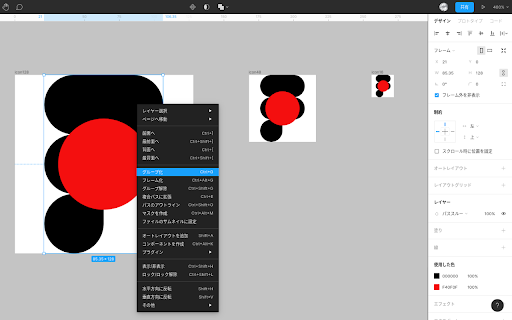
Figma の表示を日本語化する拡張です。 【重要】 Figma 公式が日本語に対応しました。 本拡張機能を削除するよう、お願い申し上げます。 今までお使いくださり、ありがとうございました。 --- 手順: 1) 「Chromeに追加」をクリックする 2) Figmaファイルのページを再読み込みする 注意事項: ・Figmaのファイル一覧ページは日本語化に対応しておりません ・Figmaのファイルを開いたページのみ日本語化に対応しております 現在は、とりあえず動作するベータ版ですが、多くの人にテストしていただいて改善していきたいです。 文言の変更・追加などの要望は、下記フォームで受け付けております。 https://forms.gle/bv3CHN2dERS611oZA

Alt & Meta viewer
This extension show alt and meta.

TDK Meta Checker
閲覧中のタイトル・description・キーワードなどのメタ情報を確認しやすく表示します。 閲覧中のWebサイトで サイトタイトル(title タグ)や説明文(metaタグのdescription)などを確認するための仕事効率化の拡張機能です。 Facebookのシェアデバッカーのリンクや、 Twitter Cardのバリデーターリンクがあり確認しやすくしてあります。 重要な項目が未設定だったりすると警告メッセージを表示してくれます。

Chatwork Input Tools
Add text decoration icons to ChatWork. 選択したメッセージをタグで囲むことができます。 タグの効果については公式サポートページをご覧ください。 http://support-ja.chatwork.com/hc/ja/articles/203127904-投稿に装飾はできますか- -- 2017/03/15 ChatWorkの仕様変更に対応しました。 2016/07/10 メッセージ入力欄にリスト作成のサポートを追加しました。 TOリストにすべて選択 (アイコンのみ)を追加しました。 2015/12/25 TOリストの大きさを2倍にしました。 2015/10/28 公開しました。

Gyazo - Share new screenshots. Instantly.
Gyazo for Chrome is an easy-to-use extension that lets you capture anything in your browser, share it instantly, and keep it as a visual bookmark. Use it to capture a specific image, page element, free selection, or entire web page in 2 clicks. You can also get instant previews of all Gyazo links posted online simply by hovering with your mouse. Everything you capture is saved together with the site and page title, link, and date so you can easily search and find it later. With Gyazo anything you see can be instantly saved, shared, and bookmarked. — Capture any image on the web with a right click Right click any image then hover 'Capture' and left click 'This image.' The full size image will be uploaded and a preview shown to confirm. — Capture with the Gyazo icon in your toolbar - Page Element Captures individual elements of a page such as an image, a text box, or other subsection of a page. - Free Selection Captures any part of a page you want freely, similar to the Gyazo desktop app. - Page Captures the entire visible area of the page. - Whole page Captures the entire page from the very top to the very bottom. - Home This button opens your captures page in a new tab so you can browse, search, and collect your captures. — Hover Previewing When you hover over a Gyazo link you can see an instant preview below the link, no click required. Anything you capture is instantly uploaded to https://gyazo.com with a unique link. The link is copied to your clipboard so you can paste it instantly to share. By default all Gyazo links are unlisted and only visible by people who have the unique link. — Browse, search, and collect easily On your captures page you can browse, search, and collect your captures. When you capture the app also saves metadata so you can find things more easily such as the site name, page title, link, and date so you can search your captures without needing to manually add tags or descriptions. This data is saved privately by default and you can choose to share it with viewers by clicking a button. This is very useful for creating visual bookmarks and for easy recall of your ideas. Note: We do not use this metadata except to provide convenient search and organization features for you. — Create collections to organize and even share together It's easy to add captures to a collection and give it a new title. This way you can organize your captures and share a set of captures at once. You can also invite other people and add captures to a collection. You get all this with the new Gyazo extension. You can also use Gyazo for Windows, Mac, iOS, Android, Firefox, and Edge. This extension and Gyazo Teams are the only official extensions for Chrome made by Gyazo.com. To provide the functionality listed above, there are certain permissions required. Please read on to see these details. activeTab - To capture the full web page or to capture an area defined by the bounding box of a DOM element. contextMenus - To add options to the context menu so you can capture different parts of the page or to upload a given image when you right click it. tabs - To get the page title and URL so it can be saved privately and used to help you find and organize your screen captures. clipboardWrite - To copy an uploaded capture's new link to the clipboard so you can paste it without an extra step. clipboardRead - To add support for direct embedding on github.com by converting the gyazo.com URL in the clipboard to a markdown style automatically. storage - To save and sync the extension's settings. Host Permission - To allow the extension to run on any website where you may want to capture. Please also see our linked privacy policy for more details about how your data is collected, stored, and processed.
