
ekoaomnfnljoemgcledgdbgpjdibeifj
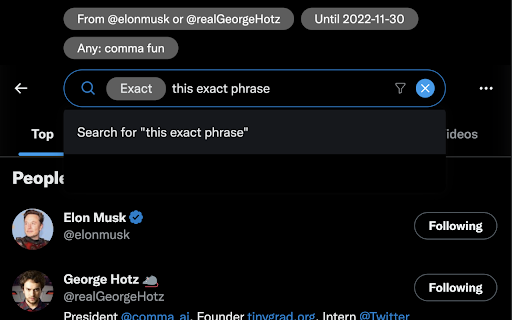
Twitter's Advanced Search user interface is not intuitive to get to. Additionally to manually type in the advanced search options… Twitter's Advanced Search user interface is not intuitive to get to. Additionally to manually type in the advanced search options requires knowledge of specific formatting. This extension seeks to bring the advanced search features to your fingertips. For "enhanced user protection" this extension also prevents searching for tweets from Kathy Griffin.

Twillot - Your Twitter, Organized
Search, organize and export your Twitter history Search, organize and export your Twitter history Never Lose a Tweet Again - For Twitter Users Who Want Secure, Smart, and Seamless Data Management - Filter out unwanted content and recommendations in your timeline - Search Twitter Bookmarks by keywords, time range, folder, username - Search Twitter Likes by keywords, time range, folder, username - Search Twitter Posts by keywords, time range, folder, username - Mass delete Twitter Bookmarks - Mass delete Twitter Likes - Mass delete Twitter Posts - Mass unfollow your following - Mass block or unblock Twitter users - AI-powered organization for Twitter Bookmarks / Likes / Posts - AI-powered organization for Twitter Following - Mass add Twitter List members - Smart create Twitter List Fix a bug that caused the syncing process to fail or take a long time to complete. Twillot 2.0 is out! This version is For Twitter Users Who Want Secure, Smart, and Seamless Data Management for Your Twitter Account. It covers all aspects of your Twitter account, including your bookmarks, tweets, and more. - Fixed a bug that caused the extension to stop smart tagging - Ending the free trial for smart tagging - Added AI-powered smart categorization to automatically organize your bookmarks! - You can upgrade to Pro Plan to auto categorize 500 bookmarks per day. - Export bookmarks with threads and engagement metrics to CSV / JSON - Download media files from bookmarks Note: Due to adjustments in our product strategy, the Workflow feature will be removed from the current version. If you're looking for similar functionality, we invite you to try our newly launched, more lightweight extension https://s.twillot.com/x-bookmarks. We're excited to announce that you can now use Twillot as a workflow in X/Twitter now. Know more about workflow, check it out https://twillot.com/docs/workflows/guide. We're excited to announce that you can now use tt for quick searches in the Omnibox. To use this feature, follow these steps: - Type tt in the Omnibox. - Press the Tab key. - Input your keyword. By doing this, you'll be taken directly to Twillot search results, enhancing your search efficiency. Click on the Twillot icon in the Chrome toolbar to open the extension.

TwSearch - X/Twitter Search Result Export
One click to export X/Twitter search result list to CSV. Save all tweet feeds and user info. Scrape and Extract X/Twitter Search result list, Save search tweet feed list and user info list to CSV / Excel / JSON. HOW TO USE? 1. Enter a X/Twitter Search link 2. Click the start button v2.4.0 - Add realtime check if a user can receive DM from your account - Fix the init issue v2.3.0 - Fix can_dm, location fields issue. - Fix the user info stuck issue. v2.1.0 - Fix the 404 issue. 🔥 Upgrade ✔︎ Support X.com and Twitter.com link ✔︎ Save export history to local storage ✔︎ Continue task progress from history ✔︎ Add websites, first name and last name fields. You can find emails with domain and name by some email hunters. 👋 FAQ https://twsearchexport.extensionsfox.com/#faq If you have any questions, please keep in touch via help@extensionsfox.com. 🔒 DATA PRIVACY All data is processed in your local computer, never passing through our web server, and no one knows what you save.

Control Panel for Twitter
Gives you more control over Twitter and adds missing features and UI improvements Control Panel for Twitter is a browser extension for Twitter - its main goals are to reduce the amount of algorithmic content you see, give you more control over your timeline and make the UI less distracting. By default, your Home timeline will be the reverse-chronological "Following" timeline, which will only contain tweets and quote tweets from the people you follow. The algorithmic "For you" timeline will be hidden, and Control Panel for Twitter will keep you on "Following" if Twitter tries to automatically take you off it. Everything is configurable, so start by opening the options popup and customizing to your liking. Changes you make in the options will be applied immediately. • Use the "Following" (chronological) timeline by default • Hide the "For you" (algorithmic) timeline • Retweets • Show in separate tab / Hide • Quote Tweets • Show in separate tab / Hide • Enable muting of Quote Tweets • Hide "See new Tweets" • Hide "Who to follow", "Follow some Topics" etc. in the timeline • Hide inline prompts in the timeline • Full-width timeline content • Hide the sidebar and let timeline content go full-width • Add "Add muted word" to the "More" menu • Fast blocking (skips confirm dialog) • Hide quotes and replies to blocked and muted accounts • Hide Retweets in user profiles • Retweets in Lists • Default to "Latest" tab in Search • Hide the quoted tweet when viewing Quote Tweets • Redirect to twitter.com • Tweak new layout • Hide Toggle navigation • Replace X branding changes • Hide Views under tweets • Hide "Verified" Notifications and Followers tabs • Restore headlines under external links • Restore Quote Tweets link under Tweets • Restore other links under Tweets • Default sorting of replies • Latest / Likes • Premium blue checks • Replace with Twitter Blue logo / Hide • Hide Premium blue check replies • Hide Premium upsells • Hide Grok • Hide Jobs • Hide Subscriptions • Don't use the Chirp font • Disable bold and italic text in tweets • Use normal text font style in navigation bar • Navigation density • Comfortable / Compact • Use normal font weight in dropdown menus • Uninvert Follow / Following buttons • Monochrome / Themed • Unblur sensitive content • Hide sidebar contents • Hide Explore page contents and use it only for searching • Hide "Discover more" tweets • Hide metrics • Reduced interaction mode • Hide the action bar under tweets – replies are now the only means of interacting • Hide the Compose Tweet button • Disable the home timeline • Find yourself wasting too much time on Twitter? Try preventing use of the home timeline • Notifications • Hide badges only / Hide Hide UI items you don't use • Bookmark button under tweets • Share button under tweets • "View post engagements" under your tweets • Tweet box in timeline • Account switcher • Messages drawer • Explore • Communities • Hide "More" menu items you don't use TWITTER, TWEET and RETWEET are trademarks of Twitter Inc. or its affiliates

Advanced Twitter Search
Advanced Search For Twitter Advanced Twitter Search is a search tool that enables you to filter Twitter search results by engagement level. You can filter search results by Type, Favourites, Re-tweets, Language, Location and more.
