
ekniobabpcnfjgfbphhcolcinmnbehde
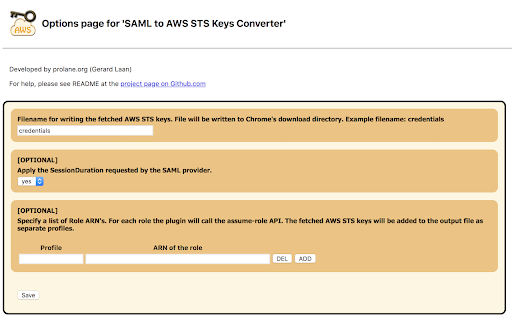
Generates file with AWS STS Keys after logging in to AWS webconsole using SSO (SAML 2.0). It leverages 'assumeRoleWithSAML' API. Google Chrome Extension which converts a SAML 2.0 assertion to AWS STS Keys (temporary credentials -> AccessKeyId, SecretAccessKey and SessionToken). ### Why this Chrome Extension? ### If you don't have any user administration setup within AWS Identity & Access Management (IAM) but instead rely on your corporate user directory, i.e. Microsoft Active Directory. Your company uses a SAML 2.0 Identity Provider (IDP) to log in to the AWS Web Management Console (Single Sign On). Then this Chrome Estension if for you! You run into trouble as soon as you would like to execute some fancy scripts from your computer which calls the AWS API's. When sending a request to the AWS API's you need credentials, meaning an AccessKey and SecretKey. You can easily generate these keys for each user in AWS IAM. However, since you don't have any users in AWS IAM and don't want to create users just for the sake of having an AccessKey and SecretKey you are screwed. But there is a way to get temporary credentials specifically for your corporate identity. The Security Token Service (STS) from AWS provides an API action assumeRoleWithSAML. Using the SAML Assertion given by your IDP the Chrome Extension will call this API action to fetch temporary credentials. (AccessKeyId, SecretAccessKey and SessionToken). This way there is no need to create some sort of anonymous user in AWS IAM used for executing scripts. This would be a real security nightmare, since it won't be possible to audit who did what. This Chrome Extension however will make it super easy for you to just use your corporate identity for executing scripts calling AWS API's.

Former2 Helper
Helps avoid CORS issues with former2.com Calls to the AWS service API endpoints are made either directly with the JavaScript SDK or via the browser extension (which also hits endpoints directly). Recording data is kept entirely in memory or on local disk and is never sent over the internet or anywhere else. You should take care to remove any sensitive data (passwords etc.) when sharing your generated code/templates with others.

Postman Interceptor
Capture requests from any website and send them to Postman Client. Postman Interceptor helps you send requests which use browser cookies through the Postman app. It can also send headers which are normally restricted by Chrome but are critical for testing APIs. The Interceptor makes this process painless. Something that would have required a proxy earlier can now be achieved without any installation steps or extra configuration.

Datadog test recorder
Record end-to-end tests in your browser. Datadog Synthetics Chrome Extension is a tool dedicated to helping you create full browser test automation in minutes instead of hours. Enterprise-ready, it activates only when you are on the Datadog Synthetics platform, for total security. By installing this extension, you agree to the Datadog End-User License Agreement. You can view the agreement here: https://www.datadoghq.com/legal/eula/

Virtru Email Protection
Surprisingly easy email protection and control for Gmail. Easily protect Gmail messages and attachments, and maintain control wherever they’re shared. At Virtru, we understand that data is an organization’s most valuable asset and sharing it is critical for business success. But sharing data creates significant risk. We believe no one should have to choose between protecting data and sharing it. We help more than 6100+ organizations, large and small, across almost every industry, protect data wherever it’s created or shared so they can collaborate with confidence. Privacy Ensure Gmail messages and attachments stay private so you don’t have to trust Google with your data. Compliance Maintain compliance with data privacy regulations such as HIPAA, GDPR, CJIS, ITAR, CCPA, FERPA, CMMC, NIST, and more. Secure, Seamless Sharing Protect Gmail messages and attachments and maintain control wherever they’re shared - both internally and externally, beyond Google. End-to-End Encryption Data-centric protection and object-level encryption for email messages and attachments directly within the Gmail client with a simple Chrome extension. Granular Access Controls Set expiration, disable forwarding, and watermark attachments with recipients’ names to deter them from leaking sensitive files. Instant Revocation Revoke access to messages and attachments immediately when emails are sent in error, or after the data within has become more sensitive. Persistent File Protection Keep attachments protected and controlled anywhere files are shared and stored (i.e. Gmail, Google Drive, desktops, network drives, and more) to ensure compliance with data privacy regulations and privacy throughout the full collaboration lifecycle. Data Loss Prevention (DLP) Automatically enable encryption with DLP rules that detect and protect sensitive data or reinforce security awareness with alerts that warn users to encrypt email. Contact us to learn more or try Virtru at your organization: https://www.virtru.com/contact-us/ By clicking the “Install” button above, or by otherwise downloading or installing the Virtru software referenced above, you consent to be bound by the Virtru Terms of Service (https://www.virtru.com/terms-of-service), which governs your access to and use of the Virtru software. If you are downloading or installing the Virtru Software, or otherwise accepting the Virtru Terms of Services, on behalf of an entity (such as your employer), you represent to Virtru that you have the legal authority to accept that Virtru Terms of Service on behalf of that entity.
