
ekennconjgaijhpnjlcfiodigjaaeadd
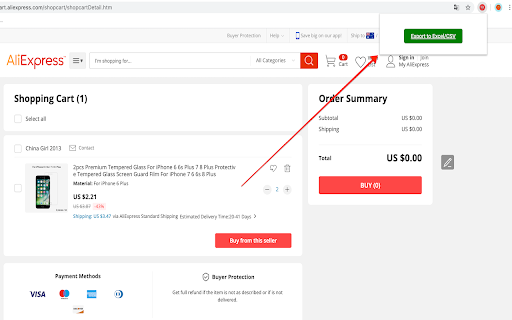

This extension exports Aliexpress cart products title, URL, Quantity and other attributes into Excel/CSV file Uses: 1- Share the links of items you want to buy with anyone, where they can buy on your behalf; an awesome solution for those who are working with buying agents in China, dropshipping, online shopping services, proxy buying services, online personal shoppers, etc. 2- Share your Aliexpress items with sourcing agents in China to find similar items on Taobao, 1688, or other Chinese wholesale websites. 3- Collaborate with your family or team members about what items you need to buy. 4- Save the cart information on your local computer to buy them in the future. And many others! The extension exports the file into CSV format, which is similar to the Excel format. If you want to convert the CSV into Excel, you can simply use Microsoft Office Excel to open the CSV file, then click on “save as” and choose the Excel file format you want (likely XLS or XLSX). This extension is FREE to use for everyone forever. The extension runs 100% on your browser/computer. All data are stored on your computer ONLY. We have no access to any data whatsoever. Please feel free to share your thoughts by leaving a review or simply emailing us. We would appreciate your rating and feedback to help us to improve our extension further. All reviews, from 1 to 5 stars, are welcome! NOTE: If you have many items in your cart, you must scroll down to the bottom until the end so that all the items in your cart shows up. Then you can now click "Export to Excel/CSV" button. Update v1.2: Added column for total item cost. Update v1.4: Minor fix of blank popups showing. Update v1.5: Separated shipping cost and shipping method. Update v1.7.2: Fix Aliexpress cart page. Update v1.7.3: Fix on missing button on popup Update v1.7.4: Fix export items on cart page. * We are NOT affiliated with Aliexpress. This extension is independently developed to easily export Aliexpress cart data.

Anti FeR toolkit
Adds features and extensions for the bushtarion web game (formerly Canola toolkit formerly Antisback's bushtarion toolkit) This adds some functionality to the Canola toolkit, which it is forked from. Fixes the regex for Company name matching (no more oddities with names that include '@', '~', or '^'), adds information about who someone has attacked, includes stealth mobs in the activity chart, and maybe more! 1.2.22 Changes: Defaults for options set to "on" 1.2.21 Changes: Additional options for the military page and supply depot 1.2.18 Changes: Includes an options page, navigate by right-clicking the icon and selecting "Options" 1.2.13 Changes: Displays development information for technologies unlocked for a given dev/construction Shows troop count on a hack Shows a horribly formatted estimate on the flak needed to land on a target given the visible units Display information about what you are 30% and 70% of in the score breakdown overlay Show gov defense in spy report incoming (but doesn't account for when it recalls) 1.2.12 Changes: Fixes seed/income calculation Adds a button to hack from the search page in a new tab Spy report incoming/outgoing is now sorted by ETA Spy report incoming/outgoing displays original mob ETA Adds an input so that dynamic AR calculation can be done from the spy report 1.2.11 Changes: Attacks on an HQ don't show a huge number for ETA Stealth mobs sent now default to ETA 5 sent New "Plant Max" feature calculates how many seeds you are able to plant given how many gards you have home. Updates grass seed bonus in Spring 1.2.10 Changes: Fixes single person mobs not showing up on spy reports Fixes HQ incoming/outgoing not showing HQ outgoing mobs stay in the outgoing screen "until recalled", which I don't know when it is recalled so take the info as an alert more than a reality Alerts if the user does not have enough harvesters to cover the max needed (in total, not at home) 1.2.9 Changes: Reverting mob notes and loving on Alci 1.2.8 Changes: Makes mob notes on alliance incoming screen more interesting for some :) 1.2.7 Changes: Fixes score evaluation for players with public ID's Fixes military mob calculations for "all" Income calculator now reasonably accounts for exponential seed loss and nighttime seed penalty Search results include a "Total" row for acres and score 1.2.6 Changes: Fixed spy report when spying a member of your own alliance Finished searching by Public Name Added full Hack output to console debugger when hacking from Alliance incoming page Added troop cost calculation on Military page 1.2.5 Changes: Fixes score calc for insurance that is "claimable early" Alliance incoming "Defend" and "Retaliate" links are now buttons Added "Hack" button on alliance incoming to make a best guess at route and fill out incoming notes Added "Recall" button on alliance incoming to recall from alliance page 1.2.4 Changes: Add Land Fat percentage to search results Fix Alliance page incomings when AHQ! is targeted Add Unit Stats quick link in side panel Add ID list generation with search results (in console debugger output) Add "Has Attacked" information on news page 1.2.3 Changes: Alerting when the user has uncultivated acres Maintenance page additionally displays the seeds you can grow with troops home Alliance page has quick links to setup defensive or offensive mobs from the incoming screen

Aliexpress Chat Tuesday API Extension
Aliexpress Chat Tuesday API - Product, Sales: Aliexpress Chat Tuesday API - Aliexpress Chat Tuesday Chrome Extension, integrated with the Chat Tuesday API, is an intuitive and powerful tool for extracting detailed product, price, sales rank, and review data from Aliexpress. With its seamless integration into Chat Tuesday’s generative AI platform, users can effortlessly organize and modify Aliexpress data to meet their unique requirements. The extension allows users to insert extracted data directly into Chat Tuesday, where the AI assists in arranging, analyzing, and customizing the data based on individual preferences. Whether you need tailored reports, dynamic reorganization of data, or insights for decision-making, this combined solution offers a streamlined approach to handling Aliexpress data with precision and ease. This extension is completely FREE, making web scraping and data downloading effortless and accessible. With our tool, you can extract valuable information with ease while ensuring your data security and privacy. All scraped data stays within your browser, guaranteeing complete control and protection of your information. *Using the Chrome browser, use our unique point-and-click feature to retrieve data from trusted sources. For the first time, you can scrape and organize data from many sources without download any learning programs. Download and use our web scraper for free. The difference between our extension and other Aliexpress scrapers is not only extracted the ASIN and Price. Comprehensive Data Retrieval and Integration with Chat Tuesday Generative AI - The extension retrieves almost all page data from Aliexpress, including pricing, product specifications, sales, ASIN, product features, client reviews, and even services offered by consumers who purchased the item. - By selecting the Synchronized button, you can sync scraped product data—such as Product Title, Price, and Brand—with the Chat Tuesday Generative AI platform. Once the data is inserted, a new chat is generated containing the imported data. You can then interact with the AI to reorganize the data, ask questions, or gain insights, with the AI providing accurate and helpful guidance. - The Bulk URL functionality allows you to add up to 100 product URLs, including single product URLs, category URLs, or a mix of both, separated by commas. The data can be saved directly to an Excel spreadsheet for easy access and management. - In case the Data Scraper closes unexpectedly during a task, you can click the Restart button to quickly resume operations. Mandatory Step : Go to ChatTuesday.com to set up the free account and start the below steps in the same browser session. 2. Search for Products - Enter any keywords in the search bar, such as a brand name or product-specific keywords. - Use Aliexpress’s filtering options to refine the search results as needed, then press Enter. 3. Activate the Chrome Extension - Once the search results are displayed, open the Chat Tuesday Chrome Extension. - A new tab will open, prompting you to either create a Chat Tuesday account or log in if you already have one. - After verifying your login details, the system will confirm your plan status as Active. Click Start, and the data will begin extracting in Excel format. 4. Sync Data with Chat Tuesday AI - After the desired data has been extracted, click the Sync button. The extracted data will be inserted into the Chat Tuesday Generative AI platform, creating a new chat. - You can now interact with the AI to ask questions, organize the data, or gain insights based on the data you’ve imported. 5. Add More Data with a Bot ID - If you want to insert additional extracted data into the same session, retrieve the UID from your Chat Tuesday profile (visible upon login) and use it to sync the new data. This product has the following advantages: 1. Competitor Analysis - Extract the entire product list, sales rank, and pricing information in Excel format. - Conduct in-depth competitor comparisons to refine your business strategies and stay ahead of the competition. 2. Get to Know Your Clients - Access customer feedback and reviews on specific products. - Gain valuable insights into client preferences to improve offerings and boost customer satisfaction. 3. Market Research - Identify the number of resellers and competitors offering the same products in your target market. - Understand market trends and saturation for more informed decision-making. 4. Unauthorized Sales Channel Monitoring - Detect merchants listing products below the reseller pricing by analyzing extracted data. - Identify potential parallel importers or imitation resellers to maintain control over your distribution channels. 5. Seamless Integration with Chat Tuesday Generative AI - Insert extracted Aliexpress data directly into Chat Tuesday AI to organize and analyze it effortlessly. - Generate tailored chats where you can ask the AI to arrange, customize, or provide insights based on the data. 6. Data Customization and Reporting - Utilize Chat Tuesday’s AI to create dynamic reports and reorganize data to meet your specific requirements. - Simplify workflows by automating tasks like data categorization, visualization, and detailed analysis. What data you can extract : - Product specification - Price - Seller price and details - Product URL - Product image and specification - Customer review Technical support : We welcome any comments or ideas to enhance the products. Please contact:

Ebay Cart Exporter
This extension exports ebay.com cart products link, title, status, quantity and other attributes into Excel/CSV file Share links to the items you want with friends, family, or anyone who can buy them on your behalf. It’s perfect for collaborating with others, working with online buying agents, shopping services, proxy buyers, personal shoppers, and more. You can also save your cart data locally to complete your purchase later. This extension exports your eBay cart to a CSV file, which works with Excel and other spreadsheet tools. To convert it to an Excel file, simply open the CSV in Microsoft Excel, click “Save As,” and choose a format like .xls or .xlsx. The extension is completely free and always will be. It runs entirely in your browser, and all data is stored locally on your computer. We do not collect or access any information — ever. We’d love to hear from you! Leave a review or email us your thoughts — every rating, from 1 to 5 stars, helps us improve. Note: This extension is not affiliated with eBay. Works only on the eBay.com cart page.

AliEx Product Scraper | Ecomstal
Easiest Way to Scrape AliExpress Product Data with Simple Clicks by Ecomstal.com AliEx Product Scraper is a powerful Chrome extension designed to streamline your product research and data collection on AliExpress. Whether you're a casual online shopper looking for the best deals or a dropshipper managing a thriving e-commerce business, AliEx Product Scraper empowers you to gather essential product information with just a few clicks. 🔳 Save Time and Simplify Research: Forget manually copying and pasting product details. AliEx Product Scraper automates the process, allowing you to extract key data points like titles, descriptions, prices, images, and variations in seconds. This eliminates tedious tasks and frees you up to focus on analyzing product viability and making informed decisions. 🔳 Perfect for Dropshippers and E-commerce Sellers: AliEx Product Scraper is a valuable tool for anyone involved in dropshipping or e-commerce. Quickly gather product data for your online store, saving you hours of manual work. Analyze pricing, compare variations, and ensure you have all the information you need to create compelling product listings. The extension boasts a user-friendly interface that requires no coding knowledge. Simply navigate to the AliExpress product page you're interested in, activate the extension, and select the data points you want to capture. AliEx Product Scraper efficiently extracts the information and presents it in a clear format. 🔳 Export for Further Analysis: Once you've collected your desired product data, AliEx Product Scraper allows you to export it in a convenient CSV file format. This makes it easy to import the data into spreadsheets or other software for further analysis, comparison, and organization. Perfect for dropshippers who need to integrate product information into their e-commerce platforms. ◾ Boost Efficiency: Save hours on product research and data collection. ◾ Reduce Errors: Eliminate typos and inconsistencies by automating data extraction. ◾ Stay Organized: Export data to CSV files for easy management and analysis. ◾ Make Informed Decisions: Analyze product details and make smarter sourcing choices. AliEx Product Scraper is a free and easy-to-use tool that simplifies your AliExpress product research. Download the extension today and experience the benefits of automated data collection! ◾ What type of data can I scrape with AliEx Product Scraper? You can extract various data points, including product titles, descriptions, prices, variations, images, and sometimes even shipping information. ◾ Is there a limit to the amount of data I can scrape? While there's no technical limit within the extension, AliExpress itself might have restrictions on excessive data scraping. Use the extension responsibly. ◾ Can I export data for multiple products at once? Currently, the extension focuses on scraping data for a single product page at a time. However, you can quickly scrape information for multiple products consecutively. ◾ What format does the exported data take? The data is exported in a CSV (Comma-Separated Values) file format, which is widely compatible with spreadsheets and other data analysis software. ◾ Is the extension safe to use? AliEx Product Scraper is a secure extension that doesn't store any of your personal information or scrape any data beyond what's publicly available on AliExpress product pages. ◾ Does AliEx Product Scraper work on all AliExpress product pages? The extension strives to work on most AliExpress product pages, but there might be some instances where layout variations cause compatibility issues. ◾ Do I need a special account to use AliEx Product Scraper? No, the extension works without the need for an account or login. Just install it in your Chrome browser and start scraping! ◾ Is AliEx Product Scraper compatible with other browsers? Currently, the extension is designed specifically for Google Chrome. However, future versions might expand compatibility to other browsers. ◾ Is there a premium version of AliEx Product Scraper with additional features? Currently, there's only a free version available. However, future updates might introduce premium options with additional functionalities. ◾ How do I get support for AliEx Product Scraper? If you encounter any issues or have questions, refer to the extension's documentation or contact the developer directly for assistance.
