
cjadknidmgdfahbflldlhnkdpibhfpfg
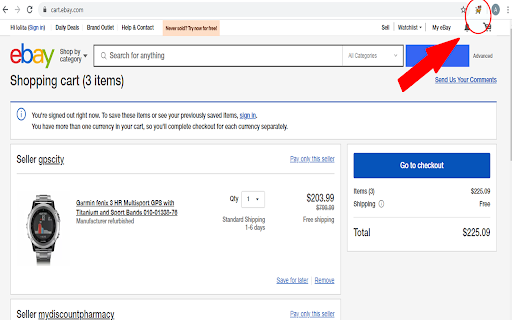

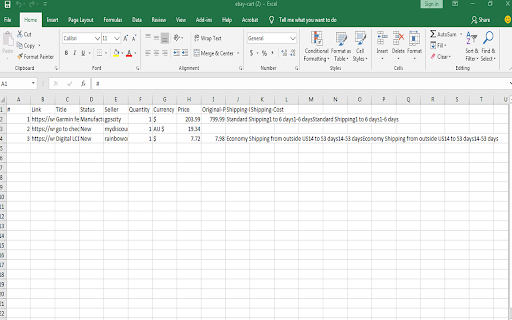
This extension exports ebay.com cart products link, title, status, quantity and other attributes into Excel/CSV file Share links to the items you want with friends, family, or anyone who can buy them on your behalf. It’s perfect for collaborating with others, working with online buying agents, shopping services, proxy buyers, personal shoppers, and more. You can also save your cart data locally to complete your purchase later. This extension exports your eBay cart to a CSV file, which works with Excel and other spreadsheet tools. To convert it to an Excel file, simply open the CSV in Microsoft Excel, click “Save As,” and choose a format like .xls or .xlsx. The extension is completely free and always will be. It runs entirely in your browser, and all data is stored locally on your computer. We do not collect or access any information — ever. We’d love to hear from you! Leave a review or email us your thoughts — every rating, from 1 to 5 stars, helps us improve. Note: This extension is not affiliated with eBay. Works only on the eBay.com cart page.

Shopify Export Data
This extension allows the user to export shopify data in csv,excel format. Export product listing data with just one tap, no setup, no sign-up, Free to start. Download the export file automatically into two formats Excel and CSV. Shopify Export Data is a complete product data exporter extension, download all product details with a single click and import them quickly into the Shopify store. Simple and easy to use. There is no limit to product listing download. You can export an unlimited number of collection pages. With Shopify Export Data, you can • Easy to operate • Free to start • All language website data exporters • Easy export and download automatically • With just one click, you can export thousand of products data • The extension supports all screen resolutions of your desktop • Use CSV files format to import products to or export products from your Shopify store • Information may contain Handle, Title, Body (HTML), Vendor, Type, Tags, etc... How Extension Work • Tab the extension icon. • Go to the Shopify website and click on that collection page for the product listing data you have to download. • Select the export file format and click on the Export/Download button. In extension, you can export all collection data by choose to all collections. • When you choose the collection, the number indicates how many products are in that collection. • It will redirect automatically after the download is over. You can save your data in your selected folder. • The data that will download will be in Excel and CSV files. • You can easily import the data on your Shopify website. Shopify Export Data is an easy to operate extension to facilitate the best user experience while dealing with the export product data. Note: Some time extension can take long time to download due to larger product details, so be patient until the download is over.

Aliexpress Cart Exporter
This extension exports Aliexpress cart products title, URL, Quantity and other attributes into Excel/CSV file Uses: 1- Share the links of items you want to buy with anyone, where they can buy on your behalf; an awesome solution for those who are working with buying agents in China, dropshipping, online shopping services, proxy buying services, online personal shoppers, etc. 2- Share your Aliexpress items with sourcing agents in China to find similar items on Taobao, 1688, or other Chinese wholesale websites. 3- Collaborate with your family or team members about what items you need to buy. 4- Save the cart information on your local computer to buy them in the future. And many others! The extension exports the file into CSV format, which is similar to the Excel format. If you want to convert the CSV into Excel, you can simply use Microsoft Office Excel to open the CSV file, then click on “save as” and choose the Excel file format you want (likely XLS or XLSX). This extension is FREE to use for everyone forever. The extension runs 100% on your browser/computer. All data are stored on your computer ONLY. We have no access to any data whatsoever. Please feel free to share your thoughts by leaving a review or simply emailing us. We would appreciate your rating and feedback to help us to improve our extension further. All reviews, from 1 to 5 stars, are welcome! NOTE: If you have many items in your cart, you must scroll down to the bottom until the end so that all the items in your cart shows up. Then you can now click "Export to Excel/CSV" button. Update v1.2: Added column for total item cost. Update v1.4: Minor fix of blank popups showing. Update v1.5: Separated shipping cost and shipping method. Update v1.7.2: Fix Aliexpress cart page. Update v1.7.3: Fix on missing button on popup Update v1.7.4: Fix export items on cart page. * We are NOT affiliated with Aliexpress. This extension is independently developed to easily export Aliexpress cart data.

Amazon cart exporter
This extension exports amazon.com cart products Title, URL, Quantity, Price and other attributes into Excel/CSV file Uses: 1- Share the links of items you want to buy with anyone, where they can buy on your behalf; an awesome solution for those who are working with buying agents, online shopping services, proxy buying services, online personal shoppers, etc. 2- Share your amazon.com items with sourcing agents. 3- Collaborate with your family or team members about what items you need to buy. 4- Save the cart information on your local computer to buy them in the future. And many others! The extension exports the file into CSV format, which is similar to the Excel format. If you want to convert the CSV into Excel, you can simply use Microsoft Office Excel to open the CSV file, then click on “save as” and choose the Excel file format you want (likely XLS or XLSX). This extension is FREE to use for everyone forever. The extension runs 100% on your browser/computer. All data are stored on your computer ONLY. We have no access to any data whatsoever. Please feel free to share your thoughts by leaving a review or simply emailing us. We would appreciate your rating and feedback to help us to improve our extension further. All reviews, from 1 to 5 stars, are welcome! * We are NOT affiliated with amazon.com. This extension is independently developed to easily export amazon.com cart data. *This extension works only on amazon.com cart page.

Amazon Review Exporter & Scraper
Collect & export Amazon product reviews in bulk. Scrape reviews with media, ratings & metadata to CSV/Excel/JSON for market research 🚀 Amazon Review Exporter & Scraper - Bulk Export Reviews with Media to CSV/Excel/JSON Effortlessly collect and export Amazon product reviews in bulk with our powerful browser extension. Scrape customer reviews including images, videos, ratings, and complete metadata, then export to CSV, Excel, or JSON formats for comprehensive market research and competitor analysis. 📊 Bulk Review Collection • Automatically scrape Amazon product reviews • Collect reviews from all major Amazon marketplaces worldwide (US, UK, CA, DE, FR, IT, ES, JP, AU, and 20+ more) • Smart duplicate detection to ensure data quality • Adjustable request intervals (3-9 seconds) to avoid rate limiting • Real-time collection progress tracking with pause/resume functionality 🎯 Advanced Filtering Options • Filter by star rating (5-star, 4-star, 3-star, 2-star, 1-star, or all ratings) • Sort by helpfulness, recent reviews, or top reviews • Filter by verified purchases only • Search reviews by specific keywords • Filter reviews with media content (images/videos) • Customize reviewer type (all customers or verified only) 💾 Multiple Export Formats • CSV export - Compatible with Excel, Google Sheets, and data analysis tools • Excel (XLSX) export - Professional formatted spreadsheets • JSON export - Perfect for developers and API integration • Customizable file naming with dynamic variables (ASIN, date, product title) 📸 Media Download Capabilities • Batch download all review images in high quality • Download customer review videos • Organized folder structure with customizable naming patterns • Automatic file organization by review ID, author, or custom templates 📋 Comprehensive Data Export • Review ID and unique identifiers • Review title and full content • Star ratings (1-5 stars) • Review date and timestamp • Reviewer name and profile information • Verified purchase status • Helpful votes count • Product format/variant information • Direct review URLs for reference • Image and video URLs • Scraped timestamp for data tracking 1. Navigate to any Amazon product page or reviews page. Click the extension icon in your browser toolbar, then click "Go to Export Reviews" button. Alternatively, use the "Quick Export" button directly on the product/review page. 2. Configure your filters (optional): Set star rating, sort order, verified purchases, or search by keywords. Adjust request interval if needed. 3. Click "Start Collection" and watch real-time progress. Pause and resume anytime during collection. 4. Export your data in CSV, Excel, or JSON format. Download review images and videos if needed. 👥 Perfect For - Market Researchers: Analyze customer sentiment, identify trends, and gather competitive intelligence from thousands of Amazon reviews. - E-commerce Sellers & Brands: Monitor product reviews, track customer feedback over time, and analyze competitor reviews to gain market insights. - Data Analysts & Scientists: Gather large datasets for sentiment analysis, natural language processing, and machine learning projects. - Academic Researchers: Collect review data for consumer behavior studies, sentiment analysis research, and e-commerce market analysis. - Content Creators & Marketers: Research customer pain points and desires for content creation and marketing materials. - Business Intelligence Teams: Track brand reputation, monitor product performance, and generate comprehensive reports with real customer feedback. - Competitor Analysis: Export all reviews from competing products to understand their strengths, weaknesses, and identify market opportunities. - Product Launch Research: Analyze reviews of similar products to understand customer expectations, common complaints, and desired features before launching. - Quality Assurance Monitoring: Regularly export your product reviews to track quality issues and measure customer satisfaction trends over time. - Customer Sentiment Analysis: Collect thousands of reviews to understand overall customer perception, emotional responses, and satisfaction levels. - Marketing Content Creation: Extract authentic customer testimonials and discover powerful product benefits mentioned by real users for campaigns. - Product Improvement Roadmap: Analyze customer feedback to prioritize feature requests and create data-driven product development roadmaps. - Academic Research Projects: Gather large-scale review datasets for research on consumer behavior, e-commerce trends, or cross-cultural preferences. - Visual Content Analysis: Download review images and videos to analyze how customers use products and identify common usage patterns. - Supplier Evaluation: Research product reviews before selecting suppliers or manufacturers to understand quality issues and customer satisfaction. - Price Point Validation: Analyze reviews across different price points to understand value perception and determine optimal pricing strategies. Your privacy is our priority. Amazon Review Exporter & Scraper operates with your data security in mind. All review scraping and data processing happens locally in your browser — we do not collect, store, or transmit your browsing history. When you create an account, we collect only your email address (or basic Google profile info if you sign in with Google) to manage your account and subscription. We use Paddle and PayPal as third-party payment processors for secure payment handling and never store your payment details on our servers. The extension only accesses publicly available review data on Amazon pages that you actively choose to scrape. For full details, see our Privacy Policy at https://amazonreviewscraper.echobot.dev/privacy.html This extension is an independent project and is not officially affiliated with, endorsed by, or associated with Amazon.com, Inc. or its affiliates. Amazon is a registered trademark of Amazon.com, Inc. This extension is designed for legitimate business research, market analysis, and academic purposes only. Users must comply with Amazon's Terms of Service and applicable laws in their jurisdiction. Please respect copyright laws and the intellectual property rights of others when downloading content. The responsibility for the downloaded content and how the exported data is used lies solely with the user. This software is provided "as is" without warranty of any kind.
