
ekekffgghkadgjkopekbpkhccddmkioc

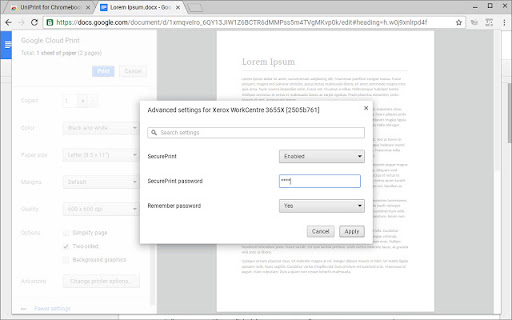

Print to your corporate printers without going through the Google cloud UniPrint for Chromebooks (Enterprise) is an extension that enables Chromebooks to print directly to your organization’s printers without having to go through Google Cloud Print. By preventing your sensitive documents from going to the cloud, you can ensure secure printing for your corporation. ---Key Benefits--- • Easy and secure printing direct to your corporate printers • No need to register corporate printers with Google Cloud Print • Easily integrates with UniPrint SecurePrint for pull printing • Access to advanced printer properties such as stapling and hole punching • Intuitive and familiar user interface requires no additional training ---Requirements--- • Have UniPrint Infinity 9.1 setup in a Print Server configuration in your data center For more information on UniPrint Infinity, visit our web site at www.uniprint.net.

Workplace Pure Browser Extension
Print from your Chrome devices to Workplace Pure Konica Minolta Cloud Print allows you to experience the easiest and most comfortable way of printing. Choose from various options and print directly from the application, via browser from your smartphone and tablet or simply print from the Google environment. Print jobs will be send to the Workplace Pure platform and can be released via a secure follow-me authentication on any multifunctional system that is connected to Workplace Pure. Print options such as duplex printing or colour printing can still be individually adapted at the multifunctional system. This is the Workplace Pure Browser Extension. Use the Cloud Print of Workplace Pure directly from your Google Chrome browser.

ezeep Blue
Extension to print from your Chromebook or Chrome browser with your ezeep Blue account Enjoy smart printing for Google Workspace, Chrome OS and your Chrome browser. ezeep Blue is a cloud printing solution that connects all printers to Chrome OS and Android. Printers can be centrally managed and assigned to users regardless of where they are located, even if the networks are separated. Integrated pull printing ensures that no printouts fall into the wrong hands. This makes ezeep Blue ideal for educational institutions and companies alike. ▸ Share and provision ezeep-enabled printers with employees or guests. With the optional ezeep Hub, you can connect printers to Chromebooks without needing a Windows PC or print server. ▸ Print from Chromebooks or the Chrome Browser to any printer, even if isn't compatible with Chrome OS. ▸ Print remotely to any printer, even if you aren't in the same network as the printer. ▸ Manage all printers and configure printing policies in one web portal. ▸ Supports all printing options provided by the printer manufacturer. ▸ Fully integrated into Chrome OS for great user experience. ▸ Supports Sign in with Google, as well as Microsoft and Apple logins. ▸ Complies with the strictest security standards, like GDPR and HIPAA and includes added security features like pull printing. All print data is transmitted TLS 1.2 encrypted and deleted immediately after printing. ▸ Hosted by carbon-neutral hosting providers. We also offset the CO2 emissions produced by each printed page via our cooperation with justdiggit.org Already have an ezeep Blue account? Download the Chrome Extension and login with your ezeep Blue account: https://app.ezeep.com/quickstart Not yet an ezeep Blue customer? Sign up & try for free: https://www.ezeep.com/free-trial/

Azure Authorization Header Extractor
This extension listens for requests coming out of tabs opened on the Azure portal. It then extract the authorization header from requests sent to Azure. You can copy the header to your clipboard by clicking the extension icon and use it when working directly with Azure REST API

Gitoqlok: Qlik and PowerBI Versioning/Toolkit
Qlik Sense and Qlik Cloud Version Control and Routine Optimization Qlik version control. Easy-to-use tool for keep track changes of your application in Qlik Sense. Track changes of your Qlik Sense application using source versioning control and collaborative development tool. Gitoqlok augments Qlik Sense interface by offering a number of handy functions to enhance your user experience. Ease your working routine by visualizing changes throughout the version commit history of your application, make sheet thumbnails in just a second, and more. Gitoqlok supports popular Git providers and platforms. Gitoqlok tutorials and Changelog: https://docs.gitoqlok.com
