
ekeefjfdbaakgbfbagacmckiedkmakem
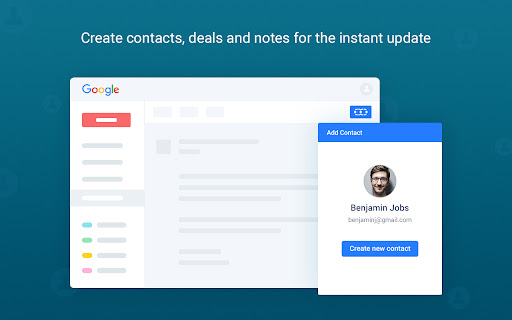


Chrome Extension for Salesmate lets you access your CRM data and manage your day to day interactions with customers inside Gmail Turn your Gmail inbox into your sales CRM hub with Salesmate CRM for Gmail. Chrome Extension for Salesmate lets you access your CRM data and manage your day to day interactions with customers inside Gmail. This highly advanced chrome extension brings the power of Salesmate to your Google Mailbox. With CRM data at your fingertips, you have the context you need for every email. Productivity features like easy templating, scheduling and tracking ensure you can spend more time on selling without facing any stumbling blocks. - Create new deal and contacts in real time from Gmail Inbox. - View all the crucial details about a deal as soon as you receive an email - Gain access to sales history - Immediately add notes and assign activities - Create deals and notes for the instant update - Get notified when a prospect opens your email, click on links or downloads the content - Installs in seconds, easy to use Keep all your information updated and function efficiently with this smart CRM for Gmail plugin. About Salesmate CRM: Salesmate is an intelligent CRM that assists companies in managing, nurturing and converting sales deals into paying customers. It is an all-in-one sales solution powered with built-in calling, email tracking, customized reporting, pipeline management, and sales automation functionalities. Salesmate is designed for busy sales reps who don’t have time to toggle between application. If you want to know more on how Salesmate CRM helps in winning more sales, you can try Salesmate for Free with our 15-day trial (no credit card required). INTELLIGENT WORKFLOWS Be more productive in your sales process and automate repetitive tasks with Salesmate intelligent workflows. - Send emails - Follow up with prospects - Assign deals to sales reps - More Spend more time in selling and let Salesmate CRM do admin tasks for you. Get complete visibility across all stages with Salesmate CRM and spot the hot deals. Stay organized and make smart moves with all your customer's data in one place. Salesmate keeps you notified with all your customer moments that helps in nurturing more relationships. SELL FROM YOUR INBOX Build more relationships and close more deals straight from your inbox. Salesmate Chrome extension allows you to manage and track emails directly from Gmail. Additionally, Salesmate seamlessly integrates with G Suite apps to make you more productive by keeping all your Google data centralized. You can also sign up for Salesmate CRM using your Google account. DATA ENTRY AUTOMATION Salesmate makes it easier for you to capture customer details from your Gmail inbox and add activity, deal, or notes with a single click.

Gmelius: Shared Inboxes & AI Email Assistants for Gmail
Save 1 hour daily: AI Assistants sort your emails, draft replies & shared inboxes let your team take over conversations for you. Gmelius is the AI-powered email management platform built natively for Gmail. It lets generative-AI assistants sort, draft replies and dispatch messages, offers shared inboxes and shared labels inside Gmail, and keeps everything in perfect sync across your team and tools. ✨ AI Assistants for Gmail – Reply, Sorting and Dispatch agents cut routine email work by an hour a day. 📨 Shared Inbox inside Gmail – manage support@, sales@ or any group address with clear open → pending → closed statuses, assignees, tags, @mentions and notes. 🏷 Shared Gmail Labels – turn any Gmail label into a live thread your whole team can follow. 🎛 Custom views – flip an inbox or label into specific views depending on your operational needs. 🤖 Automation rules and SLA timers – create “If-This-Then-That” flows, auto-assign owners and stay inside promised response times. 📊 Analytics dashboards – track volumes, resolution time and teammate workload at a glance. All features live where you already work, so your team keeps its Gmail muscle memory and gains new productivity super-powers. ✨ Highest Star Rating in our Class. 🏆 Leader of the shared inbox space. 🚀 Y Combinator S19 This is our browser extension that completes our solution for Gmail and Google Workspace customers. Key features: ✨ AI Assistants for Gmail: Meet AI assistants whose job it is to manage your Gmail inbox. ✓ AI Reply Assistants - They draft replies to your emails. ✓ AI Sorting Assistants - They sort and classify your incoming emails. ✓ AI Dispatching Assistants - They route emails to the right teammates. 📨 Shared Inbox: Transform Gmail into a collaboration platform. Make great teamwork possible in Gmail by reinventing how your team manages inboxes like support@ or invoices@. Replace cluttered Google Groups and help desks with a shared inbox built for Gmail. Discover the smartest alternative to Google Groups, Help Desks, Hiver, Front, etc. 🏷️ Gmail Shared Labels ✓ Share existing or new Gmail labels with members of your team ✓ Synchronize conversations in real-time across all devices (e.g., mobile, desktop) 👥 Team Collaboration ✓ Real-time syncing across all devices ✓ No more bcc nor fwd! ✓ Email Notes and @mentions to add context to any conversation ✓ Assign or delegate emails to members of your team 🤓 Workflow Intelligence ✓ Automate repetitive tasks with rules for internal and external workflows ✓ SLA rules, auto responder, auto assignment and more ✓ Ex: “when this email gets answered add automatically reply and assign it to that team member” 📧 Shareable Email Templates for Gmail ✓ Make email writing easy and fast ✓ Improve your team's consistency and performance ✓ Proposal, Sales, Marketing, Custom Templates - easily created and shared Swiss-grade privacy and security Headquartered in Switzerland, Gmelius follows a strict Privacy-by-Design framework. Your data stays confidential, is securely processed, and is never used to train AI models. Explore our Trust Center any time. For more details, please see https://gmelius.com/legal/security Install the extension, start your 7-day free trial, and see how AI + Gmail can unlock real email productivity for your team. Need a guided tour? Book a demo at gmelius.com/request-demo =============================== © Gmelius. Less Email. More Life. Gmail is a registered trademark of Google Inc.; Gmelius is not affiliated with Google.

DragApp: Gmail shared inbox
Turn Gmail into a collaboration tool for teams to manage shared inbox, Help Desk, CRM, Task Management and more from Gmail. Bring email collaboration, workflow automation and individual productivity into your Gmail inbox. Built for Google Workspace users. ✓ Manage shared inboxes or Google Groups like support@, sales@ or info@. ✓ Use shared boards in Kanban, list or preview views to create all types of workflows in Gmail. ✓ Know who is working on what with email assignment. ✓ Collaborate with team members within the context of a specific task with internal live chat and email comments. ✓ Create automation rules for your workflows. ✓ Create custom fields to add information specific to your company’s workflows. ✓ Personalize email templates and follow-up email sequences. ✓ Report on individual and team performance with email analytics. ✓ Integrate Drag to 5,000+ apps via Zapier. ✓ Manage workflows on the go with a mobile app. Watch our demo: https://www.dragapp.com/watch-demo/ Speak to a Customer Champion: https://www.dragapp.com/demo/ Read real customer stories: https://www.dragapp.com/customer-success-stories/ Refer Drag and get paid: https://www.dragapp.com/referral-program/ 🧮 Boards Use shared boards for different workflows, from a simple Help Desk and CRM to a Marketing board. 🙋♂️ Email Assignment Assign emails and tasks to the best-placed team members. You can see, at a glance, who’s working on what. 🎤 @mentions @mention your team to start a real-time chat with a team mate within the context of a specific email or task. 💬 Team chat A private space for you and your team to add email comments and context to any conversation. 📨 Shared drafts Work together on email replies. Write a draft reply and have a colleague check it before sending. 🏷️ Shared labels Share labels and organize your boards across your team with shared labels. ✅ Tasks Not everything comes as an email, sometimes there’s a separate task. You can add tasks directly to your inbox. 📤 Email templates Quickly select templates to send, instead of having to write them from scratch over and over again. 🕹️ Automations Easily automate repeatable workflows. Automatically send emails to boards, assign emails and create tasks for your team. 📊 Email analytics Understand what’s happening on boards. Get insights into how productive you and your team are. 📱Custom fields Custom fields have all of the different field types that you may need to organize your cards. For example ‘deal value’ for Sales CRM or ‘ticket criticality’ for Help Desk. 📁 File upload Share files with your team – upload all sorts of files to cards to close things faster. 🗂️ Merge cards Merge cards into collections to save time and energy. Group different emails and tasks into one single card to better manage your work. 🕵️ Email tracking Know who’s viewing your emails and when. Think WhatsApp’s ‘double-tick’ technology. 🧘 ”Reply as” Reply or compose new emails as yourself, your team, or as the shared inbox address such as sales@ or support@. 🚧 Collision detection Sometimes your team tries to do the same thing at once. Drag detects this and notifies users when they’re both working on the same thing. 📕 Email notes Can’t remember some details? Add notes to any email so you always have information to hand. ☑️ Checklists Most emails come with things to get done. Separate these out and add them as actionable tasks. 📆 Due dates Is there a deadline – something you need to get done by a date? Keep things on track by adding a due date. 🍭 Color coding Get a better overview of your boards by color-coding them based on time zones, urgency levels, or anything that works best for you. 🗄️ Activity log Get a full history of all actions on a board (and on a specific card). Learn what and when you need to deal with an email or task. 📇 Sort & filter Sort and filter boards so that you can focus on the things that matter most. By person, statuses, colors, labels, you pick how to filter boards. 🔗 Card and board permalinks Generate card and board links and use the URLs anywhere. Used for: ✓ Shared Inbox ✓ Help Desk & Customer Support ✓ Sales CRM ✓ Task Management ✓ Finance ✓ Operations ✓ Human Resources and Recruiting ✓ Project Management ✓ Customer Onboarding ✓ Marketing ✓ Remote Work ❤️ Trusted by over 30,000 professionals around the World. PRIVACY & GDPR We are committed to respecting everyone’s privacy and design our services in order to best achieve this.If you have questions, please email us at access@dragapp.com. For more details, please see https://dragapp.com/privacy and https://dragapp.com/gdpr. By installing this extension, you agree to DragApp's Terms and Conditions (www.dragapp.com/terms) and Privacy Policy (www.dragapp.com/privacy). Copyright © DragApp DragApp is not affiliated with Google or any Google-related services.

NetHunt CRM for Gmail
🌍 Serving customers in 73 countries for over 10 years 💌 Trusted by thousands of Gmail users NetHunt CRM turns your Gmail inbox into a complete sales hub — helping you manage contacts, track deals, automate workflows, and connect all your communication channels in one place. No tab switching. No missed opportunities. With full Gmail integration, multi-channel lead capture, advanced sales automation, and customizable pipelines, NetHunt CRM helps you organize, nurture, and close deals faster. 🚀 Why choose NetHunt CRM for Gmail ✅ 100% Gmail integration — all CRM features inside your inbox ✅ Multi-channel communication — email, WhatsApp, Instagram, LinkedIn, Telegram, and more ✅ Advanced sales automation — workflows, triggers, and follow-ups on autopilot ✅ Customizable pipelines and reports — adapt to your sales process ✅ Proven reliability — 10 years on the market, Google Cloud Partner, customers in 73 countries 📬 Centralized Contact & Lead Management ✅ Store all customer and lead data in one secure database ✅ Link emails, calls, chats, and files automatically to CRM profiles ✅ View the complete interaction timeline for each contact ✅ Segment leads with filters, tags, and custom views 🌐 Multi-Channel Lead Capture ✅ Capture leads from website forms, messengers, and social media ✅ Automatically enrich records with publicly available profile data ✅ Create leads from WhatsApp, Viber, Instagram, Facebook Messenger, Telegram, and more 📊 Pipeline & Sales Management ✅ Build multiple pipelines for different products or services ✅ Track revenue, forecast sales, and identify bottlenecks ✅ See the exact value of deals at every stage ⚡ Sales Automation ✅ Auto-create records from inbound leads ✅ Assign tasks and distribute leads automatically ✅ Send personalized multi-channel nurturing sequences ✅ Get alerts for important deal updates 💌 Email Campaigns & Tracking ✅ Send bulk personalized emails directly from Gmail ✅ Create reusable templates for repetitive outreach ✅ Track opens, clicks, replies, and link engagement ✅ Automate follow-ups for campaigns 📈 Reports & Analytics ✅ Monitor sales activity and team performance ✅ Set and track goals for individuals or the whole team ✅ Analyze deal loss reasons and revenue trends ✅ Build custom reports in Looker Studio 📅 Task Management ✅ Manage tasks and team workload inside Gmail ✅ Assign tasks automatically by round-robin algorithm ✅ Link tasks to emails and CRM records ✅ Get a daily digest to plan your workday 🔗 Integrations That Work Together ✅ Google Workspace: Gmail, Calendar, Chat, Drive ✅ Messengers: WhatsApp, Telegram, Facebook Messenger, Instagram ✅ VoIP & calls ✅ Slack for deal notifications ✅ Looker Studio for advanced reporting 🔒 Security & Privacy As a Google Cloud Partner, NetHunt passes Google’s Security Assessment Program and complies with GDPR. We closely monitor all changes from Google Cloud to meet compliance requirements and keep your data safe. 🥇 Google Cloud Partner 🥇 Google Security Assessment Program Passed ⭐ Highly rated on G2 and Capterra

Nimble Prospector
Lead Capture, Data Discovery, and CRM that works on every web page Nimble Prospector helps you create targeted lists of prospects, influencers, potential investors, and more within seconds -- from anywhere you work on the web. Don't have a Nimble account? Start your free 14-day trial at www.nimble.com/register. With Nimble Prospector 2.0, you can: - Easily build prospect lists from anywhere you work. From multiple pages across their browser, within your inbox, and across your favorite business applications. Easily create lists of conference speakers, influencers, employees from a company website, and more. Additionally, teams can make actionable lists from their LinkedIn, Twitter, and Facebook contacts. - Log notes, add tasks, attach files, and set Stay in Touch reminders to an existing contact record, or create a new contact record, to always follow up with your follow-through. - Easily view all interaction history (including past emails, Twitter conversations, events, deals, tasks, and more) to always stay up to date with next steps with key contacts. - Easily tag multiple contacts for quick list building, contact organization, and easy segmentation. - Target businesses using company profiles: including biography, industry, number of employees, year founded, keywords, company type, revenue, ticker, CEO name, address, and phone number. - Qualify prospects using auto-generated contact profiles which include biography, location, keywords, work experience, education, and social profiles - Discover verified business contact details, including email addresses, phone numbers, and address from any website, social network, or business web applications.
