
ekcdnnkolgkikkhbbjcabcjdibfbafbl
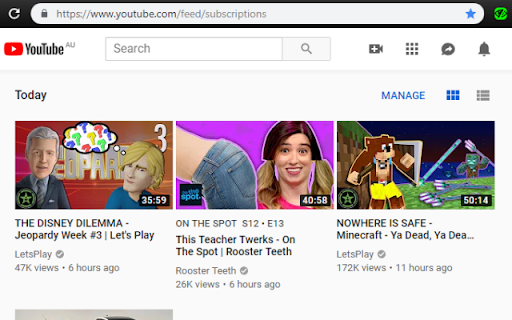
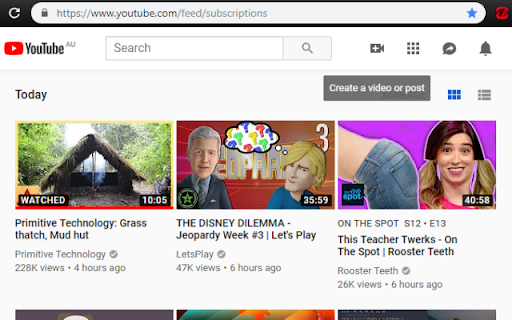
This extension will hide watched youtube videos from the subscriptions page. Sick of finding which videos you haven't already watched within your subscription feed? This extension will automatically hide watched videos so you can focus on enjoying the new content. Right click the extension icon for options: this can be used to adjust how much of the video must be watched before it is considered "Watched". Note: Red Icon means the extension is disabled, Green is enabled. Click the icon to enable/disable.

Watched Videos On YouTube Remover
YouTube only allows you to remove all watched videos from the Watch Later playlist, not taking progress into account. Videos that have only been partially viewed will also be deleted from the playlist. For individual playlists the function is even not available at all. ★ By means of this extension, the fully viewed videos can be deleted automatically from a playlist. ★ The partially watched videos remain in the playlist and can be watched at a later time. The extension extends the action menu by the entry "Remove completely watched videos". "A playlist on YouTube employs a lazy loading technique, meaning that it loads content as needed rather than all at once. Therefore, this extension operates based on the entries that have already been loaded. It doesn't automatically load all entries in the playlist. For the extension to consider more videos, you would need to manually scroll down through your playlist to load more entries."

ytb not-interested button
It's boring when you want click the not-interested button in youtube website. You need click the menu button, wait for the popup menu and the click the not-interested button. This extension is for add the not-interested button in the first level. So you can quick click and save time. Please notice: you need logined to ytb to let this extension work. Because this extension do the *I not interested* behavior, so need ytb logined. The source is at https://github.com/huhuang03/ytb_dni. If you think it's useful, please conside buy me a coffe https://www.buymeacoffee.com/huhuang03

Not Interested!
Single-button resolution to quickly mark YouTube videos and playlists as not interested. Simply hover over a video's details and press the hotkey to mark the video as not interested. Default hotkey ALT+Q. Don't forget that you can change extension hotkeys at the following webpage: chrome://extensions/shortcuts Following a recent YouTube update, homepage videos will highlight in the area you need to hover to mark the video as Not Interested! Following a new change to YouTube's layout, there is a memory leak issue on YouTube's side that has menu's endlessly appearing. if this affects you (it happens when you mark shorts as not interested, then normal videos) the extension will not work and you will need to reload your page. Unfortunately this is a YouTube issue and I was not able to fix their broken ass code. Version 2.4 - Fixed Not Interested failing to mark videos on the new YouTube layout. - Added ability to 'Hide' subscription videos using the extension. Just use the same hotkey. Version 2.3 - Fixed a permissions issue that had buttons appearing unnecessarily on music.youtube.com. - Adjusted some of the CSS styling to make it fit better in some windows. Version 2.2 As of V2.2 you can now remove videos from a playlist using the same hotkey. Removing videos from your watch later playlist just got easier! # Privacy I respect your privacy unlike many people out there nowadays. This extension does not connect to any services or even use a connection of any sort. I don't even collect usage analytics or information on who downloaded this extension. All this does is inject a script into YouTube that allows you to use your specified hotkey to mark videos as not interested. Be aware that you are viewing this on a Google page though. They are tracking everything you do. I do not.

BlockTube
BlockTube gives you the control to customize your YouTube viewing experience. It allows you to block specific channels and videos that you don't wish to see or get recommended with. The extension is lightweight and fast, integrated seamlessly and does not affect your browsing experience at all, to an extent that an unsuspecting user will never know it's there to begin with. ** The extension includes the following features * Integrated context menus across YouTube for easy blocking * Block videos by name * Block channels by name * Block comments from specific user or by content keywords * Block/Allow videos with specific runtime * Block YouTube Shorts * Block YouTube Movies * Block Explore page * Block YouTube's auto generated playlists * Hide watched videos from recommendations * Remove "Video paused, continue watching?" popups ** For advanced users * Regular Expressions are supported across all filter options * Advanced Blocking: Extend the functionality on your own using a JavaScript function (https://github.com/amitbl/blocktube/wiki/Advanced-Blocking) ** WARNING ** DO NOT PASTE UNTRUSTED CODE YOU DO NOT UNDERSTAND, YOUR YOUTUBE ACCOUNT MAY BE AT RISK IF YOU DO SO PRIVACY NOTICE: I do not collect any information or data on you. This extension does not contain analytics/tracking codes. This extension does not make even a single request to a 3rd party server. The only data being recorded is your configured options which are saved locally only on your computer. SOURCE CODE AND BUG TRACKING: https://github.com/amitbl/blocktube
