
bbeaicapbccfllodepmimpkgecanonai

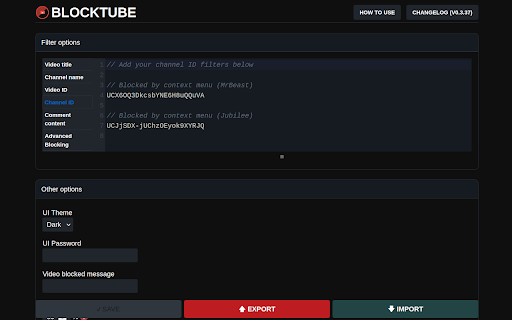

BlockTube gives you the control to customize your YouTube viewing experience. It allows you to block specific channels and videos that you don't wish to see or get recommended with. The extension is lightweight and fast, integrated seamlessly and does not affect your browsing experience at all, to an extent that an unsuspecting user will never know it's there to begin with. ** The extension includes the following features * Integrated context menus across YouTube for easy blocking * Block videos by name * Block channels by name * Block comments from specific user or by content keywords * Block/Allow videos with specific runtime * Block YouTube Shorts * Block YouTube Movies * Block Explore page * Block YouTube's auto generated playlists * Hide watched videos from recommendations * Remove "Video paused, continue watching?" popups ** For advanced users * Regular Expressions are supported across all filter options * Advanced Blocking: Extend the functionality on your own using a JavaScript function (https://github.com/amitbl/blocktube/wiki/Advanced-Blocking) ** WARNING ** DO NOT PASTE UNTRUSTED CODE YOU DO NOT UNDERSTAND, YOUR YOUTUBE ACCOUNT MAY BE AT RISK IF YOU DO SO PRIVACY NOTICE: I do not collect any information or data on you. This extension does not contain analytics/tracking codes. This extension does not make even a single request to a 3rd party server. The only data being recorded is your configured options which are saved locally only on your computer. SOURCE CODE AND BUG TRACKING: https://github.com/amitbl/blocktube

Adblock for YouTube™ — best adblocker
Privacy aware, secure Adblock for YouTube™. Blocks any ads on YouTube.com. You can understand what this extension does by looking at the name. If you don't understand then let's say, this extension helps to keep you away from various advertisements on YouTube. You can turn this extension on and off whenever you want to turn off and on your YouTube ads or advertisements. This extension has a disable button with which you can stop the extension. The best feature of this extension is that it will also show you how much time this extension has saved you from advertisements. So don't delay and download this extension soon it will keep you away from YouTube app for free and you don't have to pay any money for it. 1. Blocks video ads or advertisements during videos on YouTube. 2. Blocks suggested videos on YouTube. 3. YouTube blocks sponsored advertisements. 4. Avoid various sponsorship ads or banner ads and suggest advertisements on YouTube. 5. This extension will keep you away from YouTube advertisements. 6. Very lite and easy to use Extension. You will find thousands of extensions of this name in the market but the original extension of this name is this. If you don't believe it, you can try it. I am sure once you use the tension you will understand that it is the original extension that will help you to stay away from various advertisements on YouTube. Everyone uses this name of Ads Block for YouTube but the original extension is this. This extension keeps you away from various YouTube banner ads. Not only that, YouTube also keeps away from various sponsorships. You can turn this extension on and off whenever you want.It means you can turn YouTube ads off whenever you want and you can turn YouTube ads on.This extension keeps you away from the YouTube app. You can turn off this extension to support your favorite YouTubers. because every YouTuber gets their income from YouTube advertisement. So I request everyone to support their favorite YouTubers and also support me. While using it you will have a pop up open on YouTube. through that you can provide your review and you can close that pop up if you want. Clicking the "Don't Ask Again" button on the pop up will not opening the pop up a second time.

YTBlock - Block any content from YouTube™
Block videos, comments, channels and much more! With this extension you can block any type of content in Youtube™. ✨ Features: • Blacklist words and phrases (regex supported). • Block channels, videos, comments, posts, and playlists. • Block videos by title, categories*, tags*, description*, duration, link, ID, views*, date* and published time*. • Block members only videos. • Block already watched videos. • Block video by language*. • Block shorts, live, premiere, and age-restricted videos. • Block channels and whitelist channels. • Block comments and posts by their content or by channel. • Block playlists by channel, title, and even mix playlists. • Toggleable block overlays. • Password protection. • Many more! ⚠️* Note: A Google API key is necessary to get information that are not visible in the YouTube™ page about videos and channels, such as tags, categories and descriptions. Within the extension there's instructions on how to get one.

AiBlock for YouTube
Filter AI-generated content on YouTube. Community-powered blocklist with customizable warning and hiding modes. Youtube is drowning in AI-Slop. Thousands of channels, uploading videos, with AI scripts, audio or visuals. This is why I created this extension. It will help you, cleaning up your feed by providing personal filterlists and a list, maintained by the community. 1. Install the extension 2. Community blocklist syncs automatically on first launch 3. Browse YouTube - AI channels are filtered based on your settings 4. Right-click any channel to add to blacklist, warnlist, or whitelist 5. Customize your experience in the extension popup You can find us on github and discord if you want to support or just out of curiosity. Features - automatically synched community blocklist (can be disabled) - manually black, warn or whitelist channels - view statistics of lists and blocked videos - import/export your own lists ***** Version 1.1.3 -------------------------- Fixed • No more double overlays: blocked videos no longer show two stacked "Blocked" overlays. • Channel cards in search now get blocked reliably: previously a blocked channel could appear in search results without an overlay. • Indexing issue fixed: overlays now stay within their video tile and can't escape above YouTube's navigation bar. • Right-click "Block this channel" on Shorts and sidebar videos now blocks the correct channel. Previously it could store the handle in a form that didn't match other videos from the same channel. • Context menu items no longer disappear or duplicate after Chrome restarts the extension in the background. • Shorts feed now uses the same channel matching as the main feed, so community-list channels won't slip through on Shorts. • After navigating between YouTube pages, leftover timers from the previous page can no longer fire and cause odd overlay flickers. New • In-player suggestions are now blocked: the video thumbnails YouTube shows at the end of a video (endscreen suggestions) are now covered by the same overlay as regular feed videos. • Added support for YouTube's newer channel-page layout so blocking keeps working as the redesign rolls out. • Added support for newer channel-card layouts in search results. • Added option for automatically block submitted channels until approved Performance • Hiding a full page of videos is now noticeably lighter on your browser • Large community lists use roughly 6× less memory for the lookup table. • Overlay cleanup is faster and more reliable when YouTube reuses video tiles while you scroll. Privacy • The popup no longer loads fonts from Google. The DM Sans font is now shipped inside the extension, so opening the popup makes zero network requests to third parties. • Added a strict Content Security Policy to the extension's own pages as a defense-in-depth measure. Fixed - **Unicode channel detection**: Channels with non-ASCII characters (e.g. `@SzeptSłów`) are now correctly matched against blocklist/warnlist - **Unicode context menu submission**: Fixed channel handle extraction truncating at non-ASCII characters - **Sync count showing zero**: Fixed periodic sync overwriting existing channel lists with empty arrays on network failure Improved - **Light mode contrast**: Darker success green, stronger borders, and darker background layers for better readability Changed - **Popup redesign**: Complete visual overhaul with AiSList dark theme matching to project's website - Fixed-height popup with consistent footer positioning - Three-dot menu for Export/Import/Clear actions - **Tab renames**: "Settings" → "Preferences", "Channels" → "Your Filter" - **Username section changed**: Now with custom "Anonymous" toggle - Edit button hidden when anonymous mode is enabled Improved - **Light mode contrast**: Improved readability for footer links, theme toggle, and subtitle - **Dark mode default**: Explicitly set as default on first install - **Sync notification**: Now shows total channels synced (blocklist + warnlist combined) - **Search page channel detection**: Added `a#channel-thumbnail` selector for reliable extraction - **Channel renderer support**: Added `ytd-channel-renderer` for channel cards in search results - **New Shorts format support**: Added `ytm-shorts-lockup-view-model-v2` and `grid-shelf-view-model` Version 1.1.0 -------------------------- Added - **Channel page submission**: Right-click context menu on channel pages now uses channel handle from URL - Automatically extracts channel handle from URLs - Finds any video on the page to use as evidence link - **First-time submission confirmation**: Player submit button now shows a confirmation modal on first use - Explains that the channel will be submitted to AiSList community blocklist - "Don't show this again" checkbox to skip future confirmations - **Duplicate submission prevention**: Tracks last 50 submitted channels to prevent accidental re-submissions - Shows "Channel already submitted" message when attempting to submit a previously reported channel - Stored locally, not visible in UI - **Channel handle validation**: Popup submit form now validates and auto-extracts channel handles - Shows clear error message for invalid formats Improved - **Channel detection reliability**: Refactored `extractChannelFromElement()` for more reliable channel handle extraction - Prioritizes `#avatar-link` as primary selector - Better handling of sidebar videos, hover previews, and Shorts Version 1.0.9 -------------------------- Added - **Context menu submission**: Right-click on any video to submit the channel to the community list - "Submit to Community List" option in context menu - Automatically extracts channel handle and video URL - **Submit button in YouTube player controls**: Added a flag icon button next to subtitle/autoplay buttons - Quick one-click channel submission to community list while watching videos - Visual feedback for submission states (submitting, success, error) - Only visible when community list is enabled and on watch pages - **Submit Channel tab in popup**: New fourth tab for submitting channels to the community list - Enter channel handle (@channelHandle) and video URL as evidence - **Username field** in Settings tab for attribution - **Anonymous submission option**: Checkbox in Settings to submit channels anonymously - **HTTP error handling**: Added proper error messages on ban, rate limitations, etc. - **Sidebar video blocking**: Videos in the sidebar (suggested videos on watch pages) now get overlays/hidden - Added `processSidebarVideos()` function to handle `yt-lockup-view-model` elements Improved - **Clearer overlay messages**: Updated overlay title text based on list source - **Compact overlay for sidebar videos**: Smaller overlay design that fits within sidebar video thumbnails - **API error handling**: Improved 502 error messages across all submission methods Changed - **Popup UI reorganization**: Restructured popup interface with three main navigation tabs - **Settings tab**: Contains block mode settings, community blocklist settings, and action buttons - **Channel Management tab**: Contains the three channel lists (Blacklist, Warnlist, Whitelist) with nested tabs - **Statistics tab**: Contains all statistics tiles in a dedicated view - Moved "Clear All Blocks", "Export Data", and "Import Data" buttons from footer to Settings tab Version 1.0.7 -------------------------- Added - **Manual channel addition**: Added text input fields to manually add channels to lists - Input field with "Add" button in each tab (Blacklist, Warnlist, Whitelist) Fixed - **Fullscreen cursor visibility**: Fixed cursor not disappearing in fullscreen mode when media controls hide - Cursor now properly hides with controls in fullscreen as expected - **Statistics section overlap**: Fixed Statistics heading overlapping with channel list items Improved - **Compact statistics display**: Reduced statistics tiles height by ~20% for better space utilization - Enhanced context menu channel detection: Right-click context menu now works reliably across all video types - Hover preview videos: Successfully extracts channel when right-clicking on hover preview videos - Shorts detection: Context menu disabled for Shorts videos (shows "No Channel Found") - Shorts don't have accessible channel info in the DOM - Community warnlist support: Extension now syncs and applies warnlist from GitHub alongside blocklist - Warnlist channels show warning overlays (not hidden) regardless of block mode - Popup displays separate counts for blocklist and warnlist in sync status - Auto-sync on popup open: Automatically syncs community lists when opening popup if: - "Use community blocklist" is enabled - Last sync was more than 24 hours ago - Added drag-and-drop import with automatic UI refresh - Added dark mode with a toggle - Attempt to fix community list sync error after installation - Community list should now sync consistently after installation - Better error handling for network failures

Pro YouTube Ad Blocker
Block ads on YouTube for a seamless viewing experience. Tired of sitting through ads before every video? Pro YouTube Ad Blocker removes all types of ads from YouTube and skips ads on Hotstar, giving you a clean, distraction-free viewing experience. 🎥 Video Ads — Pre-roll, mid-roll, and post-roll ads are gone 🖼️ Overlay Ads — No more banners popping up over your video 🏠 Homepage Banners — Clean homepage without promoted content 📄 Feed Sponsored Cards — Removes sponsored videos from your feed 🔍 Search Ads — No promoted results when you search 📌 Sidebar Ads — Blocks display ads next to the video player ⚡ Shorts Ads — Ad-free Shorts browsing 🛒 Merch & Promos — Hides merch shelves and promotional overlays ⏩ Automatically skips ads on Hotstar so you get straight to your content 🔘 Master toggle to enable/disable everything in one click 🎛️ Individual toggles for each ad category — block only what you want 💾 Settings sync across your devices ⚡ Lightweight — minimal impact on browser performance 🔒 Privacy-first — no data collection, no tracking, no analytics 🧩 Simple & clean UI — set it and forget it 🆓 Completely free Download now and take back your viewing experience! 🎉
