
eifjkkaldpnckanlokabomfkfkbpakko
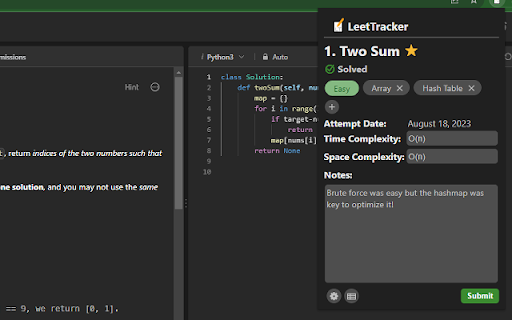
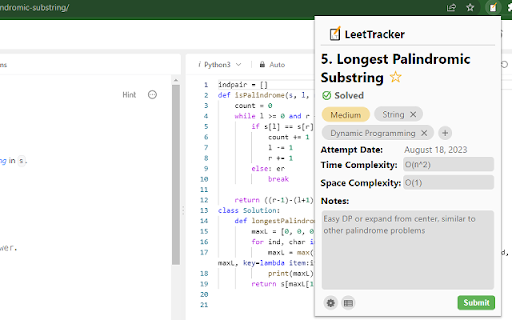
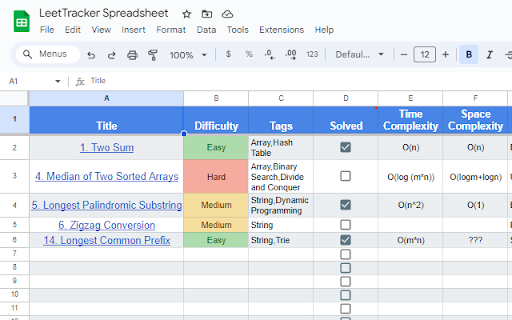
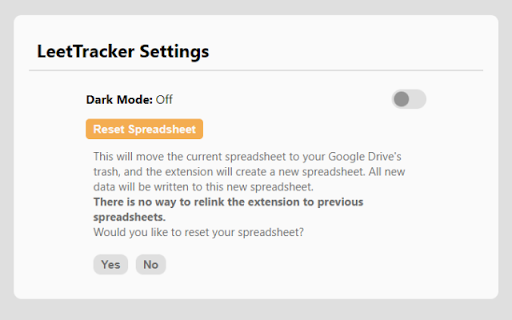
Chrome extension that helps track solved LeetCode problems. *Now updated to work with LeetCode's dynamic layout! Looking for a way to keep track of LeetCode problems without the hassle? Automatically keep track of your notes and problem data in Google Sheets and have easy retrieval in the extension at any time! LeetTracker is meant to be a simple, hassle-free way to keep track of LeetCode problems you have done. When you view any LeetCode problem, the extension will display the problem data (title, difficulty, tags, solve status) within the pop up along with a user-submitted form to keep track of time and space complexity and general notes. Once a user submits this form, a Google Sheets spreadsheet will be created and formatted as a table if it isn't already created. Then, the data will be uploaded either as a new row entry if this problem has not been submitted before, or as an update to the row containing this problem. When you visit this problem again, the extension will pull this data into the pop-up and remind you of what you wrote! Features: - Light Mode/Dark Mode - Reset Spreadsheet - Addition/Deletion of custom tags (along with LeetCode generated tags) - "Star" problems for later review - Track latest attempt/solve date for each problem - Smart detection of LeetCode tab problem data - Auto-generated and formatted creation of Google Sheets - Auto update of spreadsheet with user-submitted data - Retrieval within pop up of past problem notes/data from Sheets - More soon to come! Please reach out to us if you have any comments, suggestions or feedback! ------------------------------------------------------------------------------------- LeetTracker is completely free! We do not track or store data in any database and use Chrome storage for QOL. All API calls are to Google APIs and nothing else. We ask specifically for permission to 1. upload, edit, and delete files that the extension itself creates within your Google Drive 2. read LeetCode tab data to help populate the form 3. use browser storage to store what you've been writing and display it later. *We are completely unaffiliated with LeetCode. This is simply a tool designed for increased productivity with the site.

LeetCode Timer
Leetcode timer and performance tracking This Chrome browser extension is a must-have for coders who want to track their coding time on LeetCode.com and set time limits for themselves. With this extension, you can: - Track your coding time on each LeetCode problem. The extension will automatically start a timer when you start working on a problem and stop it when you submit your solution. You can then view your total coding time at the end for each problem. - Set time limits for yourself based on problem difficulty. The extension allows you to set different time limits for easy, medium, and hard problems. This can help you to focus on and complete problems more efficiently. Release notes for Ver. 4.2: - Revert the timer hiding behavior to its previous version. Release notes for Ver. 4.1: - Fix broken features (Hiding difficulty and acceptance rates) due to UI changes. - The timer has been made robust to handle inactive tabs when practicing outside of the browser tab. Release notes for Ver. 4.0: - Fix timer not showing up due to recent Leetcode layout changes. Release notes for Ver. 3.9: - Minor bug fixes Release notes for Ver. 3.8: - Fix a bug in timer toggling functionality. Release notes for Ver. 3.7: - Fix a bug in timer auto pause functionality when a problem is submitted multiple times. Release notes for Ver. 3.6: - Fix a bug in timer auto pause functionality when a problem is submitted multiple times. Release notes for Ver. 3.5: - Show/Hide Difficulty in recommended problems list - Many more bug fixes and improvements Release notes for Ver. 3.4: - Fix broken Auto pause functionality in Dynamic layout Release notes for Ver. 3.3: - Fix broken timer animation when paused in new layouts - Fix broken Hide Acceptance rate feature in Dynamic layout - Fix timer reset button not working when problem page is loaded Release notes for Ver. 3.2: - Fix timer stuck at loading in Dynamic layout when Hide difficulty setting is turned on. Release notes for Ver. 3.1: - Fix broken styles causing timer text invisible in dark mode - Update feedback/bug report link - Add extension rating link in the popup page. Release notes for Ver. 3.0: - New Timer Design - Timer is now draggable and can be placed where ever you want on the page. - Added support for all Leetcode UI modes(Old, Split View , Dynamic) - Bug fixes Update: 2023-08-16 Fix Broken features in old UI due to the recent release. Update: 2022-09-16 New Features: 1. Improved UI. 2. Timer will now appear for all LeetCode Explore problems. 3. Set time limits for each difficulty. Bug fixes: 1. Fix: Timer showing up in the problem discussion page 2. Fix: Hide time icon not showing up Please rate it if you find this extension useful and provide feedback if you are uninstalling.

LeetCode Tracker
Chrome extension plugin for Leetcode Tracker service. Update (3/8): Fixed the bug with Extension not loading up. LeetCode ID field is now non-functional. Please note that on the extension (upon login) activates on page : https://leetcode.com/problemset/all/ and Question pages (and takes 5-6 seconds to render the button on UI to make sure the leetcode page loads completely first.) Another major update: A full revamp of this project is underway with major big features planned and performance boosts! Stay tuned! IMPORTANT NOTE!!!!!! During sign up from our website, MAKE SURE to give google drive/sheet read/update permissions so that the extension can manage your google sheet for logging. It will only have access to that particular sheet that is created by the leetcode tracker service and not any of your personal data. Supercharge your LeetCode practice with this tracker! On signing up, you get a dashboard, and your accepted submissions will be automatically logged in a spreadsheet separated by topics. The ones you mark for revisit can be viewed easily and revisited as many times as you like!

Competitive Companion
Parses competitive programming problems and sends them to various tools like CP Editor and CPH. Competitive Companion parses competitive programming problems and contests and sends the parsed data to various tools like CP Editor and CPH. At the moment it supports 117 online judges, including most major ones like AtCoder and Codeforces. Using it is very simple. Just install the extension, make sure you got one of the supported tools open, navigate to a problem page and click on the green plus icon in the top-left of your browser. On websites where Competitive Companion is able to parse contests, navigating to the page with all the problems and clicking on the green plus icon will download and parse all problems in the contest at once. You can also use the Ctrl+Shift+U shortcut instead of the green plus icon (configurable on chrome://extensions/shortcuts).

Time and Space Complexity
Display the time and space complexities of the selected code in the web page. Gemini's Time and Space Complexity Analyzer 1. Select Context: Highlight the text on any webpage. 2. Non-Code Selection: If the selected context is not code,it will notify you with a "This is not code" message. 3. Code Analysis: If the selected context is code, the Gemini-1.5-flash LLM will analyze it and display the time and space complexity visually on a graph. Unlock the secrets of your code's performance with the Time and Space Complexity Analyzer, a must-have Chrome extension for students, coders, and the entire coding community. Powered by the advanced Google Gemini API, this tool provides instant analysis of the time and space complexity of your code snippets, helping you understand and optimize your code like never before. For Students Empower your learning journey with this indispensable tool: Quickly Learn and Verify: Get real-time feedback on the complexity of your code, reinforcing the theoretical concepts you learn in class. Improve Coding Skills: Identify inefficient code and learn how to optimize it, fostering better coding habits. Prepare for Exams and Interviews: Receive immediate insights into your code's performance, crucial for technical exams and coding interviews where efficiency is key. For Coders and the Coding Community Enhance your coding prowess with these benefits: Immediate Feedback: Gain instant insights into the efficiency of your code, enabling quicker iterations and improvements. Enhanced Productivity: Save time by automating the complexity analysis, allowing you to focus more on solving the actual problem. Learning Resource: Acts as an educational tool, helping you understand the trade-offs between different algorithms and data structures. Real-World Relevance In the broader context, this tool is a valuable addition to the coding community: Open-Source Projects: Ensure your contributions are efficient, leading to better-performing projects. Professional Development: Maintain high standards of code quality, crucial in professional environments. Community Growth: By promoting best practices in code optimization, this extension contributes to the overall growth and advancement of the coding community. Why You Need This Tool In today's fast-paced development environment, understanding and optimizing code efficiency is paramount. The Time and Space Complexity Analyzer democratizes access to advanced code analysis, making it an indispensable resource for anyone involved in coding. From beginners to experienced developers, this tool helps you maintain high-quality, efficient code effortlessly.
