
eibnbigbelnbcoenddhegialomobcfpd
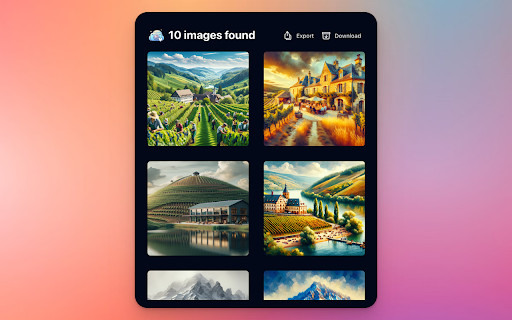

Export and Download DALL·E 3 images from ChatGPT directly to your Computer, Notion, Airtable, Google Drive, and Dropbox. Seamlessly save and organize DALL·E 3-generated artwork with our extension. Choose specific images to download or capture them all in just a few clicks. Upcoming features will enable direct exports to your preferred platforms such as Notion, Airtable, Google Drive, and Dropbox, streamlining your workflow further. Enhance your experience in managing AI creations efficiently, with less hassle and more productivity.

ChatGPT Images Exporter
Download all ChatGPT generated images in high quality and export metadata for easy organization. ChatGPT Images Exporter: Download & Save Your AI-Generated Images Easily Effortlessly download, save, and organize all your ChatGPT AI-generated images. This powerful browser extension lets you export your entire image collection from Chat conversations in just a few clicks, preserving your creative work forever. ChatGPT Image Data Exporter is the essential tool for anyone who uses ChatGPT's image generation capabilities. Whether you're creating digital art, designing visual content, building an AI image portfolio, or simply want to save your images, this extension streamlines the entire process. Key Features: The extension provides two essential functions designed to enhance your ChatGPT experience: - Bulk Image Download: Instantly download all your AI-generated images in their highest quality. Save hours of manual work with our one-click solution that preserves your entire AI image library. - Comprehensive Metadata Export: Capture essential information about each image, including URL, Dimensions, Conversation Info, etc. Export this data in your preferred format (CSV, JSON, or Excel) for seamless organization and reference. How to Use: - Open ChatGPT in your browser and navigate to the Images page (https://chatgpt.com/images) - Click the export button at the top of the page to open the task dialog - Choose to download all images or export image information based on your needs - For image downloads, you can specify a custom folder name or use the default option ChatGPT Images Downloader transforms how you interact with and utilize ChatGPT's visual outputs. For content creators, it's a time-saving asset management tool. For designers, it's a portfolio builder. For educators, it's a resource organizer. For casual users, it's peace of mind knowing your AI creations are safely stored. Whether you're building an AI art portfolio, conducting visual research, creating educational materials with AI images, or simply preserving your art creations, this extension ensures your valuable AI-generated images are always at your fingertips. Never lose another Chat image again. Download, save, and organize your entire AI art library with just one click. Data Privacy Your data stays on your device and is not stored or transmitted to our servers. We prioritize keeping your information secure and confidential. In-App Purchases Our Extension is a freemium product with a nominal subscription fee. With a paid subscription, you can download up to 5,000 items at a time and receive premium support. The exact cost is displayed in the extension's interface, ensuring transparency and ease of understanding. Disclaimer This software is a third-party browser extension independently developed by an unaffiliated developer. This software is not an official product of OpenAI Inc.

ChatGPT Images Downloader
Turn your AI creations into organized collections with just one click. Download all ChatGPT images instantly. ChatGPT Images Downloader - Batch Download AI-Generated Images with One Click This is a specialized browser extension designed to streamline the process of saving AI-generated images from your conversations. Instead of manually downloading each image individually, this powerful AI image batch download tool allows you to download all conversation images with a single click, saving you valuable time while ensuring you get the highest-quality versions of your AI artwork. ChatGPT Images Downloader offers a seamless experience for anyone who regularly creates and wants to preserve AI-generated imagery: Batch Download Capability: Download all images from your ChatGPT Image Library simultaneously, eliminating the tedious process of saving each AI-generated image individually. Original Quality Preservation: The extension automatically exports the highest resolution versions of your Chat images, ensuring you retain the full quality of your AI-generated artwork. Custom Folder Organization: Choose your preferred download location or use the default folder for quick access, making it easy to organize your growing collection of AI art. Privacy-Focused Design: Your data remains exclusively on your local machine, never passing through external servers, providing complete privacy and security for your creative work. How to Use Getting started with this AI image gallery tool is simple: 1. Navigate to the ChatGPT website and click the "Images" option in the left sidebar to reach https://chatgpt.com/images. 2. Click the download button at the top of the page to begin the bulk download of AI images 3. Before downloading, you can specify a custom folder name or use the default folder for immediate download. The extension works seamlessly with the ChatGPT interface, requiring no complex configuration or technical knowledge to save AI artwork. ChatGPT Images Downloader is the essential companion for anyone who regularly creates AI-generated images. By simplifying the download process and ensuring you always get the highest quality versions of your artwork, this image collection manager helps you focus on creativity rather than file management. Data Privacy Your data stays on your device and is not stored or transmitted to our servers. We prioritize keeping your information secure and confidential. Please get more details at https://gptlibrarydownloader.com/ In-App Purchases Our Extension is a freemium product with a nominal subscription fee. With a paid subscription, you can download up to 5,000 items at a time and receive premium support. The exact cost is displayed in the extension's interface, ensuring transparency and ease of understanding. Disclaimer This software is a third-party browser extension independently developed by an unaffiliated developer. This software is not an official product of OpenAI Inc.

Social Attache
Automate your social media prospecting and messaging with the only tool that covers all the bases. Social Attaché is the world's only social CRM... with automation! Work your business directly within your social media accounts instead of having to copy/paste between social and CRM. - prospecting made easy through one-click import of a social profile as a contact - one-click import the email sender from your Web based email - automatically import profiles of people who've messaged you on social - watch posts and automatically import profiles of those who comment - auto-respond to post comments with a social message - automatically accept new group members and import their answers to the group questions - set up automated follow ups via email, SMS text and social messaging - curate content with one-click post download - schedule your content for auto-posting on all your social platforms - schedule your content once for repeating parties or challenges that take place within Facebook groups or Messenger group chats

ChatGPT Library Exporter - Download ChatGPT Image Data
Download all your ChatGPT-generated images in high quality and export metadata for easy organization—fast, simple, secure. Save All Your AI-Generated Images — Fast, Organized & High-Quality Easily download all your AI-generated images from ChatGPT in just one click! Whether you’re a content creator, designer, educator, or hobbyist, this extension helps you save, store, and organize your entire AI image library — all in high resolution and with complete metadata. 📥 Instantly download all ChatGPT-generated images from your Library — no need to save them one by one. All images are downloaded in their highest available quality, making it easy to preserve your creative work forever. 📁 Images are automatically grouped into folders based on the ChatGPT account from which they were downloaded, keeping your files tidy and easy to navigate. 🗂️ Export essential details about each image — including dimensions, URLs, conversation info, and more — in formats like CSV, JSON, or Excel. Perfect for cataloging, archiving, or referencing. 🧑🏫 How It Works 1. 🔓 Open ChatGPT in your browser and go to the Library page 2. 🎯 Click the export button at the top 3. 🖼️ Choose to download all images or export image metadata 4. ✅ Let the extension handle the rest — files are saved and organized automatically 💡 Who It’s For This tool is ideal for: • 🎨 Digital artists building AI portfolios • ✍️ Content creators saving visual assets • 🧑🏫 Educators compiling image-based learning materials • 🤖 Researchers archiving AI-generated visual content • 🧑💻 Everyday users who just want to keep their creations safe 🧰 New! More Tools Tab – Explore More Exporters We’ve added a brand-new “More exporter tools” tab to help you discover more powerful media downloaders — built for your favorite platforms. Your data stays 100% local. Nothing is stored or shared with external servers. Your privacy and security are our top priorities. This is an independent third-party extension and is not affiliated with or endorsed by OpenAI Inc.
