
eiamiknkelfkfombkabmpdanicllfohk

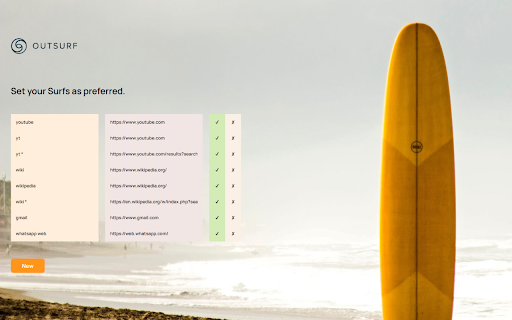
Even your RAM has a right to be off duty. Outsurf gives your PC what it deserves. We help you save time and thus reduce the load on your PC. Picture this: You want to go surfing and you have to wait in line at the surfboard rental before you can finally ride the waves. Something similar happens when you want to visit your favorite websites and are redirected to web search first, wasting your time. Outsurf can help you there. Simply type a shortcut, which you can completely customize, into the address bar and we'll instantly redirect you to the website you want. You can even search directly on the desired page and enjoy even faster what you actually want to see instead of a web search. For example, just type "wiki" in the address bar and within seconds you'll reach Wikipedia web page directly. Skip annoying queues and pushy rentals, we give you the surfboard immediately! When and how you want. Of course, we do not store any of your personal data and offer you the possibility to uninstall Outsurf in no time if you are not satisfied with it. Also feel free to use our feedback form to help us make Outsurf even better. If you have any questions, please contact: molacekpeter@gmail.com

Total Adblock - Ad Blocker
Instantly block annoying ads, pop-ups & intrusive trackers with Total Adblock. Enjoy a cleaner, faster, and more secure browsing experience with powerful customization options. - Block Unwanted Ads & Trackers: Remove disruptive ads and trackers for a clutter-free internet - Remove in-play video ads: Enjoy distraction free viewing when streaming videos - Disable Annoying Notifications: Use the Pop-Up Blocker to prevent intrusive browser notifications from interrupting your browsing - Tailored Ad Blocking: Access user-friendly presets to block ads based on specific needs such as speed, privacy, or security - Seamlessly connect with other products in the Total Security suite for comprehensive protection across all your devices - Manage your own list of websites with acceptable ads Start with a 7-day free trial to experience premium features, including unlimited ad and tracker blocking on all websites. After the trial, continue using basic adblock features for free or upgrade to maintain premium protection on popular sites. Your privacy is our priority. No personal data is required to start your free trial—just install and go. If you choose to upgrade, we ensure a secure transaction process. Detailed information is available in our Terms and Privacy Policy: Join our community of users who trust Total Adblock for a smoother, more secure browsing experience. For more information on pricing and features, visit our Pricing Page: We collect your IP address on initial installation to allocate your free trial access without requiring any personal information. You will only need to provide personal details if you choose to activate a premium subscription. Your privacy is paramount; Total Adblock does not store or log your data. This service is sold by Total Security Limited, a trusted cybersecurity provider

JumpFind 2
Now even better and more user-friendly: JumpFind 2 Do you know this? 1. You type "youtube" into the address bar 2. Now you will be redirected to standard web search 3. Now you can click on the first result to get to the actual YouTube page Do you think it could be faster? So do we! We've taken care of the problem and have come up with a simple solution to make life easier for you and us, and save a lot of valuable time. For questions and suggestions, please contact: fischerthomas158@gmail.com Let's say it takes you 30 seconds to get on YouTube and you do it three times a day. That's over 9h a year. With JumpFind 2 you shorten the time and simply skip the first two points. You will be redirected directly to the page you want. Best of all, you can set your own jumps, giving you full control over the commands. To save you even more of your precious time, we have created a pre-selection of the most frequently used jumps: - "yt" or "youtube" type in the address bar to land directly on youtube.com - "wiki" or "wikipedia: Direct link to wikipedia.org - "gmail": direct link to gmail.com - "whatsapp web": Direct link to web.whatsapp.com Besides saving time, you're also doing something really good for the environment. Direct referrals eliminate unnecessarily used resources. This improves your eco-balance and helps promote a healthier planet. The most important thing about privacy: - No personal data is collected about the setup & use of this extension - If you wish, you can simply uninstall the extension. When doing so, you will be redirected to a feedback form, so you can decide to tell us the reason for uninstalling. In this case we will store the entered text together with your IP address for the next 30 days.

Avira Password Manager
Avira Password Manager saves, manages, and syncs all your passwords across all your devices. Say goodbye to handwritten notes creating chaos on your desktop. This password organizer makes it a breeze to bring order to your work and personal life. Avira Password Manager can now also check the security status of your user accounts directly via your Avira Password Manager dashboard. This ensures you enjoy maximum protection, as we want you to be as well-protected as possible. Avira Password Manager synchronizes every change you make, and can be used on a wide range of devices and operating systems as well as with popular browsers via an extension. ◆ ONE PASSWORD FOR ALL DEVICES ◆ With Avira Password Manager you only need to remember one single password – the master password. It's like the key to an uncrackable password vault, in which your logins are safely stored. ◆ AUTO-FILL LOGIN FORMS ◆ Easy, convenient, time-saving: The Avira Password Manager browser extension auto-fills your logins across all your favorite websites, making it the best password manager available. Password Manager also recognizes when you enter a new password on a website and asks if you want to save it. ◆ INSTANT PASSWORD GENERATOR ◆ Do you use weak, common passwords for all your accounts? Not anymore! Avira Password Manager makes it effortless to generate strong, unique passwords to give you the best protection against identity theft. ◆ DIGITAL WALLET ◆ You can securely manage all your credit cards in your digital wallet. You can add them manually in the web or conveniently scan them on your mobile app. Your saved cards will be available on all your devices. ◆ AVAILABLE OPTIONS ◆ Avira Password Manager is available as a web dashboard and as a mobile app. The web dashboard is complemented by a browser extension for easy automatic creation and storage of your passwords. ◆ SECURITY◆ The new security status shows you at a glance how secure your passwords, accounts, and websites are, and whether any of your credentials have already been compromised. You can then take immediate action to improve your online security. Avira Password Manager protects your passwords, credit cards, and notes using 256-bit AES encryption – the most secure standard out there. Think of it as your own personal armored password safe. Thanks to your master password only you and you alone have access to them – not even Avira can access your data. ◆ WHAT'S NEW? ◆ Now save all your credit cards in your secure digital wallet, where the magnetic stripe will never wear off.

Avira Browser Safety
Your surfing made private and secure Avira Browser Safety protects you from malicious websites & invisible trackers Safe surfing - Browse securely: We block over 80 million malicious sites per month. - Shield your identity: We detect over 20 million phishing & spam attacks per month. - Download safely: We prevent over 1 million potentially unwanted applications (PUA) from hiding in your downloads. Private browsing - Anti-tracking: We stop thousands of ad networks from monitoring you online. - Optimal experience: We enable you to access all your favorite web services without interference. Smarter searches - Know before you go: We highlight infected sites directly in your search results. - Anti-hijacking: We ensure you’re never redirected to malicious search engines.
