
eiaekkbkomopkiidlmeabjpjldhbikfc

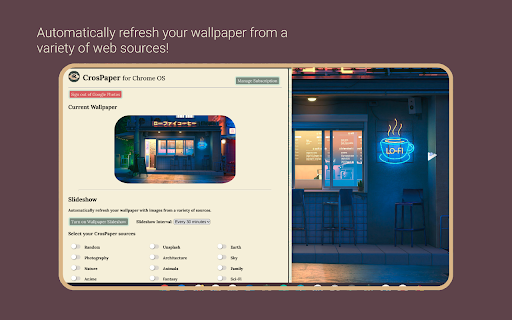
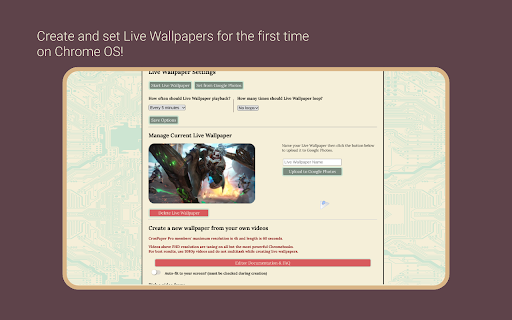
Customize your Chromebook's wallpaper with any image you find online, in your Google Photos library, or your file browser. 🌟 𝗪𝗛𝗔𝗧'𝗦 𝗡𝗘𝗪 - Bug fixes for saving Live Wallpapers (CSP, CSPX) - Added auto-optimization for large wallpapers! Enjoy better playback by optimizing for your device. The Best Wallpaper App for ChromeOS! 🖱𝗥𝗜𝗚𝗛𝗧-𝗖𝗟𝗜𝗖𝗞 𝗧𝗢 𝗣𝗜𝗖𝗞 - Make a wallpaper from any image, SVG, or web page you online! It's as easy as right-clicking and picking a layout. - Grab GIFs and videos from supported websites, then edit them into Live Wallpapers! - With Notifications turned on, you can even reset the layout of your wallpaper from the system tray. 💾 𝗦𝗔𝗩𝗘 𝗙𝗢𝗥 𝗟𝗔𝗧𝗘𝗥 - Any picture you select from online can be saved to local storage. - CrosPaper Pro members can upload directly to Google Photos from the Pop-up menu. - Use the Share button to send your friends a link to your wallpapers - Keep track of your old wallpapers using the History feature. Up to 20 entries for free members and 100 for Pro! - Save CrosPaper Live Wallpapers for future use, or share them with your friends! 📸 𝗨𝗦𝗘 𝗬𝗢𝗨𝗥 𝗢𝗪𝗡 𝗜𝗠𝗔𝗚𝗘𝗦 𝗔𝗦 𝗪𝗔𝗟𝗟𝗣𝗔𝗣𝗘𝗥𝗦 - Use the pop-up window to add wallpapers from images in your Chromebook's local storage. - CrosPaper Pro members can pick images from their Google Photos library as wallpapers. - Pick a solid color to serve as a neutral backdrop! 🪄 𝗘𝗗𝗜𝗧 𝗬𝗢𝗨𝗥 𝗜𝗠𝗔𝗚𝗘𝗦 - Add filters to enhance your backdrops with effects—including blur, brighten, and more! - Unlike the standard ChromeOS Wallpaper app, CrosPaper can resize any image to fit your screen using our built-in image adjuster! - Pro members can even adjust any video to fit their screen for a custom Live Wallpaper! 📽️ 𝗟𝗜𝗩𝗘 𝗪𝗔𝗟𝗟𝗣𝗔𝗣𝗘𝗥𝗦 - Missing Wallpaper Engine on ChromeOS? CrosPaper can create live wallpapers using your own videos! - Watch your video or GIF playback on your desktop every 3 minutes in HD! - Enhance battery life by configuring CrosPaper to automatically disable playback when your Chromebook’s battery drops below 25% or when it’s unplugged. - CrosPaper Pro members can create videos up to 1 minute long and even play them back in slow motion! 🎞 𝗪𝗔𝗟𝗟𝗣𝗔𝗣𝗘𝗥 𝗦𝗟𝗜𝗗𝗘𝗦𝗛𝗢𝗪, 𝗣𝗟𝗔𝗬𝗟𝗜𝗦𝗧, & 𝗥𝗔𝗡𝗗𝗢𝗠 𝗚𝗥𝗔𝗗𝗜𝗘𝗡𝗧𝗦 - CrosPaper uses a variety of sources across the web to supply you with pictures for cycling wallpapers. - Pro members can choose from 19 categories of themed images! - Pro members can randomly generate backgrounds as a source to see beautiful gradients created on your machine. It’s all local, so it’s all offline! - As a Pro member, create local and web-based Playlists, which can change based on your media preferences. Want to have a special playlist for late-night dark mode surfing? Now you can! - Watch your battery die in style with the Battery Playlist rule, or set a wallpaper for each moment with the Time of Day rule. 💻 𝗖𝗨𝗦𝗧𝗢𝗠 𝗦𝗖𝗥𝗘𝗘𝗡𝗦𝗔𝗩𝗘𝗥𝗦 - CrosPaper Pro members can go beyond standard ChromeOS with customizable screensavers! - Add webpage URLs to monitor a site, whenever your Chromebook runs idle. - Playback video as a screensaver using URLs or local files. - If you don’t have any other ideas, try the default screensaver or your favorite YouTube video! 🦾 𝗖𝗥𝗢𝗦𝗣𝗔𝗣𝗘𝗥 𝗣𝗥𝗢 For $9.99 a year, or $19.99 one time, get access to pro features. (Custom Pricing for Enterprise/Education) - With CrosPaper Pro, any picture you set from the web, wallpaper slideshow, or Google Photos can be adjusted to fit your screen ratio! - Pick specific categories you want to show up on your Wallpaper Slideshow! Categories include: Nature, Animals, Sci-fi, Architecture, Sports, and much more! - Enjoy beautiful, randomly generated gradients in the Abstract Patterns mode! - Enhance the Live Wallpaper experience with longer clips and support for up to 4k resolution videos!* - Live Wallpaper options are expanded for more customization. Enjoy loops and shorter intervals! - Upload images directly to Google Photos from the Chrome Context Menu! - Use your Google Photos library of images as static wallpapers or playlists! - Access the Playlist mode and additional sources for Slideshows—including beautiful satellite images! - Change the letter-boxing color to match your image or brighten your screen! - More features are always on the way! 🔒𝗦𝗧𝗔𝗬 𝗣𝗥𝗜𝗩𝗔𝗧𝗘 & 𝗦𝗘𝗖𝗨𝗥𝗘 - We use the latest, most secure extension technologies from Google to accomplish what we do. Manifest Version 3 keeps you safe from harmful extensions and we embrace it wholeheartedly. - CrosPaper Pro payments are handled by Stripe. This system is used and trusted by Google, Amazon, Zoom, and others. - Everyone should feel safe while browsing the internet. To make that possible, Chrome's new Enhanced Protection mode is constantly checking potentially dangerous websites, downloads, and extensions. CrosPaper is declared safe by Google's Enhanced Protection standards and we'll continue to target this level of security with every update. 𝗔𝗗𝗗𝗜𝗧𝗜𝗢𝗡𝗔𝗟 𝗜𝗡𝗙𝗢𝗥𝗠𝗔𝗧𝗜𝗢𝗡 - Any image stored on Google Photos depletes your Google Drive Storage allotment. - The Wallpaper slideshow and all CrosPaper Pro features require internet connection. - We developed CrosPaper for Chrome OS and it will not work on Windows, Mac OS, or Linux. * For most devices running CrosPaper Pro Live Wallpaper, 1080p is recommended due to hardware limitations. CrosExperts is not liable for any hardware issues you may encounter. For support, visit us on our subreddit: https://www.reddit.com/r/CrosExperts/

Screen Recorder for Google Chrome™
Screen Recorder is a software that allows you to capture and record your computer screen right in the browser! Use this free screen recorder software to make video recordings / screen recordings directly from the Chrome browser and share these video recordings with your friends/colleagues. To begin using the software Screen Recorder for Google Chrome™, simply click on "Start Capture" to begin recording your computer screen. Once you have finished recording your video, click on "Stop capture" to stop the video. You can save the video you made onto your computer/Google Drive. Its simple and easy to use Screen recorder to make video tutorials/software help videos etc and much more. Disclaimer: Please note this extension is NOT made by Google and is made by an independent development team. All copyrights belong to their respective owners. Google doesn’t endorse or sponsor this Chrome extension. Screen Recorder for Google Chrome™ is not owned by, is not licensed by and is not a subsidiary of Google Inc.

Chramshoot Image Editor
Edit any image from your computer quickly and efficiently right from Google Chrome. Chramshoot Image Editor is a powerful yet lightweight Chrome extension that lets you capture, edit, and optimize images directly from your browser in seconds. With Chramshoot, you can instantly capture your screen or upload images from your computer and enhance them using an intuitive, modern editing interface. Adjust brightness, contrast, and saturation with precision, apply artistic effects like black & white or sepia, and add stylish frames such as golden, vintage, or minimalist borders. The extension also includes practical tools to crop images to custom dimensions, optimize image quality for smaller file sizes, and undo changes at any time. Once you're done, you can export your edited image as a high-quality JPG file ready for sharing, uploading, or saving. 📸 Capture screenshots directly from your browser 🖼️ Upload and edit images from your computer 🎛️ Adjust brightness, contrast, and saturation 🎨 Apply visual effects like black & white and sepia 🖌️ Add decorative frames (golden, vintage, black, white, and more) ✂️ Crop images with custom dimensions ⚡ Optimize image quality and file size 🚀 Fast, lightweight, and easy to use Chramshoot is designed for users who want a fast, efficient, and distraction-free way to capture and edit images without leaving Chrome or using complex external software.

Comic Book Reader for Google Chrome™
Read your comic books quickly from Google Drive or local computer. Want to read your comics online today? Simply install our software Comic Reader for Google Chrome™ today. Open the most popular comic book file formats such as .cbr, .cbz today! Our software loads comic books instantly and allows you to begin reading your comics within minutes. Here are the steps involved Install the software Comic Reader for Google Chrome™ Choose the comic you wish to open Begin reading This software is 100% free and can open comic book files not just from your computer, we also support Google Drive as well. Start reading your comics online now! Disclaimer: Please note this extension is NOT made by Google and is made by an independent development team. All copyrights belong to their respective owners. Google doesn’t endorse or sponsor this Chrome extension. Comic Reader for Google Chrome™ is not owned by, is not licensed by and is not a subsidiary of Google Inc.

ChromeClaw - Your own personal AI assistant in your browser. 🦞
ChromeClaw - Your own personal AI assistant in your browser. Any OS. Any Platform. 🦞 ChromeClaw brings the power of OpenClaw into a lightweight Chrome extension — protected by the browser sandbox. Just install, add your API key, and start chatting. No server, no Docker, no CLI, no account required. Complete Open source (MIT). USE YOUR OWN API KEYS - Connect any LLM provider — OpenAI, Anthropic, Google, OpenRouter, or any OpenAI-compatible endpoint. Switch models anytime. Your keys stay local in your browser. MESSAGING CHANNELS - Connect WhatsApp and Telegram so your AI agent can send and receive messages on your behalf. VOICE - Speak to your AI and hear it talk back. No cloud required for voice. MEMORY - ChromeClaw remembers across sessions. - Session journaling automatically extracts key memories from your conversations. MULTI-AGENT SYSTEM - Create named agents with their own models, tools, workspace files, and custom JavaScript tools. Switch between agents or let AI manage them. BROWSER AUTOMATION - Control browser tabs via Chrome DevTools Protocol — take screenshots, read page content, click elements, type text, and run JavaScript. WORKSPACE & SKILLS - Attach persistent context files (personality, instructions, user info) to every conversation. Create reusable prompt templates with variable substitution. EASY TO SET UP - Install the extension, open settings, paste your API key, pick a model — done. Everything is configured through a simple options page. No terminal, no config files. PRIVACY & SECURITY - Everything runs inside Chrome's browser sandbox. Your API keys and data stay local. No external server. No account required.
