
egjonoicjpecjmnegjogdpnagopdkdej
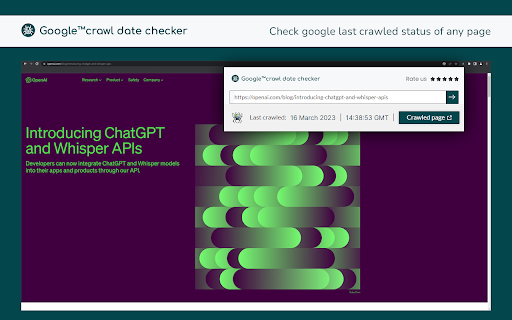
Install the Google bot last crawl date checker extension to access the last crawl date and time of any web page by google. Stay Ahead in SEO with Crawl Date Checker in 2025. Keeping your website optimized for Google has become more critical than ever. Crawl Date Checker is the ultimate tool for easily accessing the last crawl date of any web page by Google. With just one click, this Chrome extension provides the exact date and time of Google’s last crawl on any website, offering valuable insights into your site's SEO performance and indexing frequency. Instant Crawl Date Access: Instantly view the last Google crawl date of any webpage with just one click, helping you stay updated on your site's indexing. SEO Performance Insights: Track the frequency of Google’s crawls and spot patterns, helping you optimize content updates and improve SEO strategies. No Google Search Console Needed: Monitor Google’s indexing of your site without the need to log into Google Search Console, making it more accessible. Simple User Interface: Designed to be easy to use with no technical skills required, perfect for all skill levels. Optimization Support: Use the crawl date data to plan content updates, make SEO adjustments, and track how recent changes impact Google’s crawl behavior. Install the Extension: Click "Add to Chrome" to install Crawl Date Checker. Visit Any Webpage: Navigate to any webpage whose Google crawl date you want to check. Click the Extension Icon: Open the extension by clicking the icon in your browser toolbar, and the last crawl date will appear instantly. With Crawl Date Checker, you can easily access the last crawl date of any webpage, enabling you to track indexing and SEO performance without needing to log into Google Search Console. This tool provides valuable insights that help optimize your content updates and better understand how Google’s crawlers interact with your site. Install Crawl Date Checker today and streamline your SEO monitoring with ease! 1. What is the purpose of checking Google’s last crawl date? Understanding the last crawl date helps you track how frequently Google visits your website, allowing you to adjust SEO strategies for better indexing. 2. Does this extension require Google Search Console? No, this tool provides crawl date data directly, so you don’t need Google Search Console access to check a webpage’s crawl status. Google’s crawl frequency varies based on factors like your content's freshness, page authority, and updates. Use this extension to see real-time data on crawl frequency. 4. Is this extension free to use? Yes, the Crawl Date Checker extension is completely free.

MST SERP Counter - SEO Free SERP Checker Tool
SERP Counter is a free checker tool that allow you to fastly check google rank. Using the MST SERP Counter Google Chrome extension, you can examine the live numerical search results to see where you currently stand in the rankings.

Google Index Checker and Google Indexer
Instantly check if your URLs are indexed by Google and submit them for fast indexing. 🚀 Instant Google Index Checker - Stay Ahead of the Competition! 🚀 Do you want to know if your website is indexed on Google? Are you an SEO expert, content creator, or website owner looking to optimize your online presence? Look no further! The Google Index Checker extension is your new go-to tool for checking if URLs are indexed on Google with just a click! ⚡ 🌟 Why Install Google Index Checker? Imagine you’ve just published a new article or webpage, but you’re not sure if it’s visible on Google yet. This extension solves that problem instantly! It helps you save time and effort by checking if your page (or multiple pages) is indexed in Google Search. No more guessing or waiting around – know the status right now! 💡 Automatic Check for the Current Page 🔍 The moment you click on the extension, it automatically checks if the page you’re on is indexed by Google and shows you the result in seconds. No need to press any extra buttons! It's fast, efficient, and super easy. ⏱️ Bulk URL Checking for Up to 10 URLs 📋 Have multiple pages or posts to check? Paste up to 10 URLs, hit the Bulk Check button, and the extension will run through all of them to show whether each URL is indexed or not. Results are displayed in a clean, scrollable table for easy navigation. 📜 URL Validation to Save API Quota 🛡️ We care about efficiency! The extension validates each URL before making requests to ensure your Google API quota is not wasted on invalid or broken URLs. Only valid URLs get checked for indexing, helping you save resources. Color-Coded Results for Clarity 🎨 Get instant visual feedback with our color-coded results system. URLs that are indexed will show in green ✅, while non-indexed URLs will show in red ❌. For invalid URLs or errors, the results appear in orange ⚠️, making it super easy to understand the status at a glance. Scroll-Enabled Bulk Checker for Seamless Browsing ⏩ The bulk checker is scrollable, allowing you to smoothly navigate through large lists of URLs without clutter. Manage your data more effectively and track multiple pages with ease! Responsive and Clean User Interface 🌟 The extension is designed with user-friendliness in mind. It features a fixed-size popup window with a clean, attractive layout, offering an effortless experience even for beginners. 🖼️ Completely Private & Secure 🔐 Your data is safe with us! The URLs you check stay local to your browser. We don’t track or store any information about your websites or URLs. 🏆 Who Is This Extension For? SEO Experts 📈: Optimize your site rankings by checking if your SEO efforts are being indexed properly. Bloggers ✍️: Quickly check if your blog posts are appearing on Google. Web Developers 💻: Ensure that new pages or changes are reflected in Google’s index. Marketers & Content Creators 📊: Confirm that marketing materials, landing pages, or campaign links are visible to your audience. 🤔 How Does It Work? One-Click Check: As soon as you open the extension, the current page's URL is checked and results are shown automatically. Bulk URL Checker: Paste up to 10 URLs in the provided text area and click the "Bulk Check" button to get the indexing status for all your links. Results are displayed in a neat table for easy reference. 💡 Why Is Indexing Important? Google indexing is critical for your online visibility. If your website or pages are not indexed, they won’t appear in search results, limiting your reach and traffic. By regularly checking your indexed status, you can ensure that your SEO and content strategies are on track, making this tool essential for anyone focused on boosting their digital footprint! 🌍 📦 Lightweight and Fast We’ve kept this extension small in size but big in functionality. It’s built to be lightning-fast ⚡ and won’t slow down your browser. Its sleek design and efficient code make sure it runs smoothly, even when checking multiple URLs. 💡 Super Easy to Use No need to be tech-savvy! Just install the extension, click the icon in your browser, and the extension will do the rest. You can immediately see if your current page is indexed, or check multiple URLs with minimal effort. 🌐 Multi-Purpose Tool for All Website Owners Whether you run a small blog or manage a large portfolio of websites, the Google Index Checker will streamline your workflow. You’ll save time by avoiding manual checks and instead get the indexing results delivered instantly right in your browser. 🔗 ⚙️ How to Get Started: Click the Add to Chrome button above. Once installed, click the extension icon next to your address bar. The extension will automatically check the current page’s Google index status. For bulk checking, paste up to 10 URLs, and hit Bulk Check to see which are indexed! 💬 Support & Feedback We love hearing from our users! If you have any questions, issues, or feature requests, feel free to reach out to us. Your feedback helps us make this extension even better! 🙌

Detailed SEO Extension
Get SEO insights at the click of a button to any website you're currently on. Built by full-time SEO's for daily analysis. Get SEO-related insights at the click of a button to any website you're currently on. Pull back their title tag, meta description, meta robots tag and much more. Save hours of time looking through the source code of this page with our SEO analysis extension.

Check My Links
Check My Links is a link checker that crawls through your webpage and looks for broken links. Check My Links is a powerful link checker that scans any webpage, Google Sheet, Docs and instantly identifies broken or invalid links. Whether you're editing a webpage, auditing content, or managing SEO, Check My Links helps you verify every link on the page with a single click. New Feature: Now it can detect the link from Google Doc and Excel sheet too and verify them. ✅ How it works 1. Open the webpage you want to validate. 2. Click the Check My Links icon in your toolbar. 3. The extension will scan all links on the page, highlight the valid ones, and clearly mark any broken or problematic links. 4. View results instantly on the page. 🎁 Features * One-click scan for all webpage links * Highlights valid, broken, and redirected links * Download or view detailed reports for broken and invalid links * Customize highlight colors * Option to disable color highlighting * Faster, accurate link validation - perfect for developers, content editors, and SEO teams 🔐 Advanced Features After a fresh install, the extension will not show product information or tutorials. After a few days, it may display helpful product tips as info. If you prefer a clean interface, you can hide these info using the Advanced Feature Key available here: https://selectorshub.com/how-to-get-check-my-links-advanced-features-key/ 🚫 Default Excluded URLs To prevent unnecessary noise during scanning, the following URLs are excluded by default. If needed, you can remove these exclusions from the extension’s settings: 1. doubleclick.net 2. appliedsemantics.com 🔗 More Details Learn more about the tool here: https://selectorshub.com/checkmylinks/ 💬 Need Help? If you face any issues or have questions, reach out anytime at support@selectorshub.com
