
egilgkfibealmbllcigihfhglhipnmie
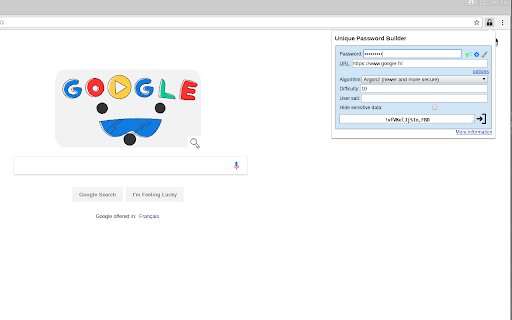

A good security practice is to use a different and strong passwords for each site you visit. Memorizing that in your head is a pain. The UniquePasswordBuilder addon allows you to construct strong and different passwords based from a single master password (the only you have to know). When you’re on a login page, click on the lock icon, then type your master password. When finished, a password for that login page has been generated. You can then click on the icon on the right or press enter to paste it into clipboard, then just paste it in the login form. For each website, the generated password is different. The master password is hashed a large number of time with the domain’s site generating an unique password for that site. Hashing algorithm is scrypt (which is memory resistant). Note that your master password should be strong (more than 10 characters in lower and upper case, numbers and special characters). Using simple password makes brute force attack easier. Other password tools (LastPass, KeyPass, etc) usually stores websites passwords into a encrypted database. The drawback of that approach is that the database needs to be synced between all of your devices. UniquePasswordBuilder doesn’t uses a central database because it recomputes your password each time. For increased security, you can set a `user salt`, which make it even more resilient against rainbow table attacks. You can use CTRL + SHIFT + L to open the addon. That addon is free software and you can study the source code here : https://github.com/paulgreg/UniquePasswordBuilder You’ll find further information on the project home page : https://paulgreg.me/UniquePasswordBuilder/

Seofy
SEOFY: AI-powered SEO toolkit for checking canonicals, backlinks, meta tags, SERP data, and optimizing site speed. Introducing the Ultimate SEOFY - a powerful Chrome extension designed to revolutionize your SEO workflow. Developed with the assistance of cutting-edge AI technology, this all-in-one toolset is a game-changer for SEO professionals, digital marketers, and website owners. Canonicalization Check: Ensure the consistency and accuracy of your website's canonical tags with this powerful feature. Detect and address issues related to canonicalization, helping you maintain proper indexing and prevent duplicate content penalties from search engines. Keep your site's SEO on point by easily identifying and resolving canonicalization challenges. Domain Authority and Backlink Check: Gain valuable insights into your website's online influence and credibility. The Domain Authority feature provides a quick snapshot of how well your domain is likely to perform in search engine rankings. Meanwhile, the Backlink Check feature allows you to explore and evaluate your site's backlink profile, helping you understand the quality and quantity of links pointing to your pages. Strengthen your SEO strategy by leveraging these metrics to improve your website's overall visibility and authority in the digital landscape. Title and Meta Description Checker: Ensure your website's meta tags are optimized for maximum impact and click-through rates. Instantly analyze and improve title tags and meta descriptions with actionable suggestions. SERP Data Scraper: Effortlessly extract Search Engine Results Page (SERP) data from Google searches. Gain valuable insights into competitor rankings and keyword performance with a single click. Keyword Research Made Easy: Unlock the potential of your SEO strategy with advanced keyword research tools. Discover high-value keywords, assess search volumes, and identify competition levels to optimize your content. Page Speed Analyzer: Improve user experience and search rankings with in-depth page speed analysis. Identify performance bottlenecks and receive optimization tips for lightning-fast loading times. Backlink Explorer: Explore your website's backlink profile and uncover valuable linking opportunities. Evaluate backlink quality and monitor link building efforts to boost your site's authority. Site Audit and Error Checker: Perform comprehensive website audits to identify critical issues affecting SEO performance. Detect broken links, indexation problems, and duplicate content for enhanced site health. Competitor Analysis: Stay ahead of the competition with detailed competitor insights. Analyze rival websites' traffic, keywords, and backlinks to inform your SEO strategy. Intuitive Interface: Our user-friendly interface ensures seamless navigation and easy access to all tools. No technical expertise required – get started instantly! The Ultimate SEO Toolkit is your one-stop solution for mastering SEO like never before. Maximize your website's visibility, drive organic traffic, and dominate search engine rankings. Elevate your SEO game with the power of AI and supercharge your online presence. Download the extension now and experience the future of SEO! Schema Tag Check: This function, integrated into a Chrome extension, enhances user interaction by visually presenting structured data (schema types) found on web pages. Users can quickly identify and explore schema types implemented through HTML attributes (itemtype) and JSON-LD scripts (application/ld+json). This feature streamlines the process of understanding how websites utilize structured data, empowering users with insights into content organization and metadata usage directly within their browsing experience. --Change Log--- V 4.1.1 (Oct 2024) - Improved UI/UX - Revamped Backend Code for Better speed. V 3.1.0 (November 2023) - Canonicalization Check - Login Functionally for Wordpress Website (Paid Users Only) - Contact for details. - Bulk URL opener / Copy URLs of existing Tabs. - Optimized Speed Improved user interface with a more intuitive design. Check Page Index Highlight Do-Follow Links Highlight No-Follow Links Existing SERP Visibility Title and Meta Description Length Canonical URL Check Word Count Heading Details View robots.txt View sitemap.xml SERP Scraper Check Cache Check Indexed URLs Highlight Heading Tags Google: Domain Highlighter in SERP Google: Domain Ranking Detail in SERP

Anti FeR toolkit
Adds features and extensions for the bushtarion web game (formerly Canola toolkit formerly Antisback's bushtarion toolkit) This adds some functionality to the Canola toolkit, which it is forked from. Fixes the regex for Company name matching (no more oddities with names that include '@', '~', or '^'), adds information about who someone has attacked, includes stealth mobs in the activity chart, and maybe more! 1.2.22 Changes: Defaults for options set to "on" 1.2.21 Changes: Additional options for the military page and supply depot 1.2.18 Changes: Includes an options page, navigate by right-clicking the icon and selecting "Options" 1.2.13 Changes: Displays development information for technologies unlocked for a given dev/construction Shows troop count on a hack Shows a horribly formatted estimate on the flak needed to land on a target given the visible units Display information about what you are 30% and 70% of in the score breakdown overlay Show gov defense in spy report incoming (but doesn't account for when it recalls) 1.2.12 Changes: Fixes seed/income calculation Adds a button to hack from the search page in a new tab Spy report incoming/outgoing is now sorted by ETA Spy report incoming/outgoing displays original mob ETA Adds an input so that dynamic AR calculation can be done from the spy report 1.2.11 Changes: Attacks on an HQ don't show a huge number for ETA Stealth mobs sent now default to ETA 5 sent New "Plant Max" feature calculates how many seeds you are able to plant given how many gards you have home. Updates grass seed bonus in Spring 1.2.10 Changes: Fixes single person mobs not showing up on spy reports Fixes HQ incoming/outgoing not showing HQ outgoing mobs stay in the outgoing screen "until recalled", which I don't know when it is recalled so take the info as an alert more than a reality Alerts if the user does not have enough harvesters to cover the max needed (in total, not at home) 1.2.9 Changes: Reverting mob notes and loving on Alci 1.2.8 Changes: Makes mob notes on alliance incoming screen more interesting for some :) 1.2.7 Changes: Fixes score evaluation for players with public ID's Fixes military mob calculations for "all" Income calculator now reasonably accounts for exponential seed loss and nighttime seed penalty Search results include a "Total" row for acres and score 1.2.6 Changes: Fixed spy report when spying a member of your own alliance Finished searching by Public Name Added full Hack output to console debugger when hacking from Alliance incoming page Added troop cost calculation on Military page 1.2.5 Changes: Fixes score calc for insurance that is "claimable early" Alliance incoming "Defend" and "Retaliate" links are now buttons Added "Hack" button on alliance incoming to make a best guess at route and fill out incoming notes Added "Recall" button on alliance incoming to recall from alliance page 1.2.4 Changes: Add Land Fat percentage to search results Fix Alliance page incomings when AHQ! is targeted Add Unit Stats quick link in side panel Add ID list generation with search results (in console debugger output) Add "Has Attacked" information on news page 1.2.3 Changes: Alerting when the user has uncultivated acres Maintenance page additionally displays the seeds you can grow with troops home Alliance page has quick links to setup defensive or offensive mobs from the incoming screen

MS Password Generator
Create a unique password for each site and service. Create a unique password for each site and service. Input the Main key and a site key to generate a strong password for that site. No registration. Work offline without sending or storing any data on the internet. Could re-generate password on other computers and mobile devices by the Main Key. *Sync your passwords on other platforms Firefox add-on: https://addons.mozilla.org/firefox/addon/strong-password-generator/

gPass
gPass : global Password for Firefox and Chrome gPass is an online, open source and self hosted password manager. It helps you to have a different and complex password for every account you own while only remembering one (or multiple) passwords ! To have a high level of security, all information is stored encrypted (salt + AES 256-CBC). Nothing is stored on client. The decryption is done on the fly when it's needed and only with user input. So, a hacker can get your password database, it will not be able to see any information (except if it brute force or leak your masterkey) ! Thus it's important to choose a strong masterkey ! First thing is configuration : 1) Enable the extension for private browsing 2) Install your server (see below), or use the demonstration one and create your accout 2) Go to extension options and configure your server address ("https://server name/account") 3) Populate your password database. You can use "*" character to access to all subdomains of a specific website (ie *.google.com). Then usage : When you're in a login form and you want to use gPass, type your login (case sensitive !) and fill "@@masterkey" in password field (only if gPass icon is green !). Then submit and password will automatically be replaced by the one in the database (after addon decrypt it). **You can also type "@_masterkey" to only replace your password without automatic submit. This allows to support more websites.** Another option is to enter your credentials in the new popup menu by clicking on gPass icon. If it's possible, gPass will auto fill password field, if not result password is stored into your clipboard. **Popup path is a safest method as website page will never see your masterkey.** ** Warning ** : Sometimes, addon could make some websites unusable, especially for login form. In this case, you can deactivate it for only one website by clicking right on gPass icon and "disable or enable gPass for this website" in addon menu. It's a local configuration, so it must be done for each browser. gPass can also be disabled for ALL websites thanks to addon menu "Disable or enable gPass for ALL websites". _When gPass is disabled, you can still use popup feature_. To host a password server, you need a webserver. Just copy server files in a directory read/write for web server user (www-data). A sample apache2 configuration file is available in resources. Since v0.8 and the use of Crypto API, **it's manadatory to have an HTTPS access (valid SSL/TLS certificate) to the server**. Without that, the decryption will fails. A demonstration server is available [here](https://gpass-demo.soutade.fr). It's the default server configuration for fresh installed addon (user demo). **Warning** The master key derivation is partially based on account URL. So it's linked to your current server information. You can't move databases from servers with different URLs, you need to export them and import it again. Just install the package. You can have debug information by setting DEBUG in main.js. All the code is licensed under GPL v3. Source code is available [here](https://forge.soutade.fr/soutade/gPass).
