
cjepknkdbfekghcecakjfbdcjkbapipk
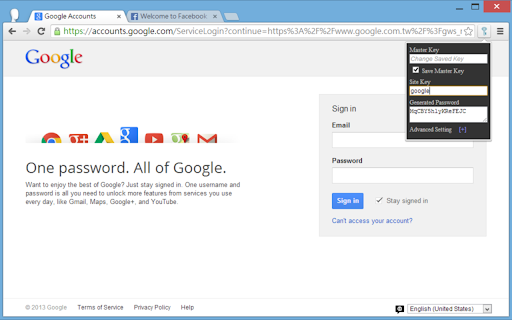

Create a unique password for each site and service. Create a unique password for each site and service. Input the Main key and a site key to generate a strong password for that site. No registration. Work offline without sending or storing any data on the internet. Could re-generate password on other computers and mobile devices by the Main Key. *Sync your passwords on other platforms Firefox add-on: https://addons.mozilla.org/firefox/addon/strong-password-generator/

Random password generator
A simple random password generator for Chrome browser Features: • beautiful minimalistic design • supports light and dark theme • password length between 1 and 99 • use numbers (0-9), lower cases (a-z), upper cases (A-Z), special (!?=)(&%$*+-.,:;) or your own custom characters • exclude confusion characters (eg. O0lIi) • mnemonic (easy-to-remember) passwords • toggle password history • add-on options saving • copying to clipboard • supports cryptographically secure pseudorandom number generation (CSPRNG) Tips: • if you want to generate a random number you can just select the Numbers checkbox and 1 char password length leaving all other options unchecked • passwords are saved to history only when clicked "copy" and when History checkbox enabled • if you need cryptographically secure password, enable it in "More options" under Cryptography

Password generator
Password generator | this is a compact and fast extension that will help you generate a new secure password in a second Creating reliable and unique passwords is crucial for safeguarding your online accounts, and a password generator can assist with this. Our strong password generator helps create passwords that are highly resistant to hacking attempts. Using a random password generator adds an extra layer of protection by generating completely unpredictable passwords. With our password generator, you can easily create passwords that meet all security requirements, ensuring peace of mind and protecting your digital life. Whether you need a strong password generator for financial accounts or a random password generator for social media, our tool is ready to support you.

MasterPassword for chrome
Remember your MasterPassword, and this app will generate unique passwords for every other site you visit One of todays main security challenges on the web is passwords. You typically have to login at many different sites, and remembering a different password for every site is hard. Unfortunately one of the sites you use will sooner or later be hacked, and passwords leaked. If that password is reused on other sites, the hackers will have access to all your accounts. MasterPassword can help. With one master password, a unique one can be generated for each site. When you need to login, this addon will complete the site password for you. And it is impossible to guess the master password from a site password. Read more at http://masterpasswordapp.com The MasterPassword algorithm is standardized. You can find app's for Ios, Android, Windows, Mac and Linux. One of MasterPasswords strong points is that neither the master or site password is stored anywhere. The site password is rather generated mathematically every time. This is in clear contrast to many other password managers, like Chrome's built in password manager. If your computer or browser is hacked, solutions where the password is stored can give away all your passwords! Similar dangers exists with cloud based solutions. The MasterPassword addon can of course co exist with other password managers and will stay out of your way until you click the MasterPassword button. If you chose to uninstall the addon, you'll just have to remember the passwords you've generated, or import them into another password manager. Since passwords in MasterPassword are mathematically generated, it is impossible to import other custom passwords into master password. They would have to be stored on your computer, which defeats MasterPassword's working principle. As such, it is convenient to use the Chrome password manager for such passwords, until you find a time to switch a site to MasterPassword. Also note that when MasterPassword enters a password for you, Chrome will behave like you typed it on the keyboard, and prompt you if you want to save it. You can of course accept this, but your passwords will then be stored and risk being stolen. I'd therefore suggest to reject that offer. Protect your accounts on the web - Use MasterPassword

LessPass
chrome and firefox web extension for lesspass password manager This add-on allows you to build LessPass passwords directly in your browser. LessPass is a password manager that guarantees you to generate the same password on the basis of unique information you provide. You can use LessPass to create passwords for various internet services (social networks , email, server passwords , ...). You can use this extension to generate complex password for your sites without the need to store them. You are the only one to know the information needed to generate a password. You can regenerate your passwords anywhere. No database, no sync needed. Tip: Use the keyboard shortcut Ctrl + Shift + L to launch LessPass
