
egfphncmmcmmadobgnjmagdljdeghamj
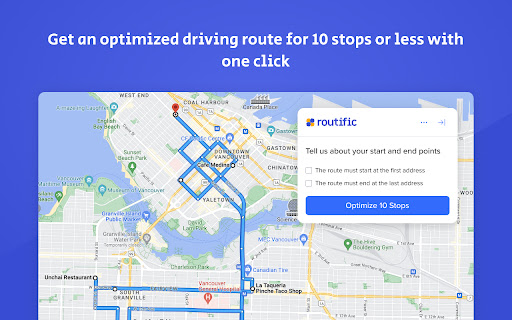
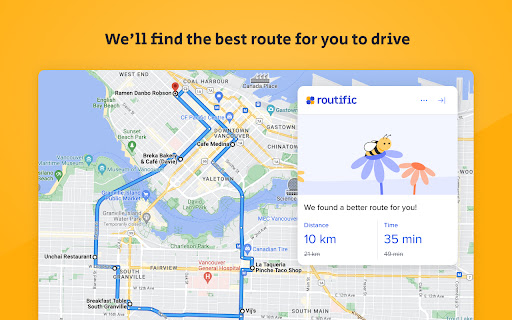
Get the most efficient driving route for up to 10 stops in Google Maps™ in just one click. | **Free forever** ✅ Less time on the road ✅ Lower gas bills ✅ Lower emissions **WHY ARE WE GIVING THIS AWAY FOR FREE? WHAT’S THE CATCH?** Why is this Chrome extension free? Two reasons: 🌲 A lot of harmful vehicle emissions are totally unnecessary. Our mission is to make route optimization available to everyone, so those emissions can be eliminated. 🟩 Many people only need to optimize a route a couple of times a year. A paid subscription makes no sense for them, and we can afford to offer this basic service free.

Free Route Planner for Google Maps
Route Optimisation for Google Maps by Zeo Zeo Web Plugin is a free route planner for Google Maps. Any user can get the correct order of stops which give them the shortest route on Google Maps. Users only need to add the stops which they want to visit on Google maps and then click on the plugin. Through advanced route optimisation algorithms users now get the shortest route on Gmaps. For free! No other app to download. Zeo Route Planner is a provider of route optimisation for delivery drivers and field service professionals. They provide app on Google Play store and Apple app store. For fleet owners they have a web based no code platform on their website. Drivers save upto 2 hours everyday and $200 per month using their services. More than a million drivers in 146 countries have already used them.

Share To Google Maps
This Chrome extension enables you to share any address available on any of the websites to Google map. Share to Google Maps Chrome extension revolutionizes your browsing experience by seamlessly integrating web page addresses and locations with Google Maps. With this powerful extension, you can effortlessly share addresses or locations from web pages to Google Maps for quick navigation or further exploration. Discover a convenient and efficient way to access location information right from your browser. >>Instant Address Integration: Easily share addresses or locations from web pages to Google Maps with a single click. >>Effortless Navigation: Seamlessly transition from browsing to navigating, as your desired location opens directly in Google Maps. >>Enhanced Exploration: Explore the surroundings of any location by effortlessly transferring it to Google Maps for further discovery. >>Streamlined Workflow: Save time and effort by eliminating the need for manual copy-pasting or typing of addresses. >>Install the Share to Google Maps Chrome extension from the Chrome Web Store. >>Upon installation, the extension integrates seamlessly into your browser. >>Browse the web and come across an address or location you want to explore on Google Maps. >>Right-click on the address or location and select "Share to Google Maps" from the context menu. >>Sit back and let the extension do the work! The selected address or location will open in Google Maps, ready for your exploration. Upgrade your browsing experience with the Share to Google Maps Chrome extension today. Effortlessly integrate web page addresses and locations with Google Maps, making navigation and exploration a breeze. Simplify your workflow and discover a seamless way to access location information right from your browser.

Free Google Maps Route Optimization by Upper
Transform your list of stops to optimized routes right in Google Maps for free. Upper’s extension allows you to optimize multi-stop routes straight in Google Maps without switching windows or copy pasting addresses. To get the shortest route on Google Maps, simply add upto 10 stops in Google Maps, and click on Upper’s extension. Select Optimize and you are done. Upper’s advanced algorithm does all the hard work for you, allowing you to spend time on other activities. Save hours of planning time and spend less on fuel with Upper. Upper is a route management software designed for all kinds of businesses: delivery, field service and maintenance, and for fleets of all sizes. With Upper, solo drivers as well as teams operate in a streamlined manner.

Google Search Maps Button
Adds back the Maps button to Google search pages and makes the search result map images clickable again for seamless navigation. The "Google Search Maps Button" Chrome extension brings the Google Maps button back to the Google Search navigation bar for users in Europe. If you've found the Google Maps button gone or missing from your search experience, this extension is designed to address exactly that. What it Does: This extension ensures you can access Google Maps with just one click from the Google Search page. It also makes map images clickable within search results, significantly improving your navigation experience. Why it's Needed: In response to the Digital Markets Act (DMA), which is aimed at fostering fair competition and innovation, the Google Maps shortcut was removed for European users. This tool effectively restores that lost convenience. Privacy and Security: Operating without saving any user data, the extension ensures your privacy and security are protected. For anyone who's noticed the Google Maps button gone from the Google Search navigation bar in Europe, this extension provides a straightforward and effective solution, seamlessly reintegrating this essential feature into your browsing routine. Troubleshooting steps if the extension is not working: 1. Check Plugin Status: Make sure that the plugin is enabled in your Chrome browser. 2. Verify Site Access: Open the details for this plugin under "My Extensions" and ensure that "Site Access" is enabled. NB! For Opera users: Go to the Manage Extension section and tick the „Allow access to search page results” option. Otherwise the plugin wont work. If you'd like to say thanks, you can do so via PayPal at henripp94@gmail.com. I'm truly grateful for any support, though it's absolutely not necessary or expected.
