
ahbbccaailjoopighefcododkmgmbfpb


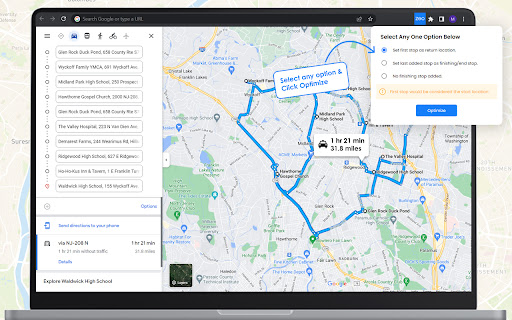

Route Optimisation for Google Maps by Zeo Zeo Web Plugin is a free route planner for Google Maps. Any user can get the correct order of stops which give them the shortest route on Google Maps. Users only need to add the stops which they want to visit on Google maps and then click on the plugin. Through advanced route optimisation algorithms users now get the shortest route on Gmaps. For free! No other app to download. Zeo Route Planner is a provider of route optimisation for delivery drivers and field service professionals. They provide app on Google Play store and Apple app store. For fleet owners they have a web based no code platform on their website. Drivers save upto 2 hours everyday and $200 per month using their services. More than a million drivers in 146 countries have already used them.

MapSnap.ai - Travel Itineraries to Google Maps™ Lists
MapSnap.ai: Google Maps™ Lists Made Easy! MapSnap.ai makes it easier than ever to visualize your travel plans on a map! This powerful Chrome extension allows you to convert any travel itinerary into a customized Google Maps™ list with just a couple of clicks. Why use MapSnap.ai? * Seamless Integration: Simply paste your itinerary—whether it’s from a blog post, a PDF, or even a ChatGPT conversation—into the extension, and let the latest advanced AI extract all relevant locations. * Easy Google Maps Lists: MapSnap.ai generates a new Google Maps list for you, complete with an engaging title, description, and a short excerpt for each location. You'll see your entire trip laid out in chronological order, making it easier to plan and navigate. * Enhanced Travel Experience: With your itinerary in Google Maps, you can easily review your trip, mark must-see places, and enjoy the convenience of having all your locations in one place. Free vs. Premium Free Version: Process up to 15 locations from your itinerary—perfect for shorter trips or a quick preview. Premium Version: The premium subscription of MapSnap.ai is perfect for those looking to manage more complex trips with ease. It leverages the most advanced AI for even more accurate and detailed travel lists. Premium users retain all the features of the free version, such as custom titles and descriptions for locations, but without any limitations on location count or itinerary length, offering superior performance for a low monthly fee. Privacy First We respect your privacy. The itineraries you provide and the created location lists are never saved or shared by the application after being analyzed by the AI model. Your data remains private and secure. Note: As with all AI-powered tools, the results can vary with each use. Re-running the same itinerary might yield different outcomes.

Timely
Optimize your Google Maps route with Timely! Check out Timely - the ultimate solution to optimize your Google Maps route! 🗺️🧭 We take your multiple-stop Google Maps route and rearrange the address order to help you navigate your trip in the shortest time possible. 🚀 Say goodbye to taking the long route and hello to more time for the things you love! ⏰ Save time, ⏱ save gas money, ⛽️ and reduce your carbon footprint 🌳 all at once! Who wouldn't want that? Timely is useful for frequent travelers, delivery drivers, small businesses, real estate agents, hikers, cyclists, or when you're just running errands. 🏃🏻♂️🚴♀️ Using Timely is as easy as 1️⃣ creating a route on Google Maps 2️⃣ clicking on the Timely extension or button 3️⃣ viewing or sharing your optimized route. It's that simple! 💡👨💻👩💻 So, what are you waiting for? Install Timely now and start optimizing your Google Maps route like a pro! 💪

Google Maps Extended Routes
Plan longer Google Maps routes for cycling and motorbiking with advanced editing, optimization, export and bookmarking 🚴 Create routes longer than 10 stops 📏 Optimize multi-stop routes for shorter travel to save time and fuel 📱 Prepare a route for mobile navigation solving "disappearing waypoints" problem 🌍 Export your route to popular services: Apple Maps, TomTom Planner, Bing, Yandex Maps and other 🔖 Bookmark and manage favourite/planned routes. Observe them on a map altogether 💾 Download a route as GPX or KML file 📋 Append route segments or places easily just pasting them from the clipboard. ✂️ Extract route segment, split a route into two at chosen point 🔄 Reverse any routes, not only with two stops ⌨️ Use “Street View Images” toggle shortcut

Google Maps Route Optimizer
Assist in optimizing routes (based on time, not distance) with multiple destinations. Assist in optimizing routes (based on time, not distance) with multiple destinations. A "Route Optimizer" button is injected onto the https://maps.google.com page, near the Search bar.
