
egfandhgklijlfkhgpnblofdbmfdnaaj
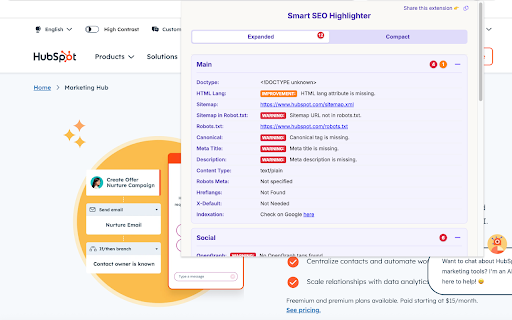


Best SEO Chrome Extension: Checks page SEO issues & redirections, CWV score, Schema, highlights headings, nofollow links & more. Developed by Albert Badalyan - an SEO Professional - "Smart SEO highlighter" is the best SEO extension to help you improve your website's quality, readability, and accessibility of your page - no matter if it's a blog post or a landing page. The extension is 100 FREE! Smart SEO Highlighter is the 1st and most complete free SEO Chrome extension that combines the functionality of 10+ other popular extensions and helps you: ✅ Easily check ALL SEO & content issues of the page 🚀 Check Core Web Vitals (CWV) score directly in extension ❌ Check page broken links ⏩ Identify Redirections or Redirect Chains Check Detailed Structured Data (Schema) of any page ❇️ Highlight ALL H1-H6 headings 📱 View page on mobile (with a single click & no coding knowledge) 🔍 Check content quality & get handy recommendations 🔗 See ALL external links 🏷️ See ALL no-follow links ⚠️ See ALL external do-follow links, etc. Unlike other SEO extensions, Smart SEO Highlighter is built to handle modern, dynamic websites (like those using React or Vue) by intelligently waiting for JavaScript-rendered content to load first. Everything is possible to get with just a single click - without using other complex tools or coding knowledge. Who is this All-in-One SEO Chrome extension for? - SEO experts - Content writers and editors - QA specialists - Link building pros - Affiliate and partnership managers - UX designers - Product owners - Agencies, tech, and in-house marketing teams - C-level managers Lightweight, fast, and secure - no data tracking. This is one of the best Chrome extensions that's created to make your SEO strategy, webpage, and content more efficient and valuable, thus making your life much easier. Why Smart SEO Highlighter is the Only SEO Extension You Need: ⚡ All-in-One Powerhouse: Get a full suite of analysis tools in a single, lightweight extension. Stop overloading your browser with single-function plugins. ✅ Instant On-Page SEO Audit: Uncover all critical SEO issues in the "Expanded View." Check everything from meta tags, canonicals, and hreflang to social (OpenGraph) data and structured data (JSON-LD, Microdata) in one organized panel. 🔗 Advanced Link Analysis: ◉ Broken Link Checker: Instantly scan and highlight all broken or timeout links on a page. ◉ External & No-Follow Links: Effortlessly visualize all external, nofollow, sponsored, and ugc links with a single click. Essential for link builders and SEO auditors. 📱 Mobile & SERP Simulation: Preview any webpage in a responsive mobile view simulator - check for mobile-friendliness and potential layout issues that affect your Core Web Vitals. ✍️ Content & Heading Structure Analysis: ◉ Visualize Headings (H1-H6): Instantly highlight the complete heading hierarchy of any page to analyze content structure and identify issues like missing H1 tags. ◉ Content Quality Score: Go beyond technical SEO. Analyze your articles and landing pages for quality, get actionable recommendations, and check for keyword density to improve your content strategy. 🚀 Built for Efficiency: Our intuitive compact and expanded views ensure you get the data you need without the clutter. The extension is lightweight, secure, and respects your privacy—no data tracking, ever. Among this SEO Chrome extension's other key features are: - Immediately identify SEO technical and content issues of the page - all in 1 place - Quickly check Broken Links on the page, see them in green if valid links, and in red for invalid and broken links - Highlight all H1, H2, H3, H4, H5 and H6 headings on any page - Check and see all No-Follow links on the page - both internal and external links - Download internal and external links in a table: it helps you identify do-follow or no-follow links - Download all images on the page: perfect to identify their size, type, and other details to optimize them for better page performance - Toggle highlighting with a single click, seeing in visually beautiful background color - See the heading type (H1, H2, etc.) in the top-left corner for easy identification - Improve accessibility and readability by making headings more visible with color background - Analyze content of articles and landing pages, providing a focus keyword (optional but good for an in-depth analysis) - No complicated setup required - works automatically after installation So whether you're optimizing a webpage for SEO, identifying technical issues, writing content or just trying to keep your website under quality control - the "Smart SEO Highlighter" is the best Chrome extension for SEO purposes to make it easier to spot content issues, analyze it, and make it more valuable for the users. Smart SEO Highlighter is a single Extension that replaces numerous other extensions, helping you to avoid overloading your Chrome browser. Smart SEO Highlighter is an alternative of the following Chrome extensions: - Meta SEO Inspector - Detailed SEO extension - Text Headline Highlighter - Nofollow - Nofollow SEO link highlighter - Nofollow link checker - Nofollow meta tag checker - TextOptimizer - Mobile Simulator - Mobile View - MobileCards - Temporary Mobile View - Mobile View Switcher, etc.

Google Search Console Enhanced Analytics
Google Search Console Enhanced Analytics is a simple, time-saving extension that enhances your analysis. Google Search Console Enhanced Analytics let’s you easily select and compare dates, generate percentage changes or generate search volumes. It enhances your analysis! Features - Select a custom standard period (either in the UI or in the extension) - Do a quick comparison - Do a custom comparison - Generate percentage changes - Generate search volumes - See exact metrics above the chart - Export all generated data to Excel Privacy Your privacy is extremely important to me. This extension does not store any data. Does this extension need Google Search Console property access? No. The only thing this extension does to calculate data is use the info inside your browser. You do not need to give access to your Google Search Console property and I don’t store / send any data to a server. How do you save my DataForSEO credentials? To make sure you don’t need to login every time you open my extension, I give you an option to save your data. Save data, don’t remember me > Your credentials are saved in the session storage of your browser and are kept there during your browsers session. Save data, remember me > Your credentials are saved in the local storage of your browser and are kept there until you delete your data inside the extension or remove the extension.

Follow, Nofollow Link Checker 🔗
Follow, NoFollow Link Checker: This extension helps highlight and export NoFollow and DoFollow links on the current web page. 📔 Enhance your web browsing experience with the Link Highlighter extension The Link Highlighter extension is a powerful and practical tool designed to transform the way you analyze and interact with hyperlinks on any website. Whether you are working in SEO, digital marketing, web development, content management, or simply exploring the structure of a site, this extension provides instant visual clarity on one of the most important elements of the web: link attributes. Understanding the difference between “nofollow” and “dofollow” links is essential for anyone concerned with search engine optimization, authority flow, and link strategy. However, manually inspecting each link through browser developer tools or source code can be time-consuming and inefficient. The Link Highlighter eliminates that friction by giving you immediate, on-page visual feedback with a single click. Instead of guessing or checking HTML manually, you can instantly see which links carry the “nofollow” attribute and which do not. This streamlined approach saves time, reduces errors, and significantly improves your workflow when auditing websites. Highlight NoFollow Links The extension instantly detects and highlights all links containing the “nofollow” attribute in bold red. These links become immediately visible on the page, allowing you to identify them without inspecting code. This is particularly useful during backlink audits, competitor analysis, or when reviewing sponsored and user-generated content. Highlight DoFollow Links Links without the “nofollow” attribute are highlighted in vibrant green. This clear visual distinction enables you to differentiate link types at a glance. Whether you are analyzing internal linking structures or evaluating outbound authority distribution, the color-coded system provides instant clarity. Export NoFollow Links The extension allows you to export all detected “nofollow” links into a structured CSV file. Each exported entry includes the destination URL and the anchor text. This functionality is especially valuable for SEO professionals who need to create reports, conduct link audits, or integrate findings into broader analytical workflows. Instead of copying links manually, you can generate structured data in seconds. Reset Highlights With a single click, you can remove all highlights and restore the page to its original appearance. This ensures a clean browsing experience and allows you to switch between analysis mode and normal navigation effortlessly. In search engine optimization, link attributes directly influence how search engines interpret and evaluate authority transfer. “Dofollow” links generally pass ranking signals, while “nofollow” links signal that search engines should not transfer authority through them. Being able to visually map these links on any webpage offers a strategic advantage. For example: Instead of relying solely on third-party tools or crawling software, you can perform quick, real-time inspections directly in your browser. Designed for Professionals and Curious Users Alike The Link Highlighter extension is suitable for: SEO consultants and specialists Web developers and technical auditors Bloggers and affiliate marketers Its simplicity makes it accessible to beginners, while its export functionality and accuracy make it powerful enough for advanced professionals. Performance and Ease of Use The extension operates directly within your browser and processes links efficiently without disrupting your browsing session. Its lightweight design ensures smooth performance even on content-heavy pages. There is no complex setup required. Install the extension, activate it, and immediately begin identifying link attributes in real time. The interface is intuitive and designed to integrate seamlessly into your daily workflow. Privacy and Security The extension requires permission to access the websites you visit in order to analyze, highlight, and export link data. This access is strictly necessary for functionality. User privacy and security are treated as a priority, and the extension operates locally within your browser environment without unnecessary data collection. Upgrade the Way You Analyze the Web Stop wasting time manually checking link attributes in page source code. The Link Highlighter extension gives you immediate visual insight, structured export capability, and a more efficient analysis process. Install the Link Highlighter extension today and take full control of your link analysis workflow. Thank you. Améliorez votre expérience de navigation avec l’extension Link Highlighter L’extension Link Highlighter est un outil puissant et pratique conçu pour transformer votre manière d’analyser et d’interagir avec les liens présents sur les sites web. Que vous travailliez dans le domaine du SEO, du marketing digital, du développement web, de la gestion de contenu ou que vous exploriez simplement la structure d’un site, cette extension vous offre une visibilité immédiate sur un élément central du web : les attributs des liens. Comprendre la différence entre les liens « nofollow » et « dofollow » est essentiel pour toute stratégie de référencement naturel, d’autorité de domaine et d’analyse de maillage. Vérifier manuellement chaque lien via les outils développeur ou le code source peut être long et peu efficace. Link Highlighter simplifie totalement ce processus en fournissant un retour visuel instantané directement sur la page. Export des liens NoFollow L’extension permet d’exporter l’ensemble des liens « nofollow » dans un fichier CSV structuré. Chaque entrée contient l’URL de destination ainsi que l’ancre du lien. Cette fonctionnalité est particulièrement utile pour les rapports SEO, les audits techniques et l’intégration des données dans des outils d’analyse. Réinitialisation des mises en évidence Un simple clic permet de supprimer toutes les surbrillances et de restaurer la page dans son état initial. Vous pouvez ainsi alterner facilement entre mode analyse et navigation classique. L’extension complète parfaitement les outils SEO traditionnels en permettant une analyse rapide et en temps réel directement dans votre navigateur. L’extension fonctionne directement dans votre navigateur et analyse les liens sans ralentir votre navigation. Son architecture légère garantit une expérience fluide, même sur des pages riches en contenu. L’extension nécessite l’autorisation d’accéder aux sites visités afin de détecter, surligner et exporter les liens. Cette autorisation est indispensable au bon fonctionnement. Le respect de la confidentialité et de la sécurité des utilisateurs reste une priorité, et l’analyse s’effectue localement dans le navigateur. Ne perdez plus de temps à inspecter manuellement le code source. Link Highlighter vous offre une vision claire, rapide et structurée de l’ensemble des attributs de liens présents sur une page. Installez l’extension Link Highlighter dès maintenant et améliorez votre efficacité d’analyse.

H-tag
Visualize H1–H6 headings and meta tags on any webpage. Simple SEO inspection tool. H-tag is a free Chrome extension for SEO specialists, developers, and content editors who want to analyze heading structure instantly. ✔ Highlight H1–H6 tags directly on the page ✔ Instantly understand page hierarchy ✔ View key meta tags (title, description, robots, canonical, viewport) Perfect for: • SEO audits • Technical SEO • Content structure validation How to use: • Click "Show/Hide Tags" to display headings • Click "Show/Hide Meta" to view meta information • Click "Reset Page" to restore the original view H-tag is a free non-profit project built for the community. No ads. No tracking. No monetization. If you find it useful, consider leaving a review ⭐

Search Console Insights
Analyze data from Google Search Console with real-time insights. Improve your SEO strategy by exploring visualized data about each page metrics, improved or declined pages, AI Overviews opportunities, implement quick analysis about keyword cannibalization and see which pages rank for the same keyword, and even more - all directly in your browser. Your data is 100% safe and secure! We do NOT store your GSC data. EVERYTHING you see in the extension is pulled from your GSC account, through the official GSC API. The extension has both Dark and Light versions. Unlock the Full Power of Your Search Console Data, Simplified GSC Insights transforms the standard Google Search Console interface into a high-performance SEO workstation. Built for SEOs, agencies, and positioned companies, this extension provides instant clarity on ranking shifts, AI-intercepted traffic, and content optimization opportunities. - Comprehensive Performance Dashboard: View Clicks, Impressions, CTR, and Average Position with dynamic Chart visualizations for any selected timeframe. - Wide Range of Analysis Period: Review your website or page analytics data for 24hs, 7 days, last 28 days, 1 year of 16 months (all data). - AI Overview (AIO) Gap Analysis: Identify pages ranking in the Top 5 that are losing clicks to AI-generated search results. - Keyword Cannibalization Check: Instantly detect if multiple pages are competing for the same exact keyword to prevent ranking self-sabotage. - Country Selection: Explore data and page or website performance in a list of top 15 countries now. - Actionable SEO Filters: Find "Quick Wins" (keywords in positions 4-10), extract actual user questions for FAQ sections, and identify "GEO Queries" for long-tail voice search. - Live URL Inspection: Fetch real-time indexation status directly from Google servers to verify page coverage and crawl dates. - Bulk Recommendations Export: Download curated SEO audits and actionable tasks into CSV format for immediate client reporting. The Google Search Console Chrome extension will have 3 plans for you to choose: 1. FREE plan: You will get a 14-Day Free Trial to test ALL the PREMIUM features. After, you will move to the Free plan unless you upgrade to see more insights and features. In the Free plan, you will still have access to the core Search Console metrics (Clicks, Impressions, CTR, Position) and the 24hr and 7-day lookback. 2. PRO plan: You will have access to the FREE plan and some of the premium features (but not all of them) from the higher (ENTERPRISE) plan. 3. ENTERPRISE plan: You will have access to all the free and premium features of the extension, including Keyword Cannibalization checker, AIO Gap analysis, Quick Wins, 1-Year data lookback, All Recommendations, and CSV Exports. - No Data Storage: We value your privacy. Your Search Console data is fetched via the official API, processed in real-time, and is never stored on our servers. - Scale Ready: Manage multiple seats and team licenses with our seamless license key system. - Efficiency: Save hours of manual filtering. What takes 20 minutes in the standard GSC interface takes 20 seconds with our advanced filters.
