
egefdkphhgpfilgcaejconjganlfehif

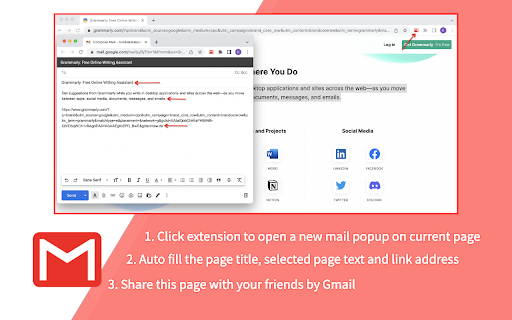
provides a button which allows you to send a webpage URL (link) via email. It provides a button that will create a Gmail message when clicked, using the page title as the subject and selected page text and link address as the message. All you have to do is choose a mail recipient and click send. features: ➔ provides a fast way to quickly send a link to the current website per email to somebody. ➔ works with local Mail clients and WebMail accounts like GMail, Hotmail, etc. ➔ create a new mail window on current page. For setting the domain name of your "Google Apps for your domain" account, click Options. options features: ➔ set the domain name of your google account ➔ set a prefix for the subject field when sending from Gmail Note that if you use a local mail client a default Mail client must be registered on the computer. this extension was made by third party developers and it is NOT made by Gmail Inc.

Send from Gmail (by Google)
Makes Gmail your default email application and provides a button to compose a Gmail message to quickly share a link via email This extension will open a Compose window in Gmail when you click any email address on a webpage. It also provides a button that will create a Gmail message when clicked, using the page title as the subject and selected page text and link address as the message. For setting the domain name of your "Google Apps for your domain" account, click Options. By installing this extension, you agree to the Terms of Service at https://chrome.google.com/extensions/intl/en/gallery_tos.html

Go2Mail: Save Links & Articles to Email
Save ad-free articles and links you find on the web directly to your Gmail inbox. Go2Mail saves links & articles directly to your email with just one click. No more switching apps or endless tabs! Go2Mail simplifies saving content for later use. Read articles in a ad-free format, with preserved format directly from your email inbox. Access bookmarks offline or organize them with powerful email search & filter options. Here's how it works: 1. Find an interesting article or webpage you would like to bookmark? Click the Go2Mail extension icon in Chrome browser 2. Instantly saved to your email without ads and in original format! Read it later on any device, without Go2Mail Why to use Go2Mail? - One-Click Saving 🖱️: Save articles & links directly to your email with a single click via extension button - Read Anywhere, Anytime 🌏: Access saved articles even offline, on any device using your email app - Powerful Email Integration 📮: Use powerful built-in email search & filter options to find what you need in a flash - No Downloads, No Hassle 🧘🏻: Go2Mail works seamlessly with almost any email app, eliminating the need for extra apps or syncing issues Bonus Features: - Automatic PDF Snapshots: Keep a clean copy of saved articles in a PDF format - Mobile & Kindle Friendly: Save articles on the go or send them directly to your Kindle device **Privacy Promise:** Your data and email content are never stored by Go2Mail. We prioritize your privacy.

Send URL by Email
This extension adds a button to the toolbar that allows you to send the URL of the web page by e-mail using the default e-mail application (e.g. Outlook).

Send Page
Allows you to easily send the url of a page, link, image or video per mail. This extension adds a new context menu entry called "Send this page.." when right clicking a image, video, link or page. By clicking on "Send this page.." your default (local or web) mail client will create a new mail with the page title as subject and the link as message body. It provides a fast way to quickly send a link to the current website per e-mail to somebody. It works with local Mail clients and WebMail accounts like GMail, Hotmail, etc. Note that if you use a local mail client a default Mail client must be registered on the computer. For sources, latest changes and troubleshoot infos go to: https://github.com/stadler/SendPage
