
egdkjinldbenhgdaodmdcdgknjnljihf

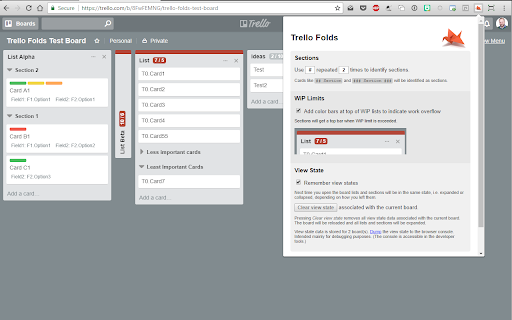

Turn your Trello board into a Kanban system with WiP limits, combining lists, card count and collapsible lists This extension adds foldable lists and sections to Trello boards, together with per list WiP limits turning your Trello board into a Kanban system. Features ==================== - Combine lists and share WiP limit between lists. E.g. "development.in progress" and "development.done" ⇒ combines to one "development" list with two sub lists - Press ⨯ in the list top right corner to fold it. Press anywhere on the folded list to expand it again. - Turn cards into collapsable sections with a selected character repeated N times (defaults to double hashes, i.e. "##") - Add WiP limits to lists by adding it in brackets to the list title, e.g. "My List [5]" - Remembers view state for boards (can be disabled) - Select how to visualize lists where WiP limit is exceeded - Open the extension popup to configure it FEEDBACK AND SUGGESTIONS APPRECIATED. New in 0.10.3 ==================== - Changed load behavior to work with changes in Trello New in 0.10.2 ==================== - Fixed collapsed board rendering offset issue due to changes in Trello's DOM/styles. - Fixed bug with not remembering board collapsed state - Minor fixes for board button hovering New in 0.10.1 ==================== - Further tweaks with board initialization/loading to make it more reliable. Hopefully it worked :-/ - Changed the default "load timeout" to 100 ms. Try increasing this value if boards do not load properly. New in 0.9 ==================== - Support for combining multiple (more than two) lists(!!) - Better realtime more accurate adjustment of combined list height - Combined list feature on by default when installing - Fix when collapsing combined lists - Fixes related to adding and removing lists in conjunction with combined lists - Fix for "Compact Mode" button in wrong state after filtering - Fixed backgound color for super lists - Fix for having URL in title causing card not to count in WiP limit For the full changelog go to the project's GitHub page.

TrelloExport
TrelloExport (Trello Export) allows to export Trello boards to Excel spreadsheets, HTML with Twig templates, Markdown, OPML and CSV. TrelloExport (Trello Export) is a Chrome extension to export data from Trello to Excel, Markdown, HTML (with Twig templates, OPML and CSV. How to use: open a Trello Board, click Show Menu, More, Print and Export, TrelloExport. Version 1.9.82 - fix error 403 in loading many cards: added automatic retry with exponential backoff for 403 errors - optimize API requests: only request checklists/attachments/comments when needed based on selected columns - removed unnecessary API parameters (organization_fields, membersInvited) that could trigger 403 - reduced member_fields from 'all' to 'fullName,username' Version 1.9.78 - Injection of TrelloExport button for Chinese (Traditional) language Version 1.9.77 - Improved injection of TrelloExport button in menu for more languages Version 1.9.76 - Improved injection of TrelloExport button in menu - Added error monitoring for 429 (rate limit) and 504 (timeout) errors - Added small delays between API requests to reduce rate limit issues Version 1.9.73: - update jquery - fix OPML export of comments due date, issue #91 - improvements for issue #29 Version 1.9.72: - finally restored the capability to load templates from external URLs, issues #86 and #87 Version 1.9.71: - Manifest v3 - checklist items' due date, assignee and status added to checklists' mode excel export Version 1.9.68: - avoid duplicate header row before archived cards in CSV export (issue #76) - export the cards "start" field (issue #84) Version 1.9.67 - Added the HTTP header "x-trello-user-agent-extension" to all AJAX calls to Trello, trying to find a solution for https://github.com/trapias/TrelloExport/issues/81 Version 1.9.66 - Added the dueComplete (bool) field to exported columns Version 1.9.65 - fix exporting of Archived items to Excel and CSV Version 1.9.64 - fix some UI defects for the "export columns" dropdown - new CSV export type - please test this! - fix issue #55, Export Done and Done By is missing for archived cards - sort labels alphabetically - HTML Twig: added "linkdoi" function to automatically link Digital Object Identifier (DOI) numbers to their URL, see [http://www.doi.org/](http://www.doi.org/), used in Bibliography template - Apply filters with AND (all must match) or OR (match any) condition, [Issue #38](https://github.com/trapias/TrelloExport/issues/38) - enable export of custom fields for the 'Multiple Boards' type of export (please see the [Wiki](https://github.com/trapias/TrelloExport/wiki) for limits) - bugfix: export checklists with no items when selecting "one row per each checklist item" - new feature: save selected columns to localStorage ([issue #48](https://github.com/trapias/TrelloExport/issues/48)) - new look: the options dialog is now built with [Tingle](https://robinparisi.github.io/tingle/) - new sponsor: support open source development! [read the blog post](https://trapias.github.io/blog/2018/06/19/TrelloExport-1.9.53) - avoid saving local CSS to localstorage - fix filters (reopened issue [issue #45](https://github.com/trapias/TrelloExport/issues/45) - paginate loading of cards in bunchs of 300 (fix [issue #47](https://github.com/trapias/TrelloExport/issues/47) due to recent API changes, see https://trello.com/c/8MJOLSCs/10-limit-actions-for-cards-requests) - bugfix export of checklists, comments and attachments to Excel - change "prefix" filters description to "string": all filters act as "string contains", no more "string starts with" since version 1.9.40 - bugfix due date exported as "invalid date" in excel and markdown - filters back working, [issue #45](https://github.com/trapias/TrelloExport/issues/45) - bugfix HTML encoding for multiple properties - small fixes in templates - two slightly different Newsletter templates - Added a button to clear all settings saved to localStorage - new jsonLabels array for labels in data - updated HTML default template with labels New SPONSORED feature: Twig templates for HTML export. See the [BLOG POST](http://trapias.github.io/blog/2018/04/27/TrelloExport-1.9.43) for more info! - new organization name column in Excel exports ([issue #30](https://github.com/trapias/TrelloExport/issues30)) - custom fields working again following Trello API changes ([issue #31](https://github.com/trapias/TrelloExport/issues30)), but not for 'multiple boards' export option. - persist TrelloExport options to localStorage: CSS, selected export mode, selected export type, name of 'Done' list (([issue #24](https://github.com/trapias/TrelloExport/issues/24))) - fix due date locale - expand flag to export archived cards to all kind of items, and filter consequently - list boards from all available organizations with the "multiple boards" export type - https://github.com/trapias/TrelloExport/issues/28 ok with Done prefix - contains vs startsWith filters for the "done" function - css cleanup - re-enabled tooltips - export custom fields (pluginData handled with the "Custom Fields" Power-Up) to Excel, (issue #22 https://github.com/trapias/TrelloExport/issues/22) Bugfix multiple css issues and a bad bug avoiding the "add member" function to work properly, all due to the introduction of bootstrap css and javascript to use the bootstrap-multiselect plugin; now removed bootstrap and manually handled multiselect missing functionalities. Temporary disabled tooltips, based on bootstrap. - only show columns chooser for Excel exports - can now set a custom css for HTML export - can now check/uncheck all columns to export

Original Card Counter for Trello
Shows the number of cards in every list in Trello. Adds support for Kanban limits. Shows the number of cards in every list in Trello. Show your support and buy me a beer: https://www.paypal.me/timvde. When installing this extension you might receive email updates about CardCounter for Trello. The old extension has been transferred but is neglected and is no longer maintained. I advise you to switch, this one will be supported by me (the original author of the old one). Changelog: 2.0.0 (23-09-2024) - Make extension compatible again with Trello

Trello Card Counter
Card counters and card identifiers for easy collaboration and project management Trello Card Counter Plus tells you how many cards you have in your lists and board and gives the cards identifiers for easier collaboration and project management.

Scrum for Trello
Adds Scrum story points to your Trello Scrum for Trello adds functionality to the awesome trello.com for use in Scrum projects. ** Update December 12th, 2023 ** Scrum for Trello is working again. Thank you to https://github.com/Swandog for creating the fixes. In the mean time there is a workaround: If you go to https://trello.com/labs you can disable the option “Board experience enhancements”. That will revert Trello to the old state and the extension works again while we work on a fix. ** Update Jun 24, 2022 ** - Update to manifest v3 - cards that are off-screen are now counted again ** Update Jun 29, 2017 ** - Works with latest Chrome ** Update Apr 8, 2016 ** - Fixed compatibility with latest Trello version ** Update Sep 4, 2015 ** - Fixed compatibility with latest Trello version ** Update Sep 2, 2015 ** - Fixed compatibility with latest Trello version ** Update Feb 26, 2015 ** - Fixed compatibility with latest Trello version ** Update Mar 29, 2014 ** - Fixed compatibility with latest Trello version ** Update Jan 14, 2014 ** - List totals show again in the new Trello.com ** Update Dec 23, 2013 ** - Upon frequent request: Settings screen to add your custom storypoints range. - compatibility new version of Trello.com ** Update Nov 6, 2013 ** - fixed issues on Windows 7 + 8 - added integration with Burndown for Trello. Thanks to @seancolombo ** Update July 31, 2013 ** - new load model in Trello. Extension is working again! ** Update June 17, 2013 ** - many fixes. Thanks for the pull requests! ** Update Apr 10, 2013 ** - Fixed compatibility with latest Trello release ** Update Dec 20, 2012 ** - Fixed count when filter is applied and fixed total count ** Update Sep 8, 2012 ** - Fixed compatibility with latest Trello release. Scrum for Trello is working again! - Added a nice feature contributed by Cedric Gatay: One thing we use often is surrounding points of done tasks with [] to prevent them for being counted by the plugin in the list total. This contain the ability to display such tasks with a decent style (half-transparency) on cards and a differentiated total shown on lists. Trello is the perfect online equivalent of the whiteboard with sticky notes aka the Scrum board. We love this app and started using it immediately after launch. One element we use a lot in our projects are the storypoints. Scrum for Trello gives you the ability to make use of story points within Trello. Scrum for Trello is a Chrome extension and you can install it via the Chrome Webstore. In the card titles you can add the storypoints between parentheses. The assigned points will be picked up by Scrum for Trello and displayed in the upper right corner of the card. For each list the total amount of story points will be calculated and shown in the title of the list. Every second the story points will be detected and calculated. So changing a number or moving a card will be reflected almost immediately. Great improvements made by @nicpottier and @paullofte: * The point value is moved to be a badge on the card. * Added support for Zero Point Cards (0), Unknown Point Cards (?), Decimal Value Cards (.5) * In addition I added the functionality to have the list total reflect the current filtered set of cards. More great improvements * @bastiaanterhorst created a storypoint icon to fit in nicely with the Trello style * bugfixes by @mgan59 * A very cool storypoint picker made by @nicpottier was integrated and adapted. Click on the title in the card view and a little menu shows you available points to quickly select. Of course you can add your own points between parentheses still. Scrum for Trello was developed by Marcel Duin (http://webglmarcel.q42.net/) and Jasper Kaizer (https://twitter.com/jkaizer) during our pet projects time at Q42 (http://q42.com). They team up with Sean Colombo (https://twitter.com/seancolombo). You can download the source code at http://github.com/Q42/TrelloScrum. Or even better, improve it and do a pull request! Scrum for Trello runs locally only and stores nothing on any server!
