
efohiadmkaogdhibjbmeppjpebenaool


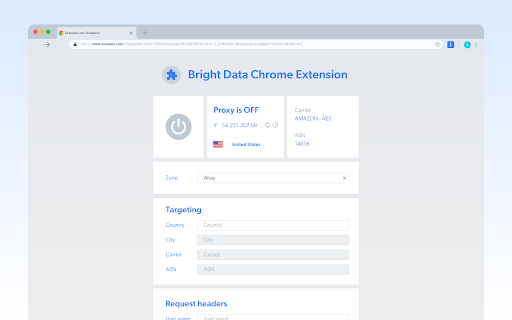
Changes location for manual data collection This extension lets Bright Data users change the location for manual data collection. Our business proxy network is the most powerful way to browse anonymously from anywhere in the world. The extension is the simplest way to integrate your existing Bright Data account and capabilities directly into your Chrome browser. The extension enables you to send concurrent URL requests through millions of residential IPs directly from your Chrome browser. Your requests are routed through nodes on our P2P network, which are real residential IPs. By sending requests via real IPs, it's virtually impossible to get blocked or cloaked, and we are able to offer near-perfect success rates, making our solution the most powerful tool available and a favorite among Fortune 500 companies. To use the extension, you must have a Bright Data account. You can sign up here: https://brightdata.com The extension includes the following features: - Supports Datacenter, Static residential, Residential, and Mobile IP browsing - Browse from any country - Customize DNS configuration to maximize discretion or speed - Set random IP rotation - Adjust user agent - Customize configuration of session length - Browse from specific cities or carriers To learn more about our other platforms, visit the following link: https://brightdata.com/proxy-tools/chrome-ext How do we use your information? We use your information to provide you with the Service and to comply with our legal requirements and internal guidelines. This means that we use the information to set up your account, provide you with support regarding the Service, communicate with you for updates, marketing offers or concerns you may have, and conduct statistical and analytical research to improve the Service. Information we share We do not rent or sell any personal information. We may disclose personal information to other trusted third party service providers or partners for the purposes of providing you with the Services, storage, and analytics, and to comply with our legal requirements and internal guidelines. We may also transfer or disclose personal information to our subsidiary affiliated companies. Security and confidentiality We use industry-standard information, security tools, and measures, as well as internal procedures and strict guidelines to prevent information misuse and data leakage. Our employees are subject to confidentiality obligations. We use measures and procedures that substantially reduce the risks of data misuse, but we cannot guarantee that our systems will be absolutely safe. If you become aware of any potential data breach or security vulnerability, we ask that you contact us immediately. We will use all measures to investigate the incident, including preventive measures, as required. Your choices and rights We strive to give you ways to update your information quickly or to delete it—unless we have to keep that information for legitimate business or legal purposes. When updating your personal information, we may ask you to verify your identity before we can act on your request. To exercise such rights, you may contact us at: privacy@brightdata.com

WebRTC Leak Prevent
Prevent WebRTC leaks using the official API. Test for leaks here - https://diafygi.github.io/webrtc-ips/ Compatible only with Chrome version 88+ and updated to comply with Manifest V3. WebRTC-based services may be affected by this extension. Please open the options page and read the instructions before use.

Canvas Fingerprint Defender
Canvas Fingerprint Defender is a lite extension that lets you easily hide your real canvas fingerprint by reporting a random fake value. According to many tech blogs, completely blocking canvas fingerprints is not a good idea, therefore reporting a "fake" fingerprint could be the best solution to better protect your privacy. This addon simply adds a small noise to the actual fingerprint and "renews" it every time you visit a website or reload a page. It is important to note that, it does not have any settings or options to adjust. Simply add it to your browser and start surfacing the internet. If you want to test this addon, please visit a website that shows your fingerprint (i.e. browserleaks). Every time you reload the page, you will see a new fake fingerprint. To report bugs, please visit the addon's homepage (https://mybrowseraddon.com/canvas-defender.html) and fill out the bug report form.

BP Proxy Switcher
Switch, test, and rotate proxies with country flags, health checks, privacy controls, and optional settings sync. BP Proxy Switcher helps you manage, test, and rotate browser proxies from one compact extension. Add your proxy list, identify proxy locations, check connection quality, and switch between proxies without repeatedly opening Chrome's network settings. Main features Switch between HTTP(S) and SOCKS5 proxies from the toolbar popup. Use authenticated proxies with usernames and passwords. Disable the proxy or start automatic proxy rotation in a few clicks. Display country flags and country names beside detected proxies. Search proxies by label, IP address, port, country, or test status. See the current proxy directly on supported webpages. Open WHOIS information for the current proxy IP. Use custom browser user-agent strings. Exclude selected domains from proxy routing.

IPRoyal Proxy Manager
IPRoyal Proxy Manager allows you to easily control all your proxies in your Browser The IPRoyal Proxy Manager is your ultimate tool for seamless proxy configuration and management in Google Chrome. This free extension empowers you to control all your proxies and proxy profiles effortlessly, with no need to adjust your system settings. Key features: - Add, configure, and manage proxies directly within the extension - Log in to IPRoyal to access and configure residential proxies - Select country, state, city, protocol, rotation, and all other options - View your remaining residential proxy traffic in real time - Switch between proxies instantly and set favorites for quick access - Search through your configured proxies for effortless management With the full functionality of the IPRoyal dashboard at your fingertips, the IPRoyal Proxy Manager is your one-stop solution for proxy configuration and control. Avoid geo-restrictions, blocks, and bans while enjoying truly unrestricted internet access - all with just a few clicks.
