
efoeeibamhajkgojfilgckakigkjdcjf
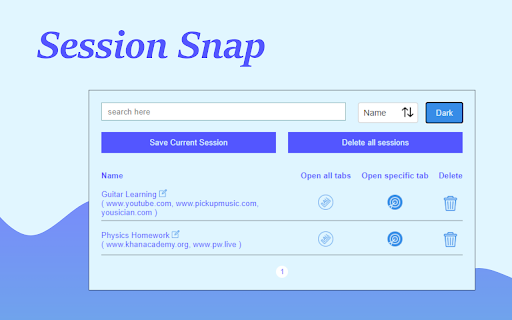
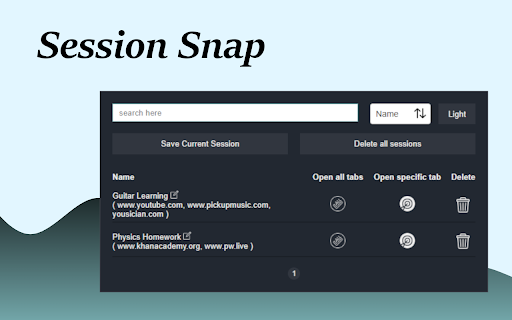

Effortlessly save your current browser session tabs, enabling you to access and reopen them. v1.1.2 UI language support for French, German, Spanish & Japanese UX improved Bug fixes Whether you're deep in research, tackling homework, or captivated by an amazing article, swiftly save your entire tab session with a single click. Organize each session individually and revisit them whenever you need, ensuring you never lose your valuable findings.

Tab Discard (Suspender)
Easily suspend inactive tabs and save up memory for your browser. Tab Discard (Suspender) is an extension that lets you easily suspend either all inactive tabs or just the active tab by clicking on the toolbar button. In principle, suspending tabs can reduce the browser memory and enhances your browsing experience. When you click on a suspended tab (make it active) it will be loaded with the previous content automatically. This addon is useful when you have several open tabs, you can suspend them all (free up the memory) with just one click and then visit them one-by-one to unsuspend. This way, your browser will use the least amount of memory and have a better performance. Please right-click on the toolbar button and then select the desired option for suspending tabs (i.e. active or inactive tabs). To report bugs, please visit the addon's homepage (https://mybrowseraddon.com/tab-discard.html) and fill the bug report form.

Browser Sessions
Manage, save and restore tabs with one click. Access your browsing sessions when you need it. Manage, save and restore tabs with one click. Access your browsing sessions when you need it. Features: ⭐️ enhanced UI ⭐️ Better animations ⭐️ Confirm deletion for sessions ⭐️ Universal Search: Search through every session and find tabs. ⭐️ Quick Save: Save a session without typing a name. ⭐️ Open sessions on a new browser window. ⭐️ View tabs from every session to find the right one. ⭐️ Save as many tabs as you need for later. ⭐️ Tabs remain saved even if you close your browser or restart your computer. ⭐️ Save tabs from different windows and their tabs arrangement. ⭐️ Automatic dark and light mode. ⭐️ Select if you save tabs that belong to the browser (Ex: History, Downloads) ⭐️ Rename Sessions

Tab Session Manager
Save and restore your browser sessions. Never lose your tabs again. Tab Session Manager is the most complete browser session manager for Chrome. Save your open tabs as named sessions and restore them with one click — perfect for switching between projects, research, and workflows without losing a single tab. CORE FEATURES • Save current window as a named session with one click • Restore full sessions instantly — opens all tabs in a new window • Auto-backup sessions on a configurable schedule (default every 30 min) • Retention policy — automatically removes old backups beyond your limit • Pin important sessions to keep them at the top • Search sessions with full-text indexer across names, URLs, and tags • Import sessions from JSON — perfect for sharing or migrating TAB UTILITIES • Duplicate tab detector — find and close duplicate tabs across all windows • Tab analytics — real-time tab count, unique domain tracking, history • Session health checker — validates all stored sessions are restorable STORAGE MANAGEMENT • Storage quota monitor — warns before you hit Chrome's 5MB storage limit • Configurable retention — auto-delete backups older than N days • Per-session statistics and restore history KEYBOARD SHORTCUTS • Alt+Shift+S — Save current session instantly • Right-click any page → Save tab to session PERFECT FOR • Developers switching between multiple projects • Researchers managing topic-specific tab sets • Students organizing study sessions • Anyone who works with 10+ tabs daily

Smart Sessions - Tab Manager
Save & restore your browser sessions. Auto saving, multiple sessions and more. With this tab manager you can group your tabs into a session. Any changes are automatically saved. Close & restore when needed. - Online synchronization with your CHROME account - Multiple active sessions - Persistent size and position of session windows - Multiple windows in a session (you can drag a tab out from active session) - Auto saving - Tags - Tab groups - Incognito mode (should be explicitly allowed for extension) - Search - Export/Import (html document) - Tab navigation/closing To start, click "create" in the top bar, enter new session name and select few tabs. After creation, those tabs will be moved to a new window and all changes to its tab list will be recorded, window size and position too. You can also move any tab out of active session, extension can easily track two or more windows. Apr 22, 2022 (1.6) - Support for tab groups - Incognito mode - Bug fixes Jan 26, 2020 (1.4) - Dark Theme - Improved Search - Export Single Session - Page Context Menu "Add To Session" - Small improvements
