
efnbieancfndfchajalhingdlneoicaa


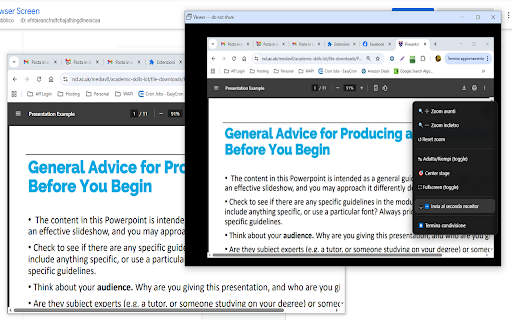
Duplicate a window, screen, or browser tab using Chrome's picker (window preselected). Includes zoom, pan, and options. Duplicate Browser Screen allows users to duplicate any browser window and move the duplicate to a second screen. This functionality is especially useful in presentations, karaoke sessions, or multitasking scenarios where the same content needs to be displayed on multiple monitors. With Duplicate Chrome Screen, users can open their browser, activate the extension, and select the window they want to duplicate. The duplicated window can then be moved to a different monitor, making it perfect for events like karaoke, where the lyrics need to be displayed on a separate screen while the main window remains under control. The same applies to presentations or live streaming, where presenters and streamers can keep an eye on the main content while showing it to their audience on a different screen. The extension offers seamless performance with minimal lag between the original and duplicated windows. It’s intuitive, quick to use, and requires no complicated setups, making it accessible to everyone, from beginners to professionals. Duplicate Chrome Screen is an essential tool for anyone who needs to mirror content across screens effortlessly and efficiently, whether for entertainment, work, or teaching purposes. 🎯 Why you’ll love it ⚡ Low-latency viewing for smooth, near-real-time playback 🧭 Simple workflow: open the browser, click Duplicate Screen, pick what to share (Window/Screen/Tab), then drag the viewer to the other display 🔍 Zoom in/out (with keyboard and wheel) ✋ Pan the view when zoomed 🖱️ Right-click menu with quick actions 🎬 Great for 📽️ Presentations & events — keep controls on your main screen, show content on the second 🎤 Karaoke — lyrics on the external display, controls stay private 📺 Live streams & demos — manage the primary window while the audience sees the output 🔒 Privacy-friendly Runs entirely in your browser—no accounts, no uploads, no complicated setup.

MirrorTab
MirrorTab captures your interactions on one browser tab and replays them live on one or more target tabs. Clicks, inputs, keystrokes, scrolling, and mouse movement are all forwarded in real time from a Source tab to every Target tab. You can even export these recorded sessions and replay them automatically at a later time! The extension is open source and can be found at: https://github.com/KostaD02/MirrorTab 1. Open the MirrorTab popup and enter a Source URL and one or more Target URLs (click "+ Add Target" to add more, up to 10). 2. Click "Start Session" to open the source and all target tabs automatically. 3. Interact with the Source tab. Every action is mirrored to all Target tabs instantly. 4. Pause, resume, or stop the session at any time from the popup. Remove individual targets from a running session without stopping the others. 5. Download the full event log as JSON or plain text whenever you need it. 1. Click the "Replay Page" button in the extension popup. 2. Upload a previously downloaded .json or .txt session log. 3. Enter the URL of the environment you want to test against. 4. Click "Start" to automatically execute all recorded actions with full playback controls (play, pause, stop, adjust speed). 1. Real-time mirroring: Live forwarding of clicks, form inputs, keystrokes, scroll events, and mouse movement. 2. Multi-Target Sync: Mirror a single source to multiple targets at once - perfect for cross-environment testing and multi-device demos. 3. Standalone Replay Engine: Upload any exported session file to an isolated Replay tab to automatically replay recorded user actions. 4. Playback Controls: Fully dictate your automated replays by adjusting the execution speed to 0.5x, 1x, or 1.5x. 5. Visual Ghost Cursor: A virtual cursor on each Target tab shows exactly where actions land. 6. Role Badges: Floating badges (SOURCE / TARGET / REPLAY) on each tab for clear identification. 7. Full Session Recording: All events are logged with precise timestamps and element selectors. 8. Export Capabilities: Download your session log as JSON or plain text for debugging, documentation, or analysis. 9. Smart Element Targeting: Unique IDs are resolved directly, while all other elements use a structural CSS path for reliable accuracy across DOM changes. 1. QA Testing: mirror user flows to multiple staging or production environments side by side. 2. Live demonstrations and presentation broadcasting to multiple screens. 3. Automated Regression: Download a bug's session log and automatically replay it against new code to verify fixes. 4. Cross-browser and cross-layout visual comparisons across several targets simultaneously. 5. Documenting interactions step-by-step for teams. Privacy: MirrorTab works entirely within your browser. No data is sent to any external server. Session data stays local and is only saved directly to Chrome storage to survive browser restarts.

YT Music Karaoke
A karaoke mode for YouTube Music 🎤 YT Music Karaoke - Synced Lyrics for YouTube Music Turn YouTube Music into a full karaoke experience with synced lyrics, immersive fullscreen mode, manual lyric search, and a modern glassmorphic theme. YT Music Karaoke highlights lyrics in real time while songs play, so you can sing along, practice vocals, or follow every line smoothly. ✨ Key Features - 🎵 Real-time synchronized lyrics with live highlighting - 🎯 Click any lyric line to jump to that part of the song - 🖥️ Fullscreen karaoke mode for an immersive sing-along experience - 🎮 Built-in fullscreen controls: play, pause, next, previous - 🔎 Manual lyric search when auto-match is not perfect - 📄 Paste your own LRC lyrics for full control - ⚡ Smart lyric caching for faster reloads - ⏱️ Time shift control to fine-tune lyric sync - 🧠 Auto-scroll with manual override for better reading flow - 🎨 Customizable typography (font family and active/inactive weights) - 🌌 Ethereal Engine theme with dynamic album-art ambience - 🚀 Performance optimized for smoother scrolling and transitions 🎬 How It Works - 1) Install the extension - 2) Open YouTube Music - 3) Enable karaoke mode from the extension popup - 4) Play any song - 5) Toggle fullscreen mode for the best karaoke experience 💫 Why You’ll Love It - Seamless integration directly inside YouTube Music - Clean, modern karaoke UI with smooth animations - Fast behavior during song changes - Great for singing practice, parties, and everyday listening 🌟 Recent Updates - Revamped UI and fullscreen karaoke workflow - Added manual lyric search and LRC paste support - Added theme toggle and enhanced visual styling - Improved song-change handling and state cleanup - Reduced observer overhead and improved performance 📝 Notes - Lyrics availability and timing depend on source data quality - Some songs may need slight timing adjustments - Use the time shift control to perfectly align lyrics - This extension is actively maintained and regularly updated

Oversized Monitor Guru (OMG)
Transform your large monitor into a professional screen sharing experience! Oversized Monitor Guru (OMG) solves the frustrating problem of sharing content from massive displays in video conferences. When you have a large monitor, sharing your entire screen makes content appear tiny and unreadable for meeting participants. - Creates a customizable mirror window of any portion of your screen. - Allows you to share only the relevant content area instead of your entire display. - Works seamlessly with Google Meet, Microsoft Teams, Slack, and other conferencing apps. - Provides precise control over mirror size, position, and quality settings. 1. Click the OMG extension icon. 2. Set your desired mirror area (width, height, position). 3. Start mirroring to create a dedicated window. 4. Share the mirror window in your video conference instead of your full screen. Perfect for developers sharing code, designers presenting mockups, analysts showing data, or anyone who needs to share specific content from a large display. Stop making your audience squint - make your presentations crystal clear!

YouTube Karaoke Queue
A premium karaoke queue interface for YouTube (Now YouTube Studio compatible) YouTube Karaoke Queue – The Easiest Way to Run a Karaoke Night Turn any YouTube session into a smooth, hands-free karaoke experience. This extension lets you quickly search for songs or videos—automatically adding “with lyrics” or “karaoke version” to your searches so you always find the right version fast. Add songs to the **top or bottom** of your queue with one click, then let the extension handle the rest. It automatically plays the next track when the current one ends, giving you a seamless karaoke flow without ever touching the keyboard. Build your perfect playlist: *Save your queue as a playlist and **load it again next time** *Rearrange songs with an easy drag-and-drop interface *Skip ahead instantly to the next track—or jump to any song in the queue *Minimize the extension to keep it out of the way; the compact view still shows what’s up next and gives you a quick “Skip Ahead” button Perfect for parties, game nights, personal jam sessions or simply your preferred YouTube Interface, this tool makes hosting karaoke effortless. Just search, queue, and sing. 🎤✨ NEW PRO VERSION NOW AVAILABLE: *PRO Settings - Add Singer - Add Key Manually - Auto Add Key with AI Integration - Change Look, Icon, and Title - Search within Subscriptions - Import YouTube Playlists - Create, Edit Multiple Queue Playlists - Import, Export Multiple Queue Playlists New Features: 6.8 - Added enhancement so extension position can be reset - Improved PRO workflow 6.6 - Fixed issue with Youtube Studio display 6.5 - Updated the entire UI to make it feel more current - Improved usability for buttons - Added ability to skip queue in YouTube search result popup 6.2 - Added a search to the queue - Added a 'move song to top of the queue' button in the queue list - Added ability to skip queue in YouTube search result - Added ability to skip queue and add to playlist button in YouTube search result - Fixed small bugs 6.1 - Added 7-Day Pro Trial - Added improved UX experience 5.00 - Added improved show/hide button - Added omni-direction resize capability - Added improved hover capability - Add AI Integrated key finder with user supplied Deepseek/ChatGPT API key
