
efhmapjgiageiihjldfjllhdebpgeghp

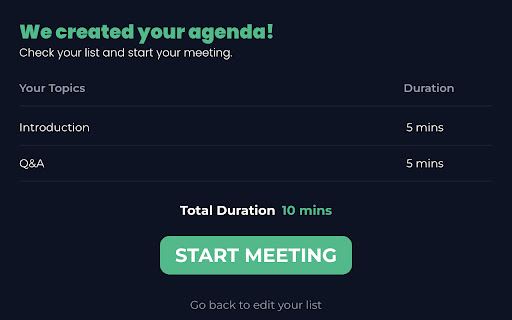
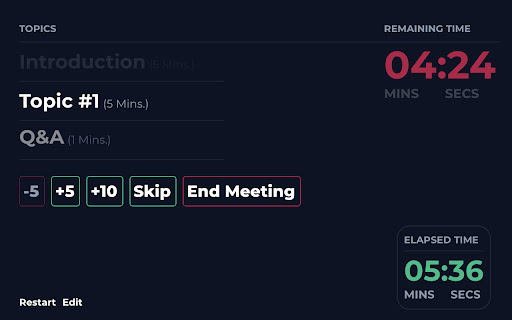
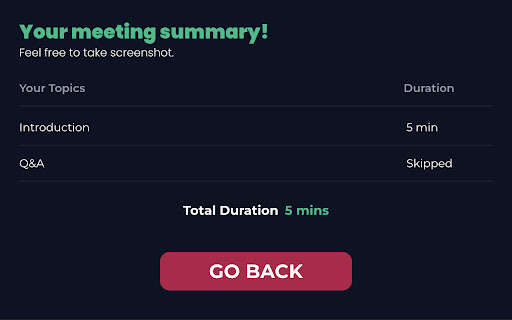
Timer for keeping meetings on track. With this simple agenda tracker, you can plan and timebox your meeting topics with it's timer. You can extend and/or skip your agenda items, and it warns 10 seconds before countdown ends.

Envoy for Google Calendar
Help your reception team prepare for your visitors by syncing Google Calendar events with Envoy. You will be able to select the location and visitor type for the given event. Now, you can also schedule to come into the office and reserve desks all within Google Calendar.

Meetrics: Prepare Excellent Agendas with AI
Meetrics is a collaboration software designed to save up to 60% of meeting time, prepare all attendees, and drive meeting outcomes with brilliantly crafted AI agendas. Eliminate time wasted on bad meetings using Meetrics in Google Calendar. AI-driven, tailored talking points ensure productive, goal-oriented discussions with the right people. Instantly generate structured agendas, assign talking points, and enforce time limits, all within a seamless, intuitive interface. 🎉 [NEW] AI-generated meeting talking points for any meeting and any objective. With the click of a button, our AI will create brilliant talking points that’ll uplevel the quality of your meetings and help you hit your meeting’s objective. You know that 10-30 *minutes* of meeting prep you just don’t have time for? Yeah, we got that covered for you. ✨ GOOGLE CALENDAR MEETRICS FEATURES With Meetrics, you’ll have easy side-bar access to these key features (with even more coming soon!): - 🖱️ AI-generated 1-click meeting objectives and talking points - ⏱️ AI-suggested talking point time limits to keep your meeting on track and within time - 🙋 AI-suggested talking point owners to share ownership (works if they have Meetrics too) - 💌 Automatically share your agenda with your meeting attendees - 👍 “Was the objective met?” feedback ratings to see how your meeting went - 💯 Meetrics score to objectively show you how you’ve been doing with your meetings over time - 👥 Run effective 1:1s, team meetings, and board meetings, with more types to come soon! 🔑 YOUR DATA SECURITY AND PRIVACY ARE #1 TO US Meetrics follows industry best practices to ensure our product and your data is and always will be secure. Read more about how we do this in our privacy policy: https://www.meetrics.ai/privacy-policy

Body Toss Hyper Casual Game
With your bodybuilder character, you have to throw the girl as high as possible. Get ready for a trendy casual game. Show your strength and throw it to the top, let's start the adventure. How To Play Played with Mouse. Finally, you can enjoy these game for free (and more requests will be added)! Body Toss Hyper Casual Game extension does not contain any hidden ads. Help and Contact Contact with us at info@gamebol.com and share your thoughts and problems.

Meeting Timer - for Google Meet
Google Meet Timer with Calendar Sync and a shareable SubTimer for tasks, speaking time, and agenda items. Meeting Timer is a lightweight timer for Google Meet with Google Calendar Sync, a Mini SubTimer for agenda items, and a shareable timer that stays visible when you present. • Automatic countdown from your Calendar – join a Meet, and the Google Meet countdown timer starts with the correct duration. • Mini SubTimer (new) – time tasks, speaking turns, or agenda points without touching the main timer. • Share across tabs – show the timer on every tab so it appears on your shared screen. • Stay on track – halftime/overtime color cues, optional sound alerts, and overlap warnings. • Drag & drop – place the timer where you want; we remember the position. • Quick access to upcoming events – open the extension popup to see and join your next meetings. • Automatic: Connect Google Calendar once. The timer counts down for any Meet that matches your event. • Manual: Set a duration yourself. Great when there’s no calendar event, or an event couldn't be matched. • 🕒 Automatic Timer (Calendar matched) • ⏰ Manual Timer (Calendar event not matched) (set duration, see progress/halftime/overtime) •➕ Mini SubTimer for topics, Q&A, exercises • 🤝 Shareable timer (visible while screen sharing) • 🎛️ Drag & drop + saved position • 🌈 Progress, halftime & overtime color states • 🚨 Overlap alerts for back-to-back meetings • 🔊 Sound alerts (optional; configurable volume) • 📍 Favicon badge before a meeting starts • 📅 See all upcoming meetings from your Google Calendar in the popup 1. Install the extension. 2. (Optional) Connect Google Calendar. 3. Join a Google Meet. The meeting timer overlay appears automatically. 4. Click the SubTimer icon to add a mini countdown for agenda items or controlling speaking time. 5. Click Share to mirror timers across tabs so they appear on your shared screen. • Open settings from the gear icon on the timer. We don’t store data on our servers. Your settings and meeting data stay in your browser. Google Meet Meeting Timer's use and transfer of information received from Google APIs to any other app will adhere to Google API Services User Data Policy, including the Limited Use requirements.
