
efcolpnncmnbelhkghidlcobfbmjekcf
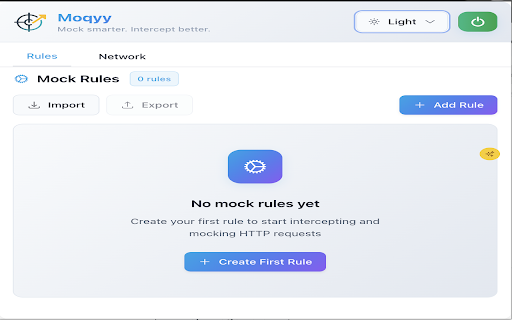


Mock APIs, intercept fetch/XHR requests, and test frontend apps without backend. Built for frontend developers and QA testers. Moqyy is the easiest way for frontend developers and QA testers to mock API responses and intercept network requests inside the browser. Mock APIs instantly, intercept **fetch** and **XMLHttpRequest (XHR)** calls, and test your frontend without waiting for backend endpoints. Moqyy is lightweight, fast, and built specifically for modern frontend workflows (React, Vue, Next.js, Angular). Key features • Intercept **fetch** and **XHR** calls. • Create API mock rules in one click. • Auto-fill request/response patterns and templates. • Save mock rules locally and import/export JSON. • Enable/Disable mocks globally or per-rule. • Capture real responses to use as a mock (Auto-capture). • Test different server responses (200, 400, 500, custom JSON). • Lightweight extension that won’t clutter your devtools. Who should use Moqyy • Frontend developers building UI without backend readiness. • QA teams testing client behavior for edge/backend error states. • Engineers who need fast, local API mocks without complex setup. Quick start 1. Install the extension. 2. Open the Network tab in Moqyy and trigger a fetch/XHR from your app. 3. Click the “+” next to a request to create a mock. 4. Edit the mock response and enable it — refresh your app and see the mocked response in action. Why Moqyy vs other tools • Focused on **API mocking** for frontend workflows (not a general network toolbox). • Simpler onboarding and a modern UI that developers prefer. • Built for speed — create useful mocks in under 30 seconds. If you find issues or want features, use the in-extension Feedback button — we read every message.

Mock Express - Modify, Mock & Intercept HTTP Requests Locally
Intercept, mock, and modify API requests directly in your browser. No server needed. 100% local and secure. 👨💻 Built by a developer for real-world debugging and testing, Mock Express helps you simulate edge cases, validate UI behavior, and test APIs with complete control—right from your browser. Designed for developers and QA teams, it removes the need for backend changes or complex setups, making it easy to reproduce failures, test different scenarios, and keep development workflows stable and predictable. ✨ Request rules → Modify outgoing requests: headers, query parameters, URL segments, and body → Block API calls to simulate failures or remove unwanted traffic → Add delays to test latency and slow network conditions → Match requests using exact, wildcard, or regex URL patterns ✨ Response rules → Mock or modify responses with custom status codes, headers, and body → Use static JSON, saved resources, or JavaScript for dynamic responses → Skip the actual network call when mocking ✨ DevTools workflow → Inspect captured requests directly in the DevTools panel → Create request/response rules instantly from captured traffic ✅ Why Mock Express ⚡ No backend required — everything runs locally 🔒 Privacy-first — no data leaves your browser 🎯 Flexible matching — supports exact, wildcard, and regex rules 🔄 Instant control — toggle rules without losing configuration 🧪 Reliable testing — simulate errors, delays, and edge cases easily 🛠 Developer-friendly — fast setup, no complex configuration 👨💻 Who it's for → Frontend developers: test UI behavior across success, error, and edge cases → QA engineers: reproduce failures and network conditions reliably → Teams: maintain consistent test scenarios even when APIs are unstable 🔒 Privacy → Mock Express runs entirely in your browser. All rules and settings are stored locally using browser storage. No accounts, no tracking, and no external servers. → Custom scripts are user-defined and executed locally within the browser. No code is fetched or executed from external sources. 🧩 Compatibility → Works with modern frameworks (React, Angular, Vue, etc.) → Supports REST APIs over HTTP (GraphQL support coming soon)

Fetch Log - API Inspector
Monitor and inspect fetch/XHR network requests with a clean developer UI **TL;DR:** Fetch Log is the Chrome extension DevTools should have shipped. It strips away the noise, capturing only real API (fetch/XHR) traffic in a persistent, developer-focused popup—no static assets, no bloat, no learning curve. **What’s actually happening?** - Real-time monitoring of HTTP API requests using the Debugger API - Live, filterable feed: case-insensitive, persistent filters - Drilldown: Pretty-printed JSON, syntax highlighting, one-click copy for headers, bodies, or responses - Auto-refreshes pending requests; dark mode for late-night debugging - All data is local, ephemeral, and under your control—no tracking, no analytics **Why bother?** - DevTools’ Network tab is a haystack; Fetch Log is the needle - Lightweight, popup UI (400x600) with zero setup—install and go - Remembers your filters, highlights endpoints, and gets out of your way - Built for frontend devs, API integrators, and anyone tired of sifting through web cruft **Limitations (aka: honesty is a feature):** - No chrome:// or extension page debugging - One tab at a time; debugger detaches on tab switch - HTTP(S) only—no WebSocket voodoo - Popup closes on navigation (Chrome’s rules, not ours) **Perfect for:** REST/GraphQL wranglers, API explorers, anyone who wants a sharper, simpler network inspector.

API Response Viewer
Captures, formats, and displays API responses in a clean interface for easy debugging and analysis of web applications. API Response Viewer is a Chrome extension that helps developers monitor and analyze API requests in real-time. It captures HTTP requests, displays them in an organized list, and formats the JSON responses for improved readability. The viewer shows essential request information including URLs, method types, response sizes, and loading times. Users can search for specific endpoints, reload the capture session, and copy JSON data with a single click. The tool also features a clean, dark-themed interface with collapsible JSON trees that highlight different data types with distinct colors for better visual parsing. This extension is particularly useful for web developers who need to debug API interactions, inspect response structures, or monitor network activity without switching between different developer tools.

Hunter Search
Otimize buscas para pentest e bug bounty com dorks automáticos. Hunter Search – Dorks Inteligentes para Pentest e Bug Bounty Otimize suas buscas de segurança! O Hunter Search é a extensão definitiva para profissionais de pentest, bug bounty hunters e entusiastas de segurança que desejam encontrar informações sensíveis, vulnerabilidades e exposições públicas de forma rápida, prática e inteligente. Principais Funcionalidades - Montagem Avançada de Dorks: Combine palavras-chave, múltiplos sites, operadores Google e dorks prontos (IDOR, XSS, SQLi, AWS, arquivos sensíveis, leaks, painéis admin e muito mais) em uma interface intuitiva. - Pré-visualização em Tempo Real: Veja como ficará sua query antes de buscar, garantindo precisão e controle total. - Busca Multi-Plataforma: Escolha entre Google, Bing ou DuckDuckGo para ampliar suas possibilidades de descoberta. - Histórico e Favoritos: Salve e reutilize suas queries mais usadas. Nunca mais perca aquele dork perfeito! - Botões Rápidos: Copie, limpe ou favorite suas buscas com apenas um clique. - Modo Escuro/Claro Automático: Interface moderna, responsiva e confortável para qualquer hora do dia. - Tooltips e Ajuda: Dicas rápidas em cada campo para facilitar o uso, mesmo para quem está começando. Exemplos de uso - Encontrar vazamentos de chaves AWS em repositórios públicos. - Buscar arquivos sensíveis (.env, config, credentials) em sites e domínios específicos. - Descobrir endpoints de administração, painéis e dashboards expostos. - Pesquisar por vulnerabilidades comuns (IDOR, XSS, SQLi) em qualquer site. - Montar dorks customizados para investigações avançadas. Por que usar o Hunter Search? - Produtividade: Economize tempo montando queries complexas com poucos cliques. - Personalização: Adapte a busca ao seu objetivo, seja para bug bounty, CTF, OSINT ou auditoria. - Praticidade: Tudo em um só lugar, sem precisar decorar dorks ou operadores. Hunter Search Otimize suas buscas. Encontre vulnerabilidades. Eleve seu bug bounty!
