
dbcmekejnbcejobnahedglfapjaodpli


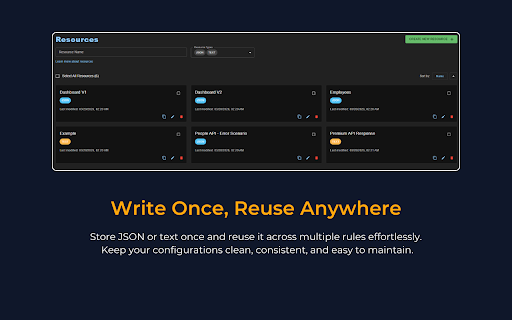

Intercept, mock, and modify API requests directly in your browser. No server needed. 100% local and secure. 👨💻 Built by a developer for real-world debugging and testing, Mock Express helps you simulate edge cases, validate UI behavior, and test APIs with complete control—right from your browser. Designed for developers and QA teams, it removes the need for backend changes or complex setups, making it easy to reproduce failures, test different scenarios, and keep development workflows stable and predictable. ✨ Request rules → Modify outgoing requests: headers, query parameters, URL segments, and body → Block API calls to simulate failures or remove unwanted traffic → Add delays to test latency and slow network conditions → Match requests using exact, wildcard, or regex URL patterns ✨ Response rules → Mock or modify responses with custom status codes, headers, and body → Use static JSON, saved resources, or JavaScript for dynamic responses → Skip the actual network call when mocking ✨ DevTools workflow → Inspect captured requests directly in the DevTools panel → Create request/response rules instantly from captured traffic ✅ Why Mock Express ⚡ No backend required — everything runs locally 🔒 Privacy-first — no data leaves your browser 🎯 Flexible matching — supports exact, wildcard, and regex rules 🔄 Instant control — toggle rules without losing configuration 🧪 Reliable testing — simulate errors, delays, and edge cases easily 🛠 Developer-friendly — fast setup, no complex configuration 👨💻 Who it's for → Frontend developers: test UI behavior across success, error, and edge cases → QA engineers: reproduce failures and network conditions reliably → Teams: maintain consistent test scenarios even when APIs are unstable 🔒 Privacy → Mock Express runs entirely in your browser. All rules and settings are stored locally using browser storage. No accounts, no tracking, and no external servers. → Custom scripts are user-defined and executed locally within the browser. No code is fetched or executed from external sources. 🧩 Compatibility → Works with modern frameworks (React, Angular, Vue, etc.) → Supports REST APIs over HTTP (GraphQL support coming soon)

Requestly: Intercept & Modify HTTP Requests
Intercept & modify HTTP(S) traffic: redirect URLs, modify headers, inject scripts, mock REST & GraphQL APIs, and more. 🚀 Best Chrome extension to supercharge Web Development & QA. Trusted by 300,000+ developers. 👉 Requestly works directly in Chrome with beautiful, modern UI and team collaboration features. Popular features – Modify HTTP Headers, Override API Responses, API Mocking, Redirect URLs, Insert Scripts & HTTP Interceptor. 🌟 Top Use Cases → Mock API Responses to build frontend when backend isn't ready → Modify HTTP Request & Response Headers → Test local JavaScript changes directly on production sites → Use HTTP Redirect Rule to load scripts from local or staging environments on production sites → Modify and Mock API Request payload, Response body, & Status Code → Override GraphQL Requests 📌 https://requestly.com/blog/what-is-requestly Requestly (now a part of BrowserStack) doesn't set up a proxy in your browser, and hence, developers don't face VPN issues or lags while using it. Requestly leverages Chrome Extension APIs under the hood to intercept & modify requests. 👉 Redirect URLs, Change Host, Modify Query Params (Map Remote or Map Local) → Use dev/staging APIs in production sites & test local changes without code changes → Debug remote Javascript by loading locally running JS in production sites → Switch Hosts (e.g. abc.com/* to xyz.com/*) using Replace Rule → Debug Ad Tracking Pixels, Debug A/B Test Campaigns, etc → Remote Debugging with Requestly on Production sites → Swap Adobe Launch (Adobe DTM) scripts in production with staging script 📌 Demo Video – https://www.youtube.com/watch?v=85GVaOWTnlE 👉 Insert Scripts to any Webpage → UserScripts are simple JavaScript/CSS code that can change the layout of a page, add or remove new functionality and content, or automate actions. → Use File Server to upload long scripts and Inject them using Script Rule → Inject your JS tags on potential customers' sites and test your features → The sales/product team can use this to demo the product directly on the prospect's website (10x engaging demo) 📌 Demo – https://www.youtube.com/watch?v=4dvucRjLwGY 👉 Requestly supports the following imports → All HTTP header profiles from ModHeader → JSON configuration for Redirects & Scripts from Resource Override → XML configuration from Charles Proxy (Map local isn't supported in chrome extension yet due to technical limitations in browser) 👉 Additional Features → Enable/Disable rules with a single click → Export and import the rules and maintain a backup for your rules → Easy collaboration with others. Share Rules with other Users in one click 📌 Demo – https://www.youtube.com/watch?v=BM7kTFy-vdc

ModResponse - Mock and replay API
Mock, modify, and replay API. Easy setup. No proxy needed. No code change required. ModResponse is a powerful and easy-to-use tool for web developers that simplifies the process of modifying, stubbing, and replaying HTTP responses. It requires no extra proxy or code change to be made, allowing you to quickly and conveniently test different scenarios and debug edge cases. With ModResponse, you can modify the API response, return different HTTP status code, add delay to your request, etc. You can also reroute your HTTP request to a different server, allowing you to test your local changes in production domain within seconds, without the risk of breaking production. ModResponse does not require extra proxy or making any code change. It can modify pretty much any HTTP request, not just XHR requests. Simply install it and you are ready to go! ** What can ModResponse do?** - Record and replay HTTP response - Stub HTTP response - Reroute request to a different URLs - Change HTTP response body, status code, and headers - Delay HTTP requests to simulate slow network - Simulate network errors - Advanced filtering by tab, tab group, window, or time - Demo with fake data Want to create perfect data for your product demo? With ModResponse, you can replace the actual API response with a fake one that contains the data you want. No need to change your real data or make code change. - Speed up slow requests Do you have API requests that are taking a long time to finish, and every time you make a small UI tweak you need to wait >10 seconds for the API request to finish to visualize your change? Using replay response, you can record and replay the slow API request. That way, you will only need to wait on the slow API request once. All subsequent requests to be served from the cached response within a few milliseconds. - Develop against edge cases Need to handle a 4XX or 5XX status code from an XHR request, or try out how your UI will behave with a very long string? Using replay response or stub response, you can modify the response body, status code, or response headers to simulate different scenarios that you need to handle. - Develop against unimplemented APIs Are you a web developer who is blocked because an endpoint you depend on is not yet implemented? Using stub response, you can mock the API response so you can start developing against that endpoint. That way, you can develop the frontend while others implement the endpoint (as long as the actual implementation return the response in the same format). - Testing on production domains Do you need to integrate with a third party platform that only works on your production domain? Using proxy request, you can reroute the request from your production domain to localhost or a dev domain, allowing you to test your changes on your production domain without the risk of breaking it. - Debug edge cases Need to test how your app behaves when some resources takes too long to load, or when they fail to load due to network errors? With ModResponse, you can add artificial delay and simulate different network error conditions so you can debug and handle edge cases with ease. ** Other ModResponse features ** - Support having multiple profiles with quick switching between profiles - Export and import profile - Easily share your profiles with others - Dark mode support - Customizable profile badge - Clone profile ...and more!!! "debugger" is required in order for response modification to work. "tabs" permission is required for prefilling the URLs, and for tab filter, tab group filter, and window filter to work. "storage" and "unlimitedStorage" are required to store the response modification. "contextMenus" is used to enable quick pause/unpause by right-clicking on the icon. ** Known issues ** 1, You will see ["ModResponse" started debugging this browser] banner when ModResponse is activated. This is because it uses the debugger API, which is needed for response modification. Due to Chrome's security policy (https://crbug.com/1096262), that banner would show up on all tabs even when a tab is not being modified, and it may still for a few more seconds after ModResponse is paused or disabled. To hide it, you can run chrome with --silent-debugger-extension-api command line switch. 2, Clicking on the "Cancel" button on the ["ModResponse" started debugging this browser] banner will not deactivate ModResponse. To deactivate it, please open ModResponse and click on the "Pause" button. Once paused, the banner should disappear in a few seconds.

tweak: mock and modify HTTP requests
Mock or modify your HTTP requests to test, develop and demo your web application tl;dr tweak allows you to mock and modify HTTP requests without leaving the browser You can intercept requests/API calls and 🪄 ﹥ Modify ⁃ Response data and headers ⁃ Status code ⁃ Request payload 💸 ⁃ Request headers 💸 ﹥ Delay individual requests/API calls ﹥ Export and import rules to organize and share your configs with your team ﹥ Search requests in the background to import them automatically Premium 💸 ﹥ Modify the response data by writing custom JavaScript ﹥ Organize your workspace with collections ﹥ Change rules in bulk using global custom variables ﹥ Create mock data with random generators ﹥ Use tweak’s breakpoints and logpoints to debug requests/API calls What you CAN’T do with tweak 🚫 ﹥ Replace documents such as HTML/CSS/Images Useful links 🔗 ﹥Getting started https://tweak-extension.com/docs/intro ﹥FAQs https://tweak-extension.com/faqs ﹥Changelog https://tweak-extension.com/changelog ﹥Support help@tweak-extension.com

Moq - Mock API Requests
Mock HTTP requests with custom responses, status codes, delays, and headers. Perfect for development, testing, and debugging. Moq - Powerful API Mocking for Chrome DevTools Moq is a developer tool that intercepts and mocks HTTP requests directly in your browser, eliminating the need to modify backend code or wait for API changes during frontend development. ✓ Speed Up Development - Test different API responses instantly without backend changes or server restarts ✓ Isolated Testing - Work offline or test edge cases (errors, timeouts, specific data) that are hard to reproduce ✓ No Code Changes - Mock requests at the browser level without touching your application code ✓ Real Time Control - Enable/disable mocks on-the-fly, perfect for comparing real vs mocked responses → Client-Side Interception Captures fetch() and XMLHttpRequest before they reach the network → Full Response Control Set custom status codes (200, 404, 500), response bodies, headers, and delays → Proxy Rules Route matching requests through a custom proxy target instead of returning a mock response • Redirect requests to any base URL (e.g. staging, local server) • Optional path rewrite with from/to pattern (plain string or regex) • Attach JavaScript response hooks to transform proxied responses • Conflict detection warns when a proxy rule overlaps with a mock rule • Hit counters track how many times each proxy rule is triggered • Import/Export proxy rules independently from mock rules → Response Hooks with JavaScript Write code to transform responses dynamically (both mock and real) • Toggle hooks on/off without deleting code • Comprehensive validation catches undefined variables and syntax errors • Available globals: response, request, helpers (uuid, timestamp, random data) → Two Response Modes • Mock Mode - Return configured mock response with your custom data • Passthrough Mode - Forward request to real server and transform response with JavaScript hook → Dynamic Variables Generate unique data with {{timestamp}}, {{uuid}}, {{random_number}}, {{random_string}} in responses → Request Recording & Logging Record and inspect actual network traffic, create mocks from real responses with one click → Smart Organization Group rules into folders, search and filter, bulk enable/disable, hit counters show usage • Compact and detailed view modes for both Rules and Proxy tabs → Rule Validation & Warnings Automatic detection of invalid regex, JSON errors, overlapping rules, and unused rules → Import/Export with Preview Share rule configurations with merge or replace modes, validate before importing → Dark/Light Theme System preference detection with manual override → Multi-Language Full English and Russian translations FOR FRONTEND DEVELOPERS: • Test different API responses without backend changes • Redirect API calls to a local or staging server with Proxy Rules • Work offline or before backend APIs are ready • Validate error handling with custom error responses • Test loading states with configurable delays FOR QA ENGINEERS: • Simulate edge cases that are hard to reproduce • Test timeout scenarios and network failures • Validate UI with specific data combinations • Automate testing with exported rule configurations FOR DEBUGGING: • Modify production API responses locally for troubleshooting • Proxy requests to a different environment without changing application code • Compare real vs mocked responses side-by-side • Track request/response patterns with hit counters • Organize test scenarios into folders for different features ✓ No data collection ✓ No external servers ✓ All data stored locally in your browser ✓ Open source and transparent 1. Open Chrome DevTools (F12) 2. Click the "Moq" tab 3. Create your first mock rule with URL pattern matching 4. Enable recording to capture real requests 5. Click "Mock This" on any logged request to create a rule instantly 6. Use Proxy Rules to redirect requests to a different server without changing your code Perfect for frontend developers, QA engineers, and anyone who needs to test API integrations without modifying backend code or waiting for server changes. All data stays local - no external servers, no data collection, complete privacy.
