
efadmbnnoammocppapaojgggfdnelmde


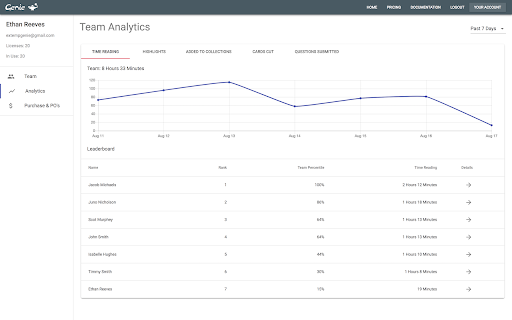
Genie puts Evidence At Your Command for Extemp, Congress, and Debate. Genie is groundbreaking software for Extemp, Congress and Debate. Auto-File hundreds of thousands of articles, cut evidence cards, organize with Folders & Collections and much more. To see everything that Genie can do for you and your team, visit extempgenie.com. Download the Limited Free Trial now, then purchase full access at extempgenie.com.

UT Registration Plus
UT Registration Plus is a Chrome extension that allows students to easily register for classes. We've all been there. 20 tabs of Rate My Professor, Catalyst, UT Planner, and the UT Course Catalog open and you still don't know what classes to take. What this extension tries to do is streamline most of the unnecessary steps and headaches of registering for classes at UT Austin. - Puts all the courses for a department into a scroll-able list. - Provides a "breakdown" popup for every class on the Course Catalog, with quick and easy links to the RateMyProfessor and eCIS pages of the professor, as well as syllabi from when the professor taught the class in the past. - Gets the course description and highlights the important information like prerequisites, restrictions, etc. - Shows graphs of the grade distributions for the semesters the professor taught the class in the past. - Gives you the ability to "Save Courses" and view them and their information in the extension popup, where you can quickly copy their unique numbers. This lets you see any schedule conflicts, and also register much quicker. You can also "save" a course just through its unique number. - Lets you import/export your schedule for easy sharing. - Highlights and crosses-out what courses on the UT Course Catalog would conflict with your currently saved courses, making selecting courses that fit with your schedule so much easier. - Displays a weekly schedule from your saved courses, so that you can easily see how difficult or easy it might be. You can save a picture of the schedule, and even export it to an ICS file that you can import into Google Calendar or iCalendar. - Import from your already registered schedule page to your saved courses, so you don't have to add each one individually Extension open source at https://github.com/Longhorn-Developers/UT-Registration-Plus

EasyBib Toolbar
Cite web sites with one click using the EasyBib Toolbar and receive advice on the credibility of the web site you're citing. EasyBib is the world's largest bibliography maker and citation machine. Our EasyBib toolbar will let you cite web sites with one click. Receive advice on the credibility of the web site you're citing. Cite as many sources as you need to build a fully-formatted, alphabetized, and Word-processor-ready bibliography.

Cosmos Eyes from NASA
Enjoy amazing and beautiful space-time photographs on new tab. Every time you open a new tab, Discover the cosmos from NASA's APOD (Astronomy Picture of the Day)

Kiwix JS Browser Extension
Kiwix is an offline reader for content from Wikipedia, TED Talks, Stackexchange, and many other sources. [To use this app you MUST download, for free, an archive with your chosen content, see below.] Kiwix is an offline reader for content from Wikipedia, Project Gutenberg, TED Talks, Wikivoyage, Stackexchange, etc. It makes knowledge available to people with limited or no Internet access, or to anyone who wants to have easy offline access to a vast repository of information. The software as well as the content is free for anyone to use. You can get the whole of Wikipedia, and hundreds of other resources, on your device to use completely offline in your own language. You can have amazing reference tools at your fingertips wherever you are. Just download your chosen archive and store it on your device (see instructions from About page of app). Great for travelling, or any place where access to the Internet is difficult or expensive! Kiwix is often faster than Wikipedia for quick consultation. This app reads a larger offline file that you can download to your device. You must download the archive separately (see About tab in the app for instructions). Offline archives are available for most Wikimedia sites, such as Wikipedia, Wiktionary and Wikivoyage, including subsets of Wikimedia (projects) such as Medicine, Chemistry, Geography, Astronomy, History, etc. There are hundreds of other resources available as well, including collections of TED Talks, Project Gutenberg (archives of books). These are all available in many different languages. This extension is very handy, always a click away in your browser. If you would like a packaged version of Kiwix JS, we make a separate Electron app for Linux and Windows based on this codebase with some additional features. It runs independently of the browser - get more info at https://kiwix.github.io/kiwix-js-pwa/app. There are also packaged versions which include the latest WikiMed (Medical Wikipedia), and Wikivoyage. If you are interested in the full range of Kiwix apps, including for iOS and Android, please visit https://www.kiwix.org. * FEATURE: Complete overhaul of dark/light theme system with auto-detection of ZIM colour scheme and auto switching * FEATURE: Added a dark/light/auto theme button in the toolbar for quickly switching between colour schemes * FEATURE: Added intelligent theme switching for new ZIMs with built-in native Wikimedia dark theme * FEATURE: Added intelligent colour scheme detection and theme support for most Zimit ZIMs (experimental) * FEATURE: New directory refresh button for browsers that have File System Access API * FEATURE: Popovers now work when experimental libzim back end is enabled (in Configuration) * CRITICAL UPDATE: Fix failure of Service Worker to discover remote PWA * UPDATE: Major overhall of file/directory picking, loading and launching in all supported APIs * UPDATE: Popover colours now adapt intelligently to auto-switching of ZIM themes (Wikimedia ZIMs only) * UPDATE: Icons and branding of app * UPDATE: Make the search bar thinner so it occupies less screen real estate * UPDATE: Added Expert Setting in Configuration to opt out of content theme manipulation (for troubleshooting and testing) * FIX: Most inverted images and videos in Zimit ZIMs with applied dark theme * FIX: Populate list of archives when selecting multiple archives via File API * FIX: Relaunching of same archive in archive list combo box * FIX: Enter key can now be used to select first entry in search results * FIX: Gesture detection for sliding away toolbars on short pages * FIX: Noscript is now properly handled in Restricted mode * FIX: Update testing framework and fix several reliability issues in test script * FIX: Follow redirects correctly when using libzim to load articles and resources * FIX: Selection of correct iframe and setting tracking variables in libzim message channel * FIX: Erratic sliding toolbars when loading Zimit archives in libzim mode * DEV: Improve build script * DEV: Updates to tmp and form-data * DEV: Bump Vite to v6.4.1
