
eeiplahcoljpdmmdofhdhinjkeammchg

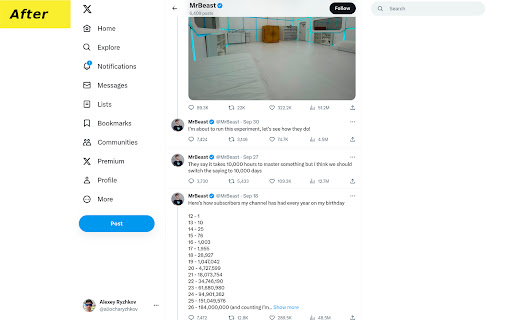
Hide ads and promoted tweets to make X.com (Twitter) less noisy This is a free ad blocker for X (formerly known as Twitter) that provides the cleanest UI. You'll no longer see ads, promoted tweets, "Discover more" tweets, "Who to follow" tweets, and other unwanted content. The "Trending" section is hidden by default, but you can change this on the options page. Unlike other similar extensions this one doesn't rely on you scrolling to block dynamic ads. Instead, it hides them the moment they're added to the page, so you won't even notice them. If you find this extension helpful, we'd appreciate a positive review or a small donation: https://buymeacoffee.com/arrr

Clean Twitter
Clean up some annoying elements on Twitter and make your Twitter experience cleaner Clean up unnecessary elements on X (Twitter) and enjoy a cleaner, more focused browsing experience. FEATURES Branding: • Restore classic Twitter logo - Bring back the bird logo Layout: • Hide right sidebar - Remove trending topics and suggestions Left Navigation: • Hide Chat - Remove the Chat/Messages tab • Hide Grok - Remove the Grok AI assistant • Hide Lists - Remove the Lists tab • Hide Bookmarks - Remove the Bookmarks tab • Hide Communities - Remove the Communities tab • Hide Premium - Remove X Premium/Twitter Blue promotional elements • Hide Profile - Remove the Profile navigation link • Hide Creator Studio • Hide Ads - Remove promotional advertisements from navigation • Hide Create your Space • Hide More - Remove the More menu option • Hide Follow - Remove the Follow navigation • Hide Aritcles - Remove the Aritcles navigation • Hide App Download in iOS Tweet Actions: • Hide Analytics - Remove analytics buttons from tweets • Hide Bookmarks - Remove bookmark buttons from tweet actions • Hide Grok - Remove the Grok AI assistant Content Area: • Hide Timeline Explore - Remove the Explore tab from your timeline • Hide Discover More - Remove "Discover more" recommendations • Hide Advertisement - Remove sponsored content and ads from your feed • Hide Today News - Remove "Today" news section • Hide Who to Follow - Remove "Who to follow" suggestions • Text mode in Home - Remove Image and Video in Home • Hide Space Live - Remove live notification in Home • Hide Notification Recommendation - Remove recommended posts from notifications GETTING STARTED 1. Install the extension from Chrome Web Store 2. Visit X (Twitter) - The extension activates automatically 3. Click the extension icon in your toolbar to customize which features to enable or disable 4. Your preferences are saved automatically and sync across devices CUSTOMIZATION All features can be individually toggled on/off through the extension popup. Choose exactly what you want to see and hide everything else. OTHER EXTENSIONS The extension popup also includes links to our other browser extensions for your reference. SUPPORT Join our Discord community for support, feature requests, and discussions: https://discord.gg/gFhKUthc88

Old Twitter Layout (2026)
A new extension that returns old Twitter's look. Extension to return old Twitter layout from 2015 (or 2018). WORKS IN 2026! This extension doesn't add any CSS on top of original Twitter. It's fully different client that replaces original new Twitter client, making it faster than alternatives that just add style on top of Twitter. This extension requires you to be logged in to Twitter account. Please visit https://twitter.com/old/settings after installing to make it work just as you like. It switches to chronological timeline by default, you can switch back to algorithmical timeline in settings. You can visit unchanged Twitter by visiting https://twitter.com?newtwitter=true. The code is open source! Check https://github.com/dimdenGD/OldTwitter to see the code and report any issues. Features - Almost all of Twitter functionality is implemented - Custom profile link colors supported - You can change custom profile link color and it'll appear for other extension users (priority: oldtwitter color db -> twitter color db -> default color) - Removes all analytics and tracking from Twitter - Track your unfollowers for free - Search, sort and filter your followers - Removes all ads - Easy download of videos and GIFs - Translate tweets without having to open them, also ability to set specific users/languages to autotranslate - Shows why tweets were added to algorthimical timeline - Dark mode support - Ability to enable/disable Twemoji, disable stars (favorites) back to likes (hearts), change font, default link color and any other color in extension - Lot of hotkeys - Mobile support - Custom CSS support If you found this extension useful please consider donating: https://dimden.dev/donate/ or following me on Twitter: https://twitter.com/dimden

Clean Twitter/X.com (Hide Tweets,Ads,etc)
A browser extension that filters out unwanted tweets. (Hides tweet by keywords, Hides ads, etc) Clean Twitter/X.com is a browser extension designed to enhance your Twitter browsing experience. It allows you to hide tweets in Twitter threads that contain specified keywords. Additionally, it provides options to hide Ad tweets and suggestions for who to follow or subscribe to. Key Features - Keyword Filtering: Set specific keywords to filter out unwanted tweets. - Hide or Notify: Choose to either hide the tweet/Ads completely or display a notice that the tweet/Ads was hidden. - Granular Options: Customize your filtering preferences for tweets, ads, and suggestions separately. - Privacy-Focused: No tracking or sign-in required. All options can found in the extension popup menu.

Twitter Ads Blocker
Remove ads from Twitter periodically. The extension removes tweets, users, and trends that are marked as ads. This extension simply removes annoying ads from Twitter, in fact AdBlock and UBlockOrigin do not remove ads on Twitter, instead use the Twitter Ads Blocker extension to find a clean timeline. - Q : When does the twitter ads are removed - A : Every 10 seconds on the twitter.com domain - Q : Is the extension is safe, can I check the source code - A : Of course ! The webextension is open-source and available on Github https://github.com/MatteoGauthier/twitter-ads-blocker . Contribution are welcomed
